3

Partitioning Basics – Part 2 – Splitting/Merging Partitions

This post follows on from the previous post Partitioning Basics – Part 1

Let’s have a look at the partitions setup in part 1, the following script will show the partition information:-

SELECT 
	t.name AS TableName, i.name AS IndexName, p.partition_number, 
	r.value AS BoundaryValue, p.rows
FROM 
	sys.tables AS t
INNER JOIN
	sys.indexes AS i ON t.object_id = i.object_id
INNER JOIN
	sys.partitions AS p ON i.object_id = p.object_id AND i.index_id = p.index_id 
INNER JOIN
	sys.partition_schemes AS s ON i.data_space_id = s.data_space_id
INNER JOIN
	sys.partition_functions AS f ON s.function_id = f.function_id
LEFT OUTER JOIN 
	sys.partition_range_values AS r ON f.function_id = r.function_id AND r.boundary_id = p.partition_number
WHERE 
	t.name = 'DemoPartitionedTable'
AND 
	i.type <= 1
ORDER BY p.partition_number;

Partitions1

These partitions will hold data until the 11th of June, after which all records in the table will be put into the end partition (number 16). This means that the end partition will end up holding a lot of records. In order to prevent this, a new partition needs to be created.

To do this, firstly the partition scheme needs to be told which filegroup the next partition will use:-

ALTER PARTITION SCHEME DemoPartitionScheme
	NEXT USED [Demo];
GO

Then a SPLIT command is run against the partition function:-

ALTER PARTITION FUNCTION DemoPartitionFunction()
	SPLIT RANGE ('2014-06-12');
GO

And now when the data checking script is run, the results are:-

Partitions2

Partition 16 now has a boundary value of 2014-06-12 and a new partition (17) has been created.

But how can a partition be removed? There’s a really simple MERGE command that performs this operation:-

ALTER PARTITION FUNCTION DemoPartitionFunction()
	MERGE RANGE ('2014-05-28');
GO

And when the data checking script is run now, the results are:-

Partitions3

So the data in the partition with the boundary value 2014-05-28 has been merged into the partition with the boundary of 2014-05-29. The problem now is that the last partition has data from the partition that was just merged into it as well as the existing data that was already there. In order to prevent this from happening, the data from the partition that is about to be merged can be switched into another table before the MERGE command is executed.

I will cover this in the next part of this blog series.

6

Partitioning Basics – Part 1 – Creating Partitions

Partitioned tables can be a quick and efficient way to (amongst other things) archive data. In the next couple of posts I will run through the basics of partitioning. Starting with setting up a partitioned table and loading some data.

Let’s create a demo database:-

USE [master];
GO

IF EXISTS(SELECT 1 FROM sys.databases WHERE name = 'DEMO')
	BEGIN
		DROP DATABASE [Demo];
	END

CREATE DATABASE [Demo]
	ON PRIMARY 
(NAME     = 'Demo', 
 FILENAME = 'C:\SQLServer\Data\Demo.MDF'), 
	FILEGROUP [DEMO] DEFAULT 
(NAME     = 'Demo_Data', 
 FILENAME = 'C:\SQLServer\Data\Demo_Data.NDF')
	LOG ON 
(NAME    = 'Demo_Log', 
FILENAME = 'C:\SQLServer\Logs\Demo_log.ldf')
GO

OK, so the first thing to do is create a partition function. This function defines the number of partitions we will intiailly have. It also specifies the boundaries of each partition.

USE [Demo];
GO

IF NOT EXISTS(SELECT 1 FROM sys.partition_functions WHERE name = 'DemoPartitionFunction')
CREATE PARTITION FUNCTION DemoPartitionFunction (DATE)
AS RANGE RIGHT 
FOR VALUES (DATEADD(dd, DATEDIFF(dd, 0, GETUTCDATE()), 7),
			DATEADD(dd, DATEDIFF(dd, 0, GETUTCDATE()), 6),
			DATEADD(dd, DATEDIFF(dd, 0, GETUTCDATE()), 5),
			DATEADD(dd, DATEDIFF(dd, 0, GETUTCDATE()), 4),
			DATEADD(dd, DATEDIFF(dd, 0, GETUTCDATE()), 3),
			DATEADD(dd, DATEDIFF(dd, 0, GETUTCDATE()), 2),
			DATEADD(dd, DATEDIFF(dd, 0, GETUTCDATE()), 1),
			DATEADD(dd, DATEDIFF(dd, 0, GETUTCDATE()), 0),
			DATEADD(dd, DATEDIFF(dd, 0, GETUTCDATE()), -1),
			DATEADD(dd, DATEDIFF(dd, 0, GETUTCDATE()), -2),
			DATEADD(dd, DATEDIFF(dd, 0, GETUTCDATE()), -3),
			DATEADD(dd, DATEDIFF(dd, 0, GETUTCDATE()), -4),
			DATEADD(dd, DATEDIFF(dd, 0, GETUTCDATE()), -5),
			DATEADD(dd, DATEDIFF(dd, 0, GETUTCDATE()), -6),
			DATEADD(dd, DATEDIFF(dd, 0, GETUTCDATE()), -7));
GO

So this statement has said that my partition function is going to be using dates as boundaries. What I’ve done is setup a bunch of partitions for one week in the past and one week in the future. The function sets the right “side” of the partition as the boundary, basically specifying which side of the boundary value the partition extends. The best way of thinking about it is like this…..

Today’s date is 2014-06-04. So the boundary values created by running the above script are:-

1. 2014-05-28
2. 2014-05-29
3. 2014-05-30
4. 2014-05-31
5. 2014-06-01
6. 2014-06-02
7. 2014-06-03
8. 2014-06-04
9. 2014-06-05
10. 2014-06-06
11. 2014-06-07
12. 2014-06-08
13. 2014-06-09
14. 2014-06-10
15. 2014-06-11

Say x is a value in the table then the partitions would evaluate as:-

1. 2014-05-28 > x
2. 2014-05-28 <= x < 2014-05-29
3. 2014-05-29 <= x < 2014-05-30
4. 2014-05-30 <= x < 2014-05-31
5. 2014-05-31 <= x < 2014-06-01
6. 2014-06-01 <= x < 2014-06-02
7. 2014-06-02 <= x < 2014-06-03
8. 2014-06-03 <= x < 2014-06-04
9. 2014-06-04 <= x < 2014-06-05
10. 2014-06-05 <= x < 2014-06-06
11. 2014-06-06 <= x < 2014-06-07
12. 2014-06-07 <= x < 2014-06-08
13. 2014-06-08 <= x < 2014-06-09
14. 2014-06-09 <= x < 2014-06-10
15. 2014-06-10 <= x < 2014-06-11
16. 2014-06-11 <= x

So in these partitions, the data in the partition is always less than the value of that partition’s boundary.

After the partition function, a partition scheme needs to be created:-

IF NOT EXISTS(SELECT 1 FROM sys.partition_schemes WHERE name = 'DemoPartitionScheme')
CREATE PARTITION SCHEME DemoPartitionScheme
AS PARTITION DemoPartitionFunction
ALL TO (DEMO);

The partition scheme maps the data to a partition function and specifies where the data is going to be stored. The [ALL TO (DEMO)] part of the statement says that all partitions are going to be mapped to the DEMO filegroup.

Now that the function and scheme have been created we can create a table on the partitions:-

CREATE TABLE dbo.[DemoPartitionedTable]
(DemoID			INT IDENTITY(1,1),
 SomeData		SYSNAME,
 CaptureDate	DATE,

 CONSTRAINT [PK_DemoPartitionedTable] PRIMARY KEY CLUSTERED 
	(DemoID ASC, CaptureDate ASC)

) ON DemoPartitionScheme(CaptureDate);

Instead of specifying that the table be placed on a filegroup, the statement has [ON DemoPartitionScheme(CaptureDate)] at the end. This means that the table is on the partition scheme, using the column CaptureDate to determine which rows go on which partition.

Let’s insert some data into the table:-

INSERT INTO dbo.[DemoPartitionedTable]
(SomeData,CaptureDate)
VALUES
('Demo',DATEADD(dd, DATEDIFF(dd, 0, GETUTCDATE()), -8));
GO 457

INSERT INTO dbo.[DemoPartitionedTable]
(SomeData,CaptureDate)
VALUES
('Demo',DATEADD(dd, DATEDIFF(dd, 0, GETUTCDATE()), -7));
GO 493

INSERT INTO dbo.[DemoPartitionedTable]
(SomeData,CaptureDate)
VALUES
('Demo',DATEADD(dd, DATEDIFF(dd, 0, GETUTCDATE()), -6));
GO 486

INSERT INTO dbo.[DemoPartitionedTable]
(SomeData,CaptureDate)
VALUES
('Demo',DATEADD(dd, DATEDIFF(dd, 0, GETUTCDATE()), -5));
GO 413

INSERT INTO dbo.[DemoPartitionedTable]
(SomeData,CaptureDate)
VALUES
('Demo',DATEADD(dd, DATEDIFF(dd, 0, GETUTCDATE()), -4));
GO 473

INSERT INTO dbo.[DemoPartitionedTable]
(SomeData,CaptureDate)
VALUES
('Demo',DATEADD(dd, DATEDIFF(dd, 0, GETUTCDATE()), -3));
GO 461

INSERT INTO dbo.[DemoPartitionedTable]
(SomeData,CaptureDate)
VALUES
('Demo',DATEADD(dd, DATEDIFF(dd, 0, GETUTCDATE()), -2));
GO 422

INSERT INTO dbo.[DemoPartitionedTable]
(SomeData,CaptureDate)
VALUES
('Demo',DATEADD(dd, DATEDIFF(dd, 0, GETUTCDATE()), -1));
GO 461

INSERT INTO dbo.[DemoPartitionedTable]
(SomeData,CaptureDate)
VALUES
('Demo',DATEADD(dd, DATEDIFF(dd, 0, GETUTCDATE()),0));
GO 273

This will insert data into today’s partition and the partitions for the last 8 days. This can be checked by running the following script:-

SELECT 
	t.name AS TableName, i.name AS IndexName, p.partition_number, 
	r.value AS BoundaryValue, p.rows
FROM 
	sys.tables AS t
INNER JOIN
	sys.indexes AS i ON t.object_id = i.object_id
INNER JOIN
	sys.partitions AS p ON i.object_id = p.object_id AND i.index_id = p.index_id 
INNER JOIN
	sys.partition_schemes AS s ON i.data_space_id = s.data_space_id
INNER JOIN
	sys.partition_functions AS f ON s.function_id = f.function_id
LEFT OUTER JOIN 
	sys.partition_range_values AS r ON f.function_id = r.function_id AND r.boundary_id = p.partition_number
WHERE 
	t.name = 'DemoPartitionedTable'
AND 
	i.type <= 1
ORDER BY p.partition_number;

This will show each partition and the number of rows in it:-
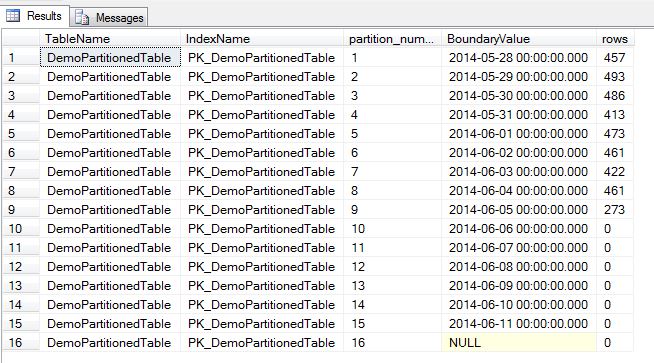
Partitions1

Remember that the boundary values are the upper limit, no value in the partitions will match that value due to the partition function being specified as RANGE RIGHT.

I’ll continue this post later in the month, when I’ll talk about creating new partitions and merging partitions.

0

Error Log Management

Thought I’d write a quick post about managing error logs within SQL Server. Good error log management is essential for investigating issues that occur in SQL Server. The last thing you want is a very large error log file that takes ages to open when you are trying to determine the cause of a problem.

I always change the maximum number of error logs to 30 (at a minimum) and then recycle the error log each night. This way I can keep a month’s worth of logs in easily manageable portions (this does depend on the system but one day’s worth of logs in each file is generally OK).

So to change the maximum number of error logs, go to Management > SQL Server Logs and right-click and select Configure. Change the maximum number of error logs (I changed it to 30) and then hit the script button which will give you the following:-

USE [master];
GO

EXEC xp_instance_regwrite 
	N'HKEY_LOCAL_MACHINE', 
	N'Software\Microsoft\MSSQLServer\MSSQLServer', 
	N'NumErrorLogs', 
	REG_DWORD, 
	30;
GO

Microsoft has provided the stored procedure sys.sp_cycle_errorlog so this can be setup to run nightly as a SQL Server Agent job. However I have found that the following error can occur on busy systems (running SQL Server 2005 I’m afraid):-

“Unable to cycle error log file from ‘…\ERRORLOG’ to …\ERRORLOG.1′ due to OS error ’32(The process cannot access the file because it is being used by another process.)”

When this happens the old log is archived but the new log is not initialised, meaning that no information will be written to the log until it is recycled manually (once you’re in the office). Not good, especially if an issue has occurred in that time.

So to try and combat this, I created the following stored procedure to try to recycle the error log a maximum of three times if an error occurs:-

CREATE PROCEDURE [dbo].[RecycleErrorLog]
AS

DECLARE @Tries TINYINT
SET @Tries = 1
WHILE @Tries <= 3

BEGIN

  BEGIN TRY
		EXEC master.sys.sp_cycle_errorlog
		BREAK
  END TRY

  BEGIN CATCH
		SELECT ERROR_NUMBER() AS ErrorNumber
		SET @Tries = @Tries + 1
		CONTINUE
  END CATCH;

END;

GO

I set the maximum number of re-tries to 3 as if the job fails three times in a row I would say that there is something more severe going on which would need to be investigated.

So I’m feeling pretty clever, the stored procedure is running fine until one day:-

“Unable to cycle error log file from ‘…\ERRORLOG’ to …\ERRORLOG.1′ due to OS error ’32(The process cannot access the file because it is being used by another process.)”

Ah, it’s no problem I tell myself. The error will be generated but the procedure will re-run and recycle the SQL Server Error Log. So…..I stroll into work, check the logs and…..they haven’t recycled. Not only that, nothing has been recorded since the attempt to cycle, I’m back to where I started!

I check the SQL Server Agent Job’s history and the job is telling me that it has run successfully. It seems that the error is not returned to the procedure, there’s a record in the SQL Server Error Log:-

“Attempting to cycle error log. This is an informational message only; no user action is required.”

I look back at the original error, there was an important part that I missed!

“…due to OS error ’32…”

It’s an OS error, it’s not going to be recorded in SQL. The only place the error is recorded is in the Application Event Log. So it looks like I’m going to have to run the stored procedure and then check the Application Event Log for errors. The best way I can think of doing this is using powershell, so here’s the script I wrote:-

#Set variable values to zero
$MaximumRetries = 0
$ErrorChecker = 0

#Open connection to SQL Server
$SQLServer = "MYSERVER"
$SQLDBName = "master"

$SqlConnection = New-Object System.Data.SqlClient.SqlConnection
$SqlConnection.ConnectionString = "Server=$SQLServer;Database=$SQLDBName;Integrated Security=True"
$SqlConnection.Open()

$SQLCmd = new-Object System.Data.SqlClient.SqlCommand("sp_cycle_errorlog", $SQLConnection) 
$SQLCmd.CommandType = [System.Data.CommandType]'StoredProcedure' 

#Run sp_cycle_errorlog
$SQLCmd.ExecuteReader()

#Check application log for errors
$datetime = (Get-Date).AddSeconds(-5)
$events = get-eventlog application -EntryType Error -After $datetime | where-Object {$_.source -like "MSSQL*"}	

do
{
	#If the application log has an error
	if ($events)
		{	
			#Set maximum retries to 3
			if ($MaximumRetries -lt 4)
				{	
					#Re-execute stored procedure
					$sqlCmd.ExecuteReader()		
					
					#Check application log
					$datetime = (Get-Date).AddSeconds(-5)
					$events = get-eventlog application -EntryType Error -After $datetime | where-Object {$_.source -like "MSSQL*"}	
			
					$MaximumRetries = $MaximumRetries + 1		
				}
	#If the application log has no errors, close connection			
	elseif (!$events)
		{
			$SqlConnection.Close()
			$ErrorChecker = 1
		}
		}	
}
while ($ErrorChecker = 0)

I saved this as a .ps1 file and then created a SQL Server Agent Job to run it. I still get alerts for the error but each time the script has done its job and re-run.

Has anyone else seen this behaviour? If so, I’d be interested in hearing how you dealt with it, my email is dbafromthecold@gmail.com

8

Database Design Guidelines For Developers

One of the developers that I work with asked me to write a “brief” (really brief) guide on database design. What I have written below is a summary in bullet point form of best practices when creating databases, tables, indexes, and then querying the data within. It is designed to be short and sweet so the reader can check each section quickly when creating a new database. References are provided so that the reader can use if they wish to explore a certain topic in more detail.

Let me know what you think! Is there anything glaringly obvious that I’ve missed? My email is dbafromthecold@gmail.com

Database Design Guidelines

Database Design

  • PRIMARY filegroup should be reserved for system objects
  • Secondary DATA filegroup should be set to default.
  • Minimum of two physical files mapped to each secondary filegroups
  • Data and Log files presized for a minimum of one year’s data inserts
  • Data and Log files should reside on separate drives
  • Denormalisation should only be considered in special circumstances. A properly normalised OLTP database will outperform a denormalised one
  • Recommended collation is Latin1_General_CI_AS

Table Design

  • Each table created within the database should have a Primary Key and a Clustered Index. These need not be the same column
  • GUID fields should not be used for clustered indexes even if used as table’s Primary Key
  • Composite keys should be avoided. Surrogate INT IDENTITY keys can be used as a replacement
  • Columns set to the smallest size possible – avoiding NVARCHAR(MAX), TEXT etc datatypes
  • Avoid Nullable columns. Nullable columns require extra space within the database to designate the fact that they are nullable
  • Use referential integrity – Foreign keys and unique constraints should be applied

MSDN CREATE TABLE Documentation – http://technet.microsoft.com/en-us/library/ms174979.aspx

Querying Data

  • Stored procedures should be used as much as possible, to allow query execution plans to be re-used
  • Do not use SELECT * – SELECT only the columns needed to keep the query’s memory usage as low as possible
  • As a standard, cursors should be avoided. Removal of RBAR (row-by-agonising-row) processing
  • SET NOCOUNT ON should be at the start of each SQL batch to reduce network traffic
  • Dynamic SQL should be executed using sp_executesql.
  • Do not repeatedly call functions within stored procedures, functions, batches and triggers.
  • Sargability (Search ARGument Able) – Confirm queries executed are able to seek on indexes in database
    • Avoid wildcard characters at the beginning of a word while searching using the LIKE keyword
    • Avoid searching using not equals operators (<> and NOT)
    • Avoid functions in WHERE clause on table columns
    • Avoid implicit conversions in WHERE clause (use CAST/CONVERT if necessary)
BAD:   SELECT ... WHERE Year(StartDate) = 2014
FIXED: SELECT ... WHERE StartDate &gt;= '01-01-2014' AND StartDate &lt; '01-01-2015'

BAD:   SELECT ... WHERE isNull(Surname,'Williams') = 'Williams'
FIXED: SELECT ... WHERE ((Surname = 'Williams') OR (Surname IS NULL))

BAD:   SELECT ... WHERE LEFT(FirstName,1) = 'P'
FIXED: SELECT ... WHERE FirstName LIKE 'P%'

BAD:   SELECT ... WHERE DateDiff(mm,OrderDate,GetDate()) &gt;= 30
FIXED: SELECT ... WHERE OrderDate &lt; DateAdd(mm,-30,GetDate())

Sargability References

Stack Overflow – What makes a SQL Statement sargable? http://stackoverflow.com/questions/799584/what-makes-a-sql-statement-sargable
Rob Farley – Sargable Functions http://blogs.msmvps.com/robfarley/2010/01/21/sargable-functions-in-sql-server/
Brent Ozar – Why %string% is slow http://www.brentozar.com/archive/2010/06/sargable-why-string-is-slow/

Indexes

  •  Naming convention – Prefix_TableName_ColumnName
  •  Prefix – PK for Primary Keys, IX for non-clustered indexes, UC for Unique Indexes
  • Make sure the option ONLINE = ON is in place
  • Correct nonclustered indexes created for incoming queries – avoid RID and KEY lookups on tables
  • No Indexes on columns like “Gender” as this would only have a maximum of three possible entries (Male, Female & NULL) making an index ineffective. Nonclustered indexes must be as selective as possible


0

SQL Server 2014 RTM

The new version of SQL Server will be here on Tuesday.

(Someone at Microsoft has a sense of humour in releasing the newest version of SQL Server on April Fool’s Day.)

At some point the usual argument about when a company should upgrade will be had. I’ve worked companies that have waited for the first service pack of a new version of SQL to come out and I’ve worked for companies that start implementing the new version as soon as it comes out.

I can see a lot of companies moving to SQL Server 2014 pretty quickly for one reason, the increase in the memory limit for Standard Edition from 64GB to 128GB. There are companies out there that have large databases running in Standard Edition, simply because they do not want to fork out for an Enterprise Edition licence.

This month will be quite interesting as there are always problems with a new version of software (see the KB article for SQL Server 2012 SP1 ). I’ll be watching the Connect site with interest.