3

Index Fragmentation

So you’ve setup a bunch of indexes in your database to tune the queries coming in. They’re all running much faster than before and you’re leaning back in your chair feeling pretty pleased with yourself. You’re done right?

Well…no. As data gets inserted into and deleted from tables within a database, the indexes on the tables become fragmented. Fragmentation is defined as:-

“Fragmentation exists when indexes have pages in which the logical ordering, based on the key value, does not match the physical ordering inside the data file.”

But does it matter that the logical ordering does not match the physical ordering? Microsoft published a white paper here which showed that with increased fragmentation, the time taken for each read from disk increased whilst the average size of each read decreased. I know it was performed using SQL Server 2000 but it’s still relevant. They summarise the results as:-

“The workload performance increase realized in the small-scale environment ranged from 60 percent at the low level of fragmentation to more than 460 percent at the highest level of fragmentation. The workload performance increased realized for the large-scale environment ranged from 13 percent at the low fragmentation level to 40 percent at the medium fragmentation level”

Note – This is the summary of the DSS workload test, complex queries against multiple levels of fragmentation

To summarise:-
Small-scale environment
After defragmenting the indexes an increase in performance of 60% was gained when there was a low level of fragmentation and there was a gain of 460% at a high level of fragmentation
Large-scale environment
After defragmenting the indexes an increase in performance of 13% was gained when there was a low level of fragmentation and there was a gain of 40% at a high level of fragmentation

Wow, removing the fragmentation in the indexes gave a performance increase between 13% and 460% (across the two environments).

The paper also discusses why the performance in the large-scale environment was less affected by fragmentation…basically the environment had a better IO subsystem…which means that throwing money at index fragmentation can appear to solve the problem but you are really just papering over the cracks.

But, what DBA doesn’t like improving the performance of a system without having to spend any money? “Look, I’ve improved the performance by X%!”. (cue smug face)

So a plan to reduce the fragmentation of the indexes needs to be implemented. But how do you approach this? Rebuild every index nightly? Will your system allow you to do that? What if you are running Standard Edition and you cannot rebuild indexes online?

The way I approach index maintenance is to customise for each database I manage. To do this, the indexes that require either rebuilds or reorganisation need identifying. Microsoft have provided the DMV sys.dm_db_index_physical_stats which will allow us to do so:-

SELECT
	[schemas].name AS [SchemaName],
	[objects].name AS [TableName], 
	[indexes].name AS [IndexName],
	[dm_db_index_physical_stats].index_depth,
	[dm_db_index_physical_stats].avg_fragmentation_in_percent,
	[dm_db_index_physical_stats].fragment_count,
	[dm_db_index_physical_stats].avg_fragment_size_in_pages,
	[dm_db_index_physical_stats].page_count,
	GETUTCDATE() AS [CaptureDate]
FROM 
	[sys].[dm_db_index_physical_stats](DB_ID(),NULL,NULL,NULL,'LIMITED' ) AS [dm_db_index_physical_stats]
INNER JOIN 
	[sys].[objects] AS [objects] ON ([dm_db_index_physical_stats].object_id = [objects].object_id)
INNER JOIN 
	[sys].[schemas] AS [schemas] ON ([objects].[schema_id] = [schemas].[schema_id])
INNER JOIN 
	[sys].[indexes] AS [indexes] ON ([dm_db_index_physical_stats].object_id = [indexes].object_id
								AND  [dm_db_index_physical_stats].index_id = [indexes].index_id )
WHERE 
	[dm_db_index_physical_stats].index_type_desc <> 'HEAP'
AND 
	[dm_db_index_physical_stats].avg_fragmentation_in_percent > 20;
GO

Note – this will pick up data on all indexes that are over 20% fragmented.

By adding GETUTCDATE() we can monitor and track the fragmentation over time, allowing us to identify which tables’ indexes are being fragmented the quickest. Nice and simple to setup, first create a table to hold the data:-

CREATE TABLE dbo.[IndexAnalysis]
		(AnalysisID					INT IDENTITY(1,1) NOT NULL PRIMARY KEY,
		SchemaName					SYSNAME,
		TableName					SYSNAME,
		IndexName					SYSNAME,
		IndexDepth					INT,
		AvgFragmentationInPercent	FLOAT,
		FragmentCount				BIGINT,
		AvgFragmentSizeInPages		FLOAT,
		PageCount					BIGINT,
		CaptureDate					DATETIME);
GO

Then create a stored procedure to capture the data and insert it into the table:-

CREATE PROCEDURE dbo.[CaptureIndexFragmentation] AS

INSERT INTO dbo.[IndexAnalysis]
SELECT
	[schemas].name AS [SchemaName],
	[objects].name AS [TableName], 
	[indexes].name AS [IndexName],
	[dm_db_index_physical_stats].index_depth,
	[dm_db_index_physical_stats].avg_fragmentation_in_percent,
	[dm_db_index_physical_stats].fragment_count,
	[dm_db_index_physical_stats].avg_fragment_size_in_pages,
	[dm_db_index_physical_stats].page_count,
	GETUTCDATE() AS [CaptureDate]
FROM 
	[sys].[dm_db_index_physical_stats](DB_ID(),NULL,NULL,NULL,'LIMITED' ) AS [dm_db_index_physical_stats]
INNER JOIN 
	[sys].[objects] AS [objects] ON ([dm_db_index_physical_stats].object_id = [objects].object_id)
INNER JOIN 
	[sys].[schemas] AS [schemas] ON ([objects].[schema_id] = [schemas].[schema_id])
INNER JOIN 
	[sys].[indexes] AS [indexes] ON ([dm_db_index_physical_stats].object_id = [indexes].object_id
								AND  [dm_db_index_physical_stats].index_id = [indexes].index_id )
WHERE 
	[dm_db_index_physical_stats].index_type_desc <> 'HEAP'
AND 
	[dm_db_index_physical_stats].avg_fragmentation_in_percent > 20;
GO

This can then be run as a nightly job so that you can track the fragmentation of the indexes over time.

SELECT 
	SchemaName AS [Schema Name],
	TableName AS [Table Name],
	IndexName AS [Index Name],
	AvgFragmentationInPercent AS [Current % Avg Fragmentation],
	LAG(AvgFragmentationInPercent,1) OVER (PARTITION BY TableName, IndexName ORDER BY CaptureDate) AS [Previous % Avg Fragmentation],
	AvgFragmentationInPercent -
	LAG(AvgFragmentationInPercent,1) OVER (PARTITION BY TableName, IndexName ORDER BY CaptureDate) AS [Difference],
	CaptureDate AS [Capture Date]
FROM 
	dbo.IndexAnalysis

Note – This SELECT statement uses the LAG() function which is only available in SQL Server 2012 onwards.

Once you have the data you can then decide how to approach the maintenance. You could use something like:-

SELECT 		   
	'ALTER INDEX [' + IndexName + '] ON [' + SchemaName + '].[' + TableName +'] ' +
    (CASE	
     WHEN (avgfragmentationinpercent >= 20 AND avgfragmentationinpercent < 40) THEN 'REORGANIZE'
     WHEN avgfragmentationinpercent > = 40 THEN 'REBUILD' END) AS [SQL Statement]
FROM 
	dbo.[IndexAnalysis] 

This will generate the required ALTER INDEX statements, you could then use sp_executesql to perform the operation. Once you have the data, you can proceed with the best approach that suits your environment. One thing that I have found is that, with large indexes in a busy system, catching fragmentation early and performing frequent REORGANIZE operations instead of less frequent REBUILDs is preferable as REORGANIZE statements are less resource intensive.
0

Deadlock Notifications (who are your victims?)

In my previous post I talked about having your own database(s) and what information you could be collecting. One piece of information that you should be collecting is what deadlocks are occurring. There are a few of ways you can collect information on deadlocks, enabling trace flag 1222 and querying the error log, running profiler (urgh!), or querying the system_health event session (in SQL Server 2008 onwards).

In this post, I’d like to talk through setting up Event Notifications and Service Broker in order to be alerted when a deadlock occurs. I like this way of alerting for deadlocks as I think that you can get the most amount of information with minimal (if any) performance impact. I also administer instances of 2005 to 2012 and like to have one solution that fits all.

DISCLAIMER!! Please don’t do this for the first time in a live environment. Create a test database on a dev server so that you can play around (see the demo at the end).

Pre-requisite – DBMail setup and configured.

Right, here we go! Create a test db and then enable Service Broker for your database and set the TRUSTWORTHY property to ON. The TRUSTWORTHY property needs to be set to ON so that the stored procedure we are going to create later can run sp_send_dbmail.

USE [master];
GO

CREATE DATABASE [DeadlockDemo];
GO

ALTER DATABASE [DeadlockDemo] SET ENABLE_BROKER;
GO

ALTER DATABASE [DeadlockDemo] SET TRUSTWORTHY ON;
GO

Second thing to do is create a table to hold the information on the deadlocks

USE [DeadlockDemo];
GO

CREATE TABLE [dbo].[DeadLockLog] 
([DeadLockID]       INT          IDENTITY (1, 1) NOT NULL,
 [DeadLockDetected] DATETIME     NULL,
 [DatabaseName]     SYSNAME      NULL,
 [DeadLockXML]      XML          NULL,
PRIMARY KEY CLUSTERED ([DeadLockID] ASC));
GO

We then need to create a queue to hold messages and a service to receive messages from the Event Notification we will setup. We specify [http://schemas.microsoft.com/SQL/Notifications/PostEventNotification] as the message type and contract (basically the direction of messages, from Event Notification to Service).

CREATE QUEUE [DeadlockQueue];
GO

CREATE SERVICE [DeadlockService]
ON QUEUE [DeadlockQueue] ([http://schemas.microsoft.com/SQL/Notifications/PostEventNotification]);
GO

Then run the following statement to create the Event Notification:-

CREATE EVENT NOTIFICATION [CaptureDeadlocks]
ON SERVER
WITH FAN_IN
FOR DEADLOCK_GRAPH
TO SERVICE N'DeadlockService', N'current database';
GO

It’s pretty straight forward, server wide, for deadlocks, to the service we have setup within the database. OK, next bit. When a new message about a deadlock is received, we want to record information on that deadlock and then be emailed. The way to do this is to create a stored procedure (substitute your own DBMail profile and email address in):-

CREATE PROCEDURE [dbo].[DeadlockNotification]
AS

DECLARE @DeadlockInfo      XML
DECLARE @EventTime         DATETIME 
DECLARE @MsgBody           XML
DECLARE @MsgType           SYSNAME
DECLARE @DBName            SYSNAME
DECLARE @DBMailBody        SYSNAME
DECLARE @DBMailSubject     SYSNAME
DECLARE @DBMailRecipient   SYSNAME
DECLARE @DBMailProfile     SYSNAME

SET @DBMailProfile   = 'YOUR DBMAIL PROFILE'
SET @DBMailRecipient = 'YOUR EMAIL ADDRESS'

--Retrieve message from queue
WAITFOR 
(RECEIVE TOP(1) 
	@MsgBody	= CAST([message_body] AS XML),
	@MsgType 	= message_type_name
FROM [DeadlockQueue]), TIMEOUT 6000;

--Retrieve information from the XML
SELECT 
@DeadlockInfo = @MsgBody.query('(/EVENT_INSTANCE/TextData/deadlock-list)'),
@DBName       = DB_NAME(@MsgBody.value('(//*/process/@currentdb)[1]', 'varchar(50)')),
@EventTime    = @MsgBody.value('(/EVENT_INSTANCE/PostTime)[1]','datetime')

--Insert record into table if message conforms to correct type
IF @MsgType = 'http://schemas.microsoft.com/SQL/Notifications/EventNotification'
INSERT INTO [dbo].[DeadLockLog]
(DeadLockDetected, DatabaseName, DeadLockXML) 
VALUES 
(@EventTime, @DBName, @DeadlockInfo)

--Set values to be included in email
SET @DBMailSubject = 'A deadlock has occurred on ' + @@SERVERNAME
SET @DBMailBody    = 'A deadlock occurred in database ' + 
			@DBName + ' at ' + CONVERT(VARCHAR(20),@EventTime)

--Send email if message conforms to correct type
IF @MsgType = 'http://schemas.microsoft.com/SQL/Notifications/EventNotification'
EXEC [msdb].[dbo].sp_send_dbmail
@profile_name	= @DBMailProfile,
@Recipients	= @DBMailRecipient,
@subject	= @DBMailSubject,
@body		= @DBMailBody;
GO

The procedure retrieves the message from the queue, pulls (or “shreds”) information from the XML, inserts it into a table and sends an email. Cool eh?

Finally, execute the following statement so that the stored procedure will run when a new message arrives in the queue:-

ALTER QUEUE [dbo].[DeadlockQueue]
    WITH ACTIVATION
    ( STATUS = ON,
      PROCEDURE_NAME = [dbo].[DeadlockNotification],
      MAX_QUEUE_READERS = 1,
      EXECUTE AS SELF
    );
GO

TESTING!!!!!
You can then test the functionality (in the dev environment that you have been doing this in……right?) by creating two tables and running concurrent UPDATE and SELECT statement in open transactions. Here’s the setup:-

CREATE TABLE [TEST1]
(ID1 INT);
GO

CREATE TABLE [TEST2]
(ID2 INT);
GO

INSERT INTO [TEST1]
(ID1)
VALUES
(100)
GO 1000

INSERT INTO [TEST2] 
(ID2)
VALUES
(100)
GO 1000

All setup? Now run the following:-

USE [DeadlockDemo];
GO

BEGIN TRAN

UPDATE [Test1] SET ID1 = 1 WHERE ID1 = 100

Open up another session, and run:-

USE [DeadlockDemo];
GO

BEGIN TRAN

UPDATE [Test2] SET ID2 = 1 WHERE ID2 = 100

SELECT * FROM [Test1];

Go back to you first session, and run:-

SELECT * FROM [Test2];

One of the process will be chosen as the deadlock victim and you will receive an email advising that a deadlock occurred in your database. You can then query your table to get the XML, save it as a .XDL file and view the deadlock graph.

REFERENCES
http://technet.microsoft.com/en-us/library/ms178080.aspx
http://technet.microsoft.com/en-us/library/ms166029(v=sql.90).aspx
https://www.simple-talk.com/sql/database-administration/handling-deadlocks-in-sql-server/

0

Your own personal space

Somewhere to relax, get away from it all (by all I mean pesky Developers wanting code deployed on a bleeding Friday afternoon) and generally unwind. Your worries seem to drift off until there’s a bang on the door…there’s been an issue in Production and you need to investigate. You heave yourself up, over to your desk and connect to your other personal space.

Every DBA should have their own database setup within the environment(s) that they monitor. Depending on the environment there could be one per instance monitored or one central database. Anyway, the point is to have an area specifically for yourself (and any other DBAs) so that you can store scripts for analysis and data on the instance(s) of SQL being monitored.

But what information should be captured? At a (bare) minimum I think the following information on a server should be captured:-

Backups – you want to know about your backups…….right?
Database Size – how big are you databases, how much have they grown over a set period of time?
Disk Space – how much free disk space do you have on your drives hosting SQL databases?
Index Stats – how are the indexes in the databases being used? Are they efficient?
Wait Statistics – what are the top waits on your server?

OK, so there are many third party tools out there that will collect this information (and more) for you. However, I still think a DBA should be able to collect this information by using scripts in their own script archive. By setting up these monitors yourself, you learn about the DMVs within SQL Server and how they can be used to troubleshoot a problem. You don’t want to be using them for the first time after an issue has occurred!

But what else should you be looking at? I’ve recently revamped my monitoring database to include the following:-

Auto-Growth Events – which databases are growing?
Blocking – who is being blocked? Are there any patterns?
Deadlocking – what deadlocks have occurred, what process was the victim?
Log Space – how much log space is being consumed for each database?
Suspect Pages – which pages have generated 823/824 errors?
SQL Error Log Auditing – what errors are being recorded?

Once this data is being collected, you can then decide what alerting you want to place on top. Certain events you’ll want to know about immediately (think deadlocks) but do you want to know about all auto-growth events? Maybe you do…by having your own personal space you can decide what you want to see, and tailor your space to what you need.

0

Shutting down multiple servers with Powershell

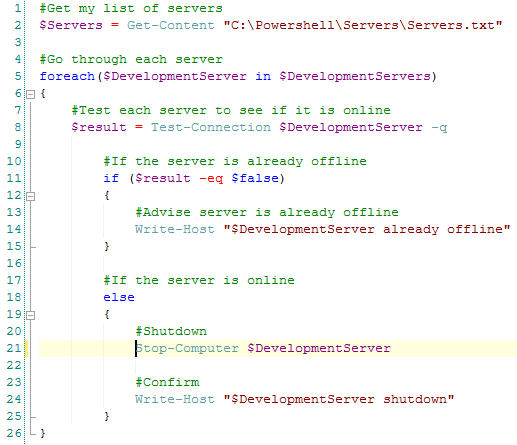
I’ve recently helped a company move their infrastructure to a new data centre. Part of this involved shutting down a large number of virtual development application servers. I don’t often shut down servers (maybe an occasional bounce after patching) so I thought about how I wanted to approach it as I wanted the process to be as quick and as painless as possible.

I decided that rather than go to each server individually in vCentre I used that marvelous tool, powershell (I say marvelous now, there have been times when I’ve cursed it, repeatedly).

I’m not THE SQL DBA WITH A BEARD but I do like to have a go with powershell, here’s how I scripted it:-

PowershellShutDownServers

Nice and simple, and as I had over 50 servers to go through saved me a load of time!

Quick note – don’t use this script for shutting down any SQL Server boxes, unless you really don’t care about the databases on them.

0

Happy New Year!

Happy New Year!

Hope you all had a good Xmas, ate too much, drank too much and are still telling yourselves that this year you will stick to your New Year’s resolutions (ha).

I didn’t blog in December because…I moved to Ireland to start a new job. I’ve always wanted to work abroad and for a Brit, working in Ireland is like abroad lite. Don’t get me wrong there are a lot of differences between Britain and Ireland but there are similarities which I find comforting (being able to get the same TV channels is a big one).

I’ve been in a hotel for the last several weeks whilst I removed all my furniture from my old flat in England (which I’ve geekily referred to as decommissioning) and whilst I searched for a new one in Ireland. But I’ve got a flat now so can start to relax a little bit on the personal front and start to concentrate on my new position.

I don’t want to blog about my new position or the company that I’m working for but I do want to talk about how I approach a new position in general. DBAs have a tendency to want to change things immediately when starting a new job, for example implementing their own backup and maintenance procedures.

In the past I have spent most of the first couple of weeks reviewing the environments in a new position, mainly to familiarise myself with them but also to make any notes for any changes I am going to recommend. After that I’ll speak to the incumbent DBA about any recommendations I have and go from there. For example, I like to disable the SA login but there may be apps that have been setup to use that account so simply disabling it may not be an option.

I guess the point I’m trying to make is that it’s not a good idea to go into a new job “all guns blazing”, wanting to make radical changes immediately. This can be difficult for me and I have had to restrain myself in the past but all it will do (at best) is make people think, “Who does this guy think he is?”

Introducing changes slowly with sound evidence for the reasons behind them will not put anyone’s nose out of joint and will also get your new colleagues to respect the knowledge that you are bringing to the table.