Next up in my series talking about The Burrito Bot is diving into the different distance metrics used to calculate how a vector generated from a query compares to the vectors stored in the database.
For the Burrito Bot, this would be taking a query such as: –
“Find me a restaurant with a cozy atmosphere”
And then sending that off to a model which generates the embedding, before using either VECTOR_DISTANCE or VECTOR_SEARCH to compare that embedding (aka the returned vector) to the embeddings of review data already stored in the database.
Here’s an example using VECTOR_DISTANCE: –
DECLARE @search_text   NVARCHAR(MAX) = 'Find me a restaurant with a good atmosphere';
DECLARE @search_vector VECTOR(1536)  = AI_GENERATE_EMBEDDINGS(@search_text USE MODEL [text-embedding-3-small]);

SELECT TOP(1)
	r.[id],
	r.[name],
	r.[city],
	r.[rating],
	r.[review_count],
	r.[address],
	r.[phone],
	r.[url],
	VECTOR_DISTANCE('cosine', @search_vector, e.embeddings) AS distance
FROM [data].[restaurants] r
INNER JOIN [embeddings].[restaurant_review_embeddings] e ON r.id = e.restaurant_id
ORDER BY distance;
GO
Here we are using cosine as a distance metric, but there are three available to us in SQL Server: –
- Euclidean Distance
- Negative Dot Product
- Cosine Distance
In this post we’ll run through all three, see how they are calculated, and explore how they differ from each other.
Vector Magnitude

But first, a word about vector magnitude. Magnitude is calculated as the square root of the sum of the vector’s squared components…and is the “length” of the vector.
However, what does that actually mean? What on earth is the length of a vector that is generated from review data?
Well, the magnitude (length) of a vector can be affected by multiple things…wording, quantity, emphasis in text, or even model behaviour.
Take these two statements…
I love burritos
vs
I really really really really love burritos
They both convey (pretty much) the same meaning…but due to wording and emphasis…could result in vectors with different magnitudes…and this is something we need to consider when choosing a distance metric when performing our calculations.
Euclidean Distance

This is calculated as the square root of the sum of the squared differences between each vector’s components. Bit of a mouthful, but this is the simplest metric. It’s basically the straight-line distance between two vectors in high-dimensional space.
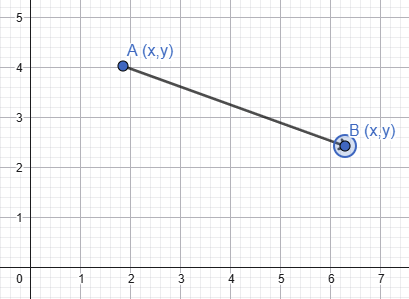
Euclidean distance accounts for both direction and magnitude, so vectors with similar meaning but different lengths may appear far apart. This makes it useful for geometric or physical data, but often less suitable for text embeddings…so not great for the restaurant review data.
Dot Product

Dot product is calculated as the sum of the products of each vector’s corresponding components.
SQL Server uses negative dot product, which as far as I can tell…is just the dot product multiplied by -1
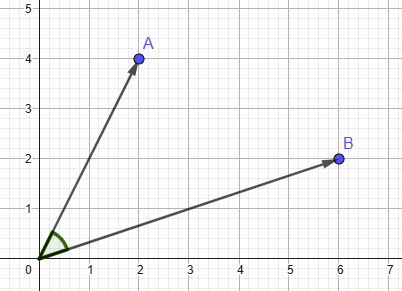
Dot product measures both directional alignment and magnitude. So this metric can have the same issue as Euclidean Distance. Vectors with similar meaning could potentially be calculated as having very different scores if their magnitudes differ significantly.
Cosine Similarity

Cosine similarity is the dot product divided by the product of the vectors’ magnitudes. It measures how closely aligned two vectors are while removing the effect of magnitude.
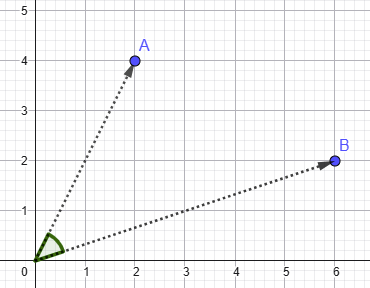
So what cosine similarity is really measuring is the directional similarity of the vectors. For the Burrito Bot, which is using embeddings generated from review data, this generally aligns well with semantic similarity. Basically, embeddings that point in similar directions in high-dimensional space often represent text with similar meaning.
Oh, and just a quick note…SQL Server actually uses cosine distance, not cosine similarity…as we are calculating how far the vectors are apart…not how similar they are. Cosine distance is calculated as: –

Vector Normalisation

Right, after all that, let’s throw a massive spanner in the works and talk about vector normalisation. This involves dividing each component in the vector by the vector’s magnitude…which scales the vector so its magnitude becomes 1.
The effect of this is that cosine similarity becomes equivalent to dot product!
And as SQL Server uses negative dot product and cosine distance, they will produce the same ordering of results for normalised vectors. Because all vectors now have the same magnitude, Euclidean Distance will also produce the same ordering of results as the other two metrics.
So if you’re working with normalised vectors…and you’re only interested in the ordering of the results rather than the actual values calculated…the choice of metric becomes much less significant.
How do we tell if the vectors are normalised? Hopefully the embedding model will tell us in its specs…but we don’t always live in a world where things are documented completely…do we? Thankfully we can use the VECTOR_NORM function within SQL to check: –
SELECT VECTOR_NORM(embeddings, 'norm2') AS length
FROM embeddings.restaurant_review_embeddings;
GO
If that returns values close to 1, then our vectors are normalised.
Hope that has been a useful dive into the different metrics available for vector distance calculations in SQL.
Thanks for reading!

