0

Dealing with stress

Anyone who knows me will know that I’m something of a stress head. I tend to worry about things and have, in the past, let it get the better of me.

But I feel that over the last few years I’ve managed to get a handle of dealing with stress. As a DBA, dealing with stressful situations comes as part of the job. I’ve had to deal with issues where a server has been down and I’ve had to deal with it (generally with a crowd of people surrounding my desk).

Over the years I’ve become pretty good at dealing with situations like that. I’ve learnt to focus on the issue at hand, tuning out all the noise to allow me to isolate, identify, and (eventually) rectify the issue.

However over the last couple of months I’ve had a couple of things to deal with, that I have to admit, stressed me out no end.

Firstly I started a new job, always somewhat stressful but added to that was the fact that I was evicted from my flat in Dublin.

(I should say that my landlord ended my tenancy as it was up for review before a new rent cycle started, I didn’t do anything to get evicted)

Now, this was a bigger problem that it normally would have been as my new job was my first remote working position.

So, yeah, I was pretty stressed.

The way I dealt with it was to take the same approach I do when dealing with issues at work. Focus on the tasks at hand and shut out all the other noise.

So each day, I had a list of things I needed to achieve. Search and book viewings for flats, email Estate Agents to register an interest in renting the property, provide the requested documents, and so forth.

By doing this, I managed to keep my levels of stress down as it felt I was working towards achieving my goal. Every task completed brought me onto the next allowing me to keep my focus.

And now, I’m writing this in my new flat looking forward to SQLBits later this week. 🙂

I’m not saying that this approach would work for anyone else but I thought I’d share what works for me.

Have a good week!

0

Friday Reading – Speaking Mentors

A new project underway is Speaking Mentors. I think this is an amazing idea and the response that it’s had already seems to have proved me right 🙂

There’s so many talented people involved I thought I’d put together a quick list of those who have written about the project on their blog. So here they are…

Speaking Mentors
Alex Yates (t) announcing the site

Giving back – Speaking Mentors
My post on why I wanted to join

I’m a Speaker Mentor!
Andy Leonard (t)

Exciting News!
Mark Wilkinson (t)

Exciting New Projects
Tracy Boggiano (t)

I’m a speaking mentor!
Angela Henry (t)

I’ve become a mentor
Alexander Arvidsson (t)

Setting mentoring ground rules
Although not part of Speaking Mentors, I thought I’d drop this blog post in by Paul Randal (t) as it has some great advice

Have a good weekend!

6

SQL Server in Kubernetes on Docker for Windows

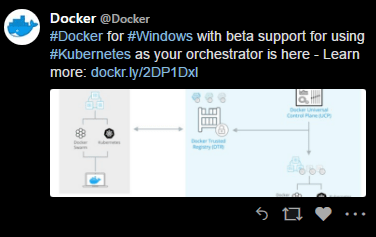
Last week Docker announced a feature that I’ve been looking forward to for a while: –
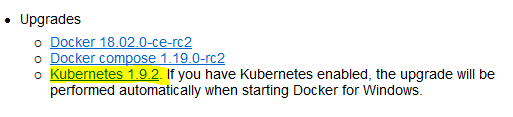
And sure enough, when I opened Docker for Windows, there was the update: –
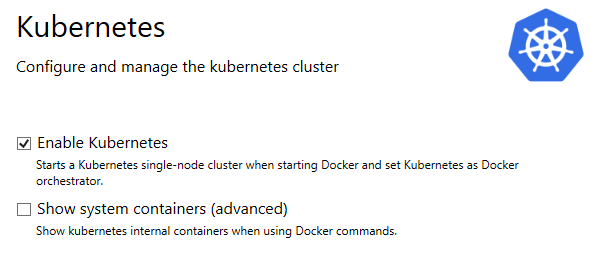
Let’s run through the steps to get this setup. First of all, enable the feature in settings: –
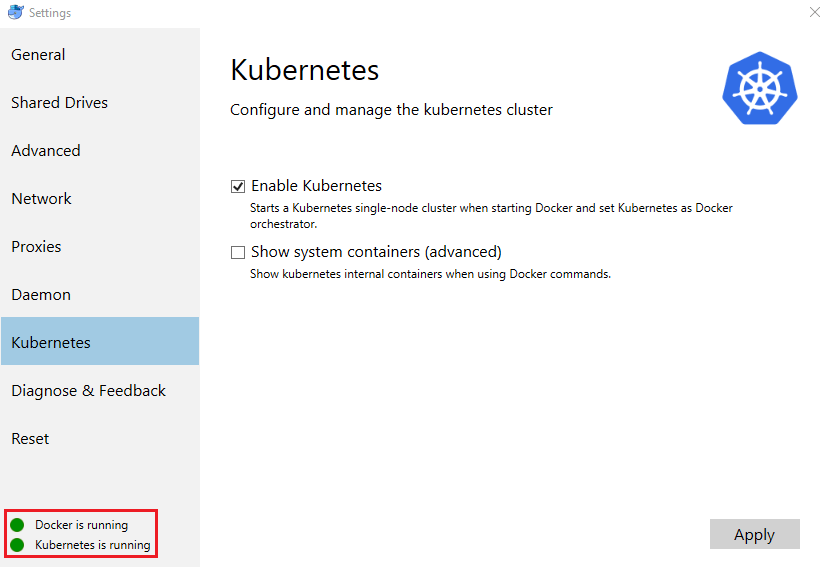
Once installed, you’ll be able to confirm that Kubernetes is up and running: –
Awesome stuff, but how do we interact with it?

Now, if this is the first time working with Kubernetes you won’t have to perform the next couple of steps but just to confirm, run the following: –

kubectl config current-context

If your shell cannot find the kubectl command, add
C:\Program Files\Docker\Docker\Resources\bin\
to your PATH environment variable and restart your shell.

If the command outputs anything other than docker-for-desktop you will need to switch to the desktop cluster. To do this run: –

kubectl config use-context docker-for-desktop
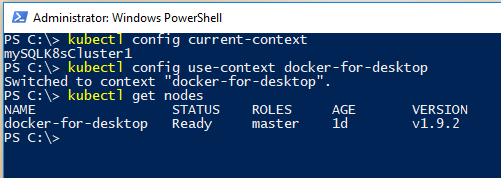
In the above screenshot I switched from my mySQLK8sCluster1 (my AKS cluster) to docker-for-desktop and then ran: –

kubectl get nodes

Now we are ready to go and build a pod running SQL Server in Kubernetes on Docker for Windows 🙂

So in C:\temp create a file called sqlserver.yml and drop in: –

apiVersion: apps/v1beta1
kind: Deployment
metadata:
  name: sqlserver
  labels:
    app: sqlserver
spec:
  replicas: 1
  template:
    metadata:
      labels:
        name: sqlserver
    spec:
      containers:
      - name: sqlserver
        image: microsoft/mssql-server-linux:latest
        ports:
        - containerPort: 1433
        env:
        - name: SA_PASSWORD
          value: "Testing1122"
        - name: ACCEPT_EULA
          value: "Y"
---
apiVersion: v1
kind: Service
metadata:
  name: sqlserver-service
spec:
  ports:
  - name: sqlserver
    port: 1433
    targetPort: 1433
  selector:
    name: sqlserver
  type: LoadBalancer

This is a very simple .yml file to create one pod running SQL Server. To create the pod: –

kubectl create -f C:\temp\sqlserver.yml

kubectl get pods
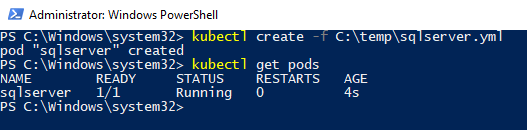
And boom! There we have a pod running SQL Server.

But how are we going to connect to it? OK, the second part of the yaml file defined a service which exposes an endpoint to allow us to connect. We can see the service by running: –

kubectl get services

The service we created is exposed on localhost (127.0.0.1) so we can use that and the port number specified in the yaml file (1433 in this example).
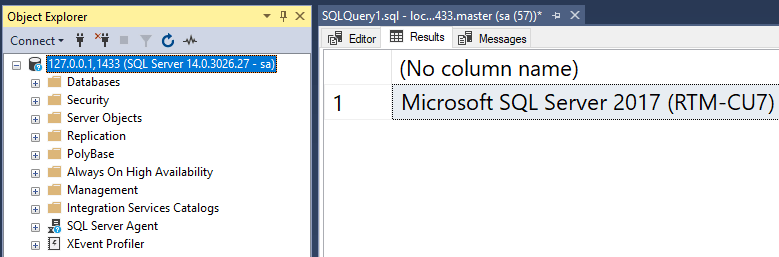
And boom! We are connected 🙂

We can also remote into the pod and verify that SQL is up and running: –

kubectl exec -it sqlserver /bin/bash

ps aux | grep sql

And there’s SQL running in the pod! Cool!

Thanks for reading!

0

Giving back – Speaking Mentors

I’ve been incredibly lucky in my career. I’ve somehow managed to meet and become friends with highly talented people who are all experts in their respective fields.

They have (almost literally) dragged me into at first blogging, and then eventually speaking. I could not have done any of it without their support and I have benefited immensely from it (professionally and personally).

However I am well aware that this is not the case for everyone. That’s why when Alex Yates (b|t) told me about speakingmentors.com I jumped straight in.

This is a simple concept. Anyone who wants help either getting into presenting or wants advice on how to improve can contact any one of the people listed as mentors and ask for help.

I was terrified before my first presentation so I know how hard it can be (I’m still terrified but I know now that I can do it), so I am more than happy to spend a bit of time with anyone who wants to ask questions or run through their session.

So if you’re looking for help, please go to the site and get in contact with one of us.

If you’re a seasoned presenter and want to help, please do the same.

This is all about increasing the number of quality presenters out there, and that will benefit everyone.

Have a good week!