18

Killing databases in SQL Server on Linux

Bit of fun this week with something that a colleague of mine noticed when playing around with SQL Server on linux.

The first thing you do when playing with a new technology is see how you can break it right? Always good fun πŸ™‚

So I’m going to break a database in a SQL Server instance that’s running on linux. I’m not going to go through the install process as there’s a whole bunch of resources out there that detail how to do it. See here

Once you have your instance up and running, connect it to as normal in SSMS and create a database with one table:-

CREATE DATABASE [GoingToBreak];
GO

USE [GoingToBreak];
GO

CREATE TABLE dbo.Test
(PKID INT IDENTITY(1,1) PRIMARY KEY,
 ColA VARCHAR(10),
 ColB VARCHAR(10),
 DateCreated DATETIME);
GO

Then insert some data: –

INSERT INTO dbo.Test
(ColA, ColB, DateCreated)
VALUES
(REPLICATE('A',10),REPLICATE('B',10),GETUTCDATE());
GO 1000

What we’re going to do is delete the database files whilst the instance is up and running. Something you can’t do to a database running in an instance of SQL on windows as the files are locked.

First, find where the files are located: –

USE [GoingToBreak];
GO

EXEC sp_helpfile;
GO

databasefiles

Then jump into your favourite terminal client (I’m using bash on windows) and connect to the linux server.

Then run: –

cd /var/opt/mssql/data/
ls
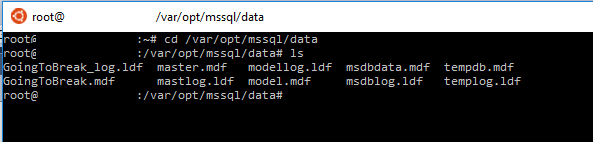
databasefiles2

Ok, so now to delete the files we can run: –

rm GoingToBreak.mdf GoingToBreak_log.ldf

databasefiles3

And the files are gone! That database is deader than dead!

But….wait a minute. Let’s have a look back in SSSMS.

Run the following: –

USE [GoingToBreak];
GO

SELECT * FROM dbo.Test;

Hmm, data’s returned! Ok, it could just be in the buffer pool. Let’s write some data: –

USE [GoingToBreak];
GO

INSERT INTO dbo.Test
(ColA, ColB, DateCreated)
VALUES
(REPLICATE('A',10),REPLICATE('B',10),GETUTCDATE());
GO 1000

What? It completed successfully??? Err, ok. Let’s run that select statement one more time…

SELECT * FROM dbo.Test;

Ok, that returned 2000 rows right? Hmm, what happens if we run CHECKPOINT?

CHECKPOINT
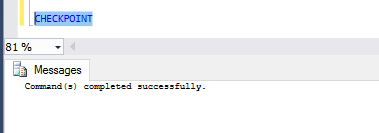
checkpoint

Errr, ok. That worked as well.

Alright, enough of this. Let’s break it for sure. Back in your terminal session run: –

sudo systemctl restart mssql-server

Once that’s complete, jump back into SSMS and refresh the connection: –
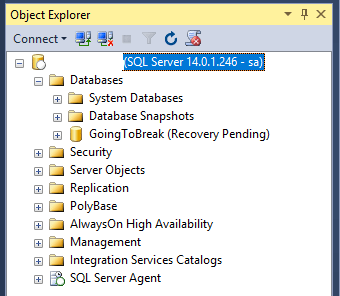
objectexplorer

Ha ha! Now it’s dead. That’s pretty weird behaviour though eh? I expect there’s a linux person out there who can explain why that happened ‘cos I’m really not sure.

EDIT – Anthony Nocentino (b|t) has come back to me and said that the files when deleted get unlinked from the directory so we can no longer see them but the SQL process will still have them open; hence being able to execute queries. Once the instance is restarted the file handle will be released, the underlying blocks and inodes get deallocated; hence the database going into recovery pending. Thanks Anthony!

One thing I do know is that SQL databases on linux will continue to allow queries to be executed against them after their underlying files have been deleted. Pretty worrying imho, you could have a problem and not even know about it until your next server restart!

0

Monday Coffee 2017-01-09

I’m almost back into the swing of things now after the Xmas break, that holiday feeling has just about left me.

For most people, there’s a good break over the Xmas period but most IT workers that I know had to be on-call for some or most of the holiday period. Being on-call is part and parcel of being a DBA and I honestly don’t mind doing it but I guess it’s really dependent on how much you get called! Ever been called when out at a restaurant? It does kinda suck…

I’ve been in roles where being on call that evening pretty much guaranteed that I’d be getting a call, which I admit, I wasn’t too keen on. Especially when the factors that lead to a problem with a system were out of my control and I’d just be firefighting the whole time.

I’m lucky now that my current role has allowed me to build a system that very rarely has problems and as such, I very rarely get called. Maybe that’s what being a good DBA (I like to think I am anyway) comes down to?

All the training courses, read articles & blogs, all the extra work that we put in is done so that we get bothered less? πŸ™‚

Have a good week!

0

Friday Reading 2017-01-06

Happy New Year to all of you out there! I know, I know it’s a week late but hey I’ve had a bit of a hectic one plus once again I’ve managed to catch the same bug that I always seem to get this time of year (excuses, excuses).

Well 2016 was a bit of a wild ride, wonder what 2017 has in-store for us? Personally I’m hoping that container technology continues to mature, the bugs are fixed in SSMS (possibly see that dark theme released? ha!) and that we see some cool blog posts about SQL on linux being utilised. I’ve read enough posts on how to install SQL on linux but I wonder how many people out there are actually using it (someone’s got to be mad enough)?

Anyway this week I’ve been reading: –

Magnificent app which corrects your previous console command
Anyone out there using bash on windows? Anyone out there as terrible at typing as I am? Have a look at this…

The Input Club
Custom mechanical keyboards? Yes please!

Leave your comfort zone in 2017
Irish Times article on 5 keys areas to focus on when trying to leave your comfort zone.

Running SQL queries with Visual Studio Code
Rob Sewell guides us through using VS Code to run t-sql queries

Wired – Microsoft’s old school database was the surprise software of the year
Anyone else roll their eyes at “old school”?

And finally…

Dr Donald Henderson
With so many celebrity deaths in 2016, I want to draw attention to Dr Donald Henderson who also died last year at 87. Dr Henderson was instrumental in the eradication of the smallpox virus and as such has saved countless lives.

0

Saturday Reading 2016-12-17

It was my office Xmas party last night so whilst recovering on my settee, I’ll be reading:-

The Most Important Role of a SQL Server DBA
Back to basics, Angela Tidwell talks about what the most important task of a DBA is (can you guess?)

Don’t blink you might READPAST it
Cool post about the query hint READPAST

The ambiguity of the ORDER BY in SQL Server
Klaus Aschenbrenner talks about quirks with the ORDER BY clause

Evernote’s new privacy policies
So Evernote’s new privacy policies basically say that its employees can view your notes, yea…

Going to take a break over the holiday period so have a good Xmas and see you in the New Year.

Thanks for reading.

4

Presenting with SQL Server Management Studio

Short one this week as it’s the usual madness on the lead up to Xmas!

One of the cool things that was mentioned in the AMA that the SQL Server Team did back in November was a quick and easy way to setup SSMS for presenting.

N.B. – This only works with v17.0 which can be grabbed in the usual place.

Load up SSMS and hit Ctrl + Q to take you to the quick launch bar. Then type PresentON and that’s it! You’re setup for using SSMS whilst presenting!

So here’s a screen shot of SSMS with a simple query in it:-

presenting1

And this is the same query after running PresentON:-

presenting2

To reverse the process, simply type PresentOFF into the quick launch bar!

From what I can see, the main difference is that the text size has been taken up to 14 from 10, which may not be enough but it’s a start. Be pretty cool if, in a future version, you could customise this!

Of course, if you don’t have v17.0 (and I must admit, the part about it not being recommended for production use is a bit worrying) you can always follow Paul Randal’s guide on how manually setup SSMS for presenting and then save it as a template.