EDIT 3 – November 2019 – There is an environment variable that can now be used to enable the SQL Server Agent, MSSQL_AGENT_ENABLED
docker run -d -p 15789:1433 `
--env ACCEPT_EULA=Y `
--env SA_PASSWORD=Testing1122 `
--env MSSQL_AGENT_ENABLED=True `
--name testcontainer `
mcr.microsoft.com/mssql/server:2019-GDR1-ubuntu-16.04
A full list of environment variables available for SQL Server can be found here
EDIT 2 – May 2018 – Thanks to Jon & Russell’s comments for pointing out that as of SQL 2017 CU4 the Agent no longer needs to be installed separately, just enabled. I have updated the code here and on Github to reflect that change
There is also the option to enable the agent in the microsoft/mssql-server-linux:latest image, just run the line of code below to enable the agent from within the container.
EDIT – Feb 2017 – Justin Hartman (t) pointed out that the original code here no longer works but a fix has been provided by Microsoft. I’ve updated the image in DockerHub and the code here and in my Github repository
At SQL Saturday Holland a few weeks ago I was (surprise, surprise) chatting about containers and mentioned that I hadn’t been able to get the SQL Agent working.
Now, one of the benefits of attending SQL Saturdays is that you get to pick the brains of a lot of very clever people and luckily for me, Jan Van Humbeek (blog|twitter) was there.
Jan said that he had gotten the SQL Agent running in Linux containers so I asked if he could send on his code and he very kindly obliged.
So, the disclaimer for this blog post is that I didn’t write the code here, Jan did. All I’ve done is drop it into a dockerfile so that an image can be built. Thank you very much Jan!
Here’s the dockerfile to build an image with the Agent installed: –
# building from ubuntu
FROM ubuntu:16.04

# install curl & sudo & apt-transport-https
RUN apt-get update && apt-get install -y curl sudo && apt-get install -y apt-transport-https

# Import the public repository GPG keys
RUN curl https://packages.microsoft.com/keys/microsoft.asc | apt-key add -

# Register the Microsoft SQL Server Ubuntu repository
RUN curl https://packages.microsoft.com/config/ubuntu/16.04/mssql-server-2017.list | tee /etc/apt/sources.list.d/mssql-server.list

# update package list
RUN apt-get update -y

# install sql server
RUN apt-get install -y mssql-server

# enable the agent
RUN sudo /opt/mssql/bin/mssql-conf set sqlagent.enabled true

# start sql server
CMD /opt/mssql/bin/sqlservr
N.B. – This dockerfile is also available on my Github
Ok, so I then dropped this docker into C:\docker\builds\linuxwithagent and built the image: –
docker build -t linuxwithagent C:\docker\builds\linuxwithagent

This does throw a few errors but will successfully build an image. A container can then be run: –
docker run -d -p 15789:1433 --env ACCEPT_EULA=Y --env SA_PASSWORD=Testing11@@ --name testcontainer linuxwithagent

Once the container is running, connect via SSMS and the agent will be available.
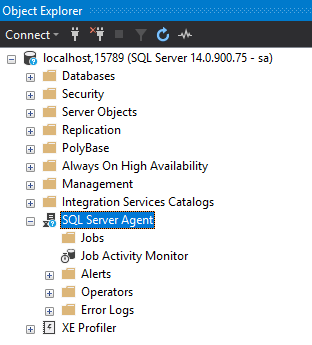
I’ve made this image available on the docker hub. You can pull it down by running: –
docker pull dbafromthecold/sqlserverlinuxagent:latest
Thanks for reading!





