A gotcha when switching partitions

When working with partitioning the SWITCH operation has to be my favourite. The ability to move a large amount of data from one table to another as a META DATA ONLY operation is absolutely fantastic.

What’s also cool is that we can switch data into a non-partitioned table. Makes life a bit easier not having to manage two sets of partitions!

However, there is a bit of a gotcha when doing this. Let’s run through a quick demo.

First create a database with a partitioned table: –

CREATE DATABASE [PartitioningDemo]
GO


USE [PartitioningDemo];
GO

CREATE PARTITION FUNCTION PF_PartitionedTable(DATE)
	   AS RANGE RIGHT
    FOR VALUES ('2011-01-01','2012-01-01','2013-01-01',
                '2014-01-01','2015-01-01','2016-01-01',
                '2017-01-01');
GO

CREATE PARTITION SCHEME PS_PartitionedTable
    AS PARTITION PF_PartitionedTable
ALL TO ([PRIMARY]);
GO

CREATE TABLE dbo.PartitionedTable
(ID INT IDENTITY(1,1),
 ColA VARCHAR(10),
 ColB VARCHAR(10),
 CreatedDate DATE)
 ON PS_PartitionedTable(CreatedDate);
GO

For a more in-depth look at what I’m doing, my series on partitioning can be found here

So let’s insert some test data:-

SET NOCOUNT ON;

DECLARE @FromDate date = '2011-01-01';
DECLARE @ToDate date = '2017-01-01';

INSERT INTO dbo.PartitionedTable
SELECT 
    REPLICATE('A',10),
    REPLICATE('B',10),
    DATEADD(DD,FLOOR(RAND()*(DATEDIFF(DD,@FromDate,@ToDate))),@FromDate);
GO 1000

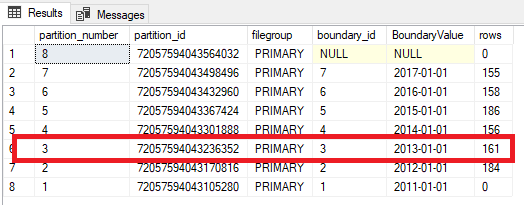
We can check the data and partitions by running: –

SELECT 
	p.partition_number, p.partition_id, fg.name AS [filegroup],
	r.boundary_id, CONVERT(DATE,r.value) AS BoundaryValue, p.rows
FROM 
	sys.tables AS t
INNER JOIN
	sys.indexes AS i ON t.object_id = i.object_id
INNER JOIN
	sys.partitions AS p ON i.object_id = p.object_id AND i.index_id = p.index_id 
INNER JOIN 
    sys.allocation_units a ON a.container_id = p.hobt_id 
INNER JOIN 
    sys.filegroups fg ON fg.data_space_id = a.data_space_id 
INNER JOIN
	sys.partition_schemes AS s ON i.data_space_id = s.data_space_id
INNER JOIN
	sys.partition_functions AS f ON s.function_id = f.function_id
LEFT OUTER JOIN 
	sys.partition_range_values AS r ON f.function_id = r.function_id 
									AND r.boundary_id = p.partition_number
WHERE 
	i.type <= 1 AND a.type = 1
AND 
	t.name = 'PartitionedTable'
ORDER BY 
	p.partition_number 
		DESC;

Now let’s create the “switch” table: –

USE [PartitioningDemo];
GO

CREATE TABLE dbo.PartitionedTable_Switch
(ID INT IDENTITY(1,1),
 ColA VARCHAR(10),
 ColB VARCHAR(10),
 CreatedDate DATE)
 ON [PRIMARY];
GO

N.B. – Keeping it simple, a non-partitioned table on the PRIMARY filegroup (the same filegroup as all my partitions in the “source” table).

OK, let’s switch one of the partitions to the switch table: –

ALTER TABLE [dbo].PartitionedTable
	SWITCH PARTITION 3
TO [dbo].PartitionedTable_Switch;
GO

All good! Worked exactly as expected 🙂

But what happens when say, because of some issue, we need to switch that data back?

ALTER TABLE [dbo].PartitionedTable_Switch
    SWITCH 
TO [dbo].PartitionedTable
    PARTITION 3;
GO
Oh no!

Msg 4982, Level 16, State 1, Line 4
ALTER TABLE SWITCH statement failed. Check constraints of source table ‘PartitioningDemo.dbo.PartitionedTable_Switch’
allow values that are not allowed by range defined by partition 3 on target table ‘PartitioningDemo.dbo.PartitionedTable’.

What’s happened??

Well, we’re trying to insert data into a partition that has constraints on it. The partition has a lower boundary of 2012-01-01 and an upper boundary of 2013-01-01. Meaning that no data can go into that partition that has values in the CreatedDate field that isn’t greater than or equal to 2012-01-01 and less than 2013-01-01.

But our switch table doesn’t have these constraints. SQL thinks that there could be data in the switch table that doesn’t fit into the destination partition.

So we need to tell SQL that the data in the switch table will fit into the partition. And we do that by dropping a constraint onto the table: –

ALTER TABLE dbo.PartitionedTable_Switch
		ADD CONSTRAINT CreatedDate_Switch_CHECK CHECK 
			(CreatedDate >= CONVERT(DATE,'2012-01-01') AND CreatedDate < CONVERT(DATE,'2013-01-01')
            AND CreatedDate IS NOT NULL);
GO

N.B. – notice the IS NOT NULL as well 🙂

And now try the switch again: –

ALTER TABLE [dbo].PartitionedTable_Switch
    SWITCH 
TO [dbo].PartitionedTable
    PARTITION 3;
GO

Woo hoo! We’ve got our data back into our main table. So, you don’t have to partition tables that you want to switch data out to, but just be aware that if you do, you need to be able to switch that data back (just in case).

Thanks for reading!

Indexing and Partitioning

Partitioning tables is a great tool to increase the manageability of your data. Being able to move large amounts of data in and out of a table quickly is incredibly helpful.

However, partitioning comes with a whole bunch of caveats and we need to be aware of what’s going on. This especially applies when creating indexes on partitioned tables, as there are a couple of things we need to be aware of.

So let’s run through a demo so that I can show you how SQL behaves when creating indexes on partitioned tables. First, create a database: –

CREATE DATABASE PartitioningDemo;
GO

And now let’s build a Partition Function & Scheme to partition a table by year: –

USE [PartitioningDemo];
GO

CREATE PARTITION FUNCTION PF_PartitionedTable(DATE)
	   AS RANGE RIGHT
    FOR VALUES ('2017-06-01','2018-01-01','2019-01-01');
GO

CREATE PARTITION SCHEME PS_PartitionedTable
    AS PARTITION PF_PartitionedTable
ALL TO ([PRIMARY]);
GO

N.B. – Keeping it simple, all partitions going to the PRIMARY filegroup. You wouldn’t do this when creating a normal partitioned table but I want to show you the index structure, so for the purposes of this demo, the location of the partitions doesn’t matter.

And now we can create the table. Really simple table, with a DATE column as my partitioning key (the column that defines the partitions): –

CREATE TABLE dbo.PartitionedTable
(ID INT IDENTITY(1,1),
 ColA VARCHAR(10),
 ColB VARCHAR(10),
 CreatedDate DATE)
 ON PS_PartitionedTable(CreatedDate);
GO

Now let’s insert some data into the table: –

SET NOCOUNT ON;
SET STATISTICS IO OFF;

DECLARE @FromDate date = '2017-01-01';
DECLARE @ToDate date = '2018-01-01';

INSERT INTO dbo.PartitionedTable
SELECT 
    REPLICATE('A',10),
    REPLICATE('B',10),
    DATEADD(DD,FLOOR(RAND()*(DATEDIFF(DD,@FromDate,@ToDate))),@FromDate);
GO 1000

Great, now we can look at creating indexes on the table.

First let’s look at creating clustered indexes on this table. Now, when creating a UNIQUE CLUSTERED INDEX on a partitioned table, the partitioning key must be explicitly defined in the index definition.

Try creating this index: –

CREATE UNIQUE CLUSTERED INDEX [IX_ID_PartitionedTable] ON dbo.PartitionedTable
 (ID) 
ON PS_PartitionedTable(CreatedDate);
GO

Whoops!

Msg 1908, Level 16, State 1, Line 26
Column ‘CreatedDate’ is partitioning column of the index ‘IX_ID_PartitionedTable’.
Partition columns for a unique index must be a subset of the index key.

This is generated as we did not specify the CreatedDate column in our index. SQL needs the partitioning key to be explicitly defined in all unique indexes on partitioned tables. This is so that SQL can determine the uniqueness of that index by checking one partition.

So, let’s change the index to be non-unique: –

CREATE CLUSTERED INDEX [IX_ID_PartitionedTable] ON dbo.PartitionedTable
 (ID) 
ON PS_PartitionedTable(CreatedDate);
GO

As it’s non-unique, SQL will create that no problem. But let’s look at what’s happened in the background. I’m going to use DBCC IND & DBCC PAGE to delve into the index. First let’s see what files are assigned to the database: –

EXEC sp_helpfile;
GO

Simple database, so the fileID will be 1 (the .MDF file)

Now look at the pages assigned to the clustered index: –

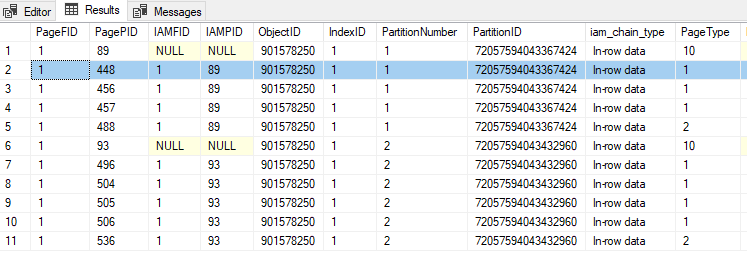
DBCC IND('PartitioningDemo','PartitionedTable',1);
GO

PageID 448 is a data page (type 1) so we’ll drop that into DBCC PAGE along with the FileID and have a look: –

DBCC TRACEON(3604);
GO
DBCC PAGE ('PartitioningDemo',1,448,3);
GO

Looking at that data page, we can see that SQL has added a UNIQUIFIER column. Now this is standard SQL behaviour, SQL does this to all non-unique clustered indexes whether they are on a partitioned table or not.

But also look at the CreatedDate column. It’s after the ID column on the page. If this was a non-partitioned table, we would see that after ColA & ColB (the order the columns are on the table). This has happened because SQL has implicitly added the partitioning key into the index definition, which has changed the physical order of the data on the page.

OK, so what about nonclustered indexes? Well it’s the same story when it comes to unique nonclustered indexes. The partitioning key must be explicitly defined in the index. But what about non-unique nonclustered indexes? Let’s have a look.

Let’s drop the clustered index created previously and create a non-unique nonclustered index: –

DROP INDEX IF EXISTS [IX_ID_PartitionedTable] ON dbo.PartitionedTable;

CREATE NONCLUSTERED INDEX [IX_ColA_PartitionedTable] ON dbo.PartitionedTable
 (ColA) 
ON PS_PartitionedTable(CreatedDate);
GO

N.B. – this is an aligned nonlclustered index. Meaning that is using the same partition scheme and key as the base table, you can read more about aligned and nonaligned nonclustered indexes here.

Let’s do the same to look at the index data: –

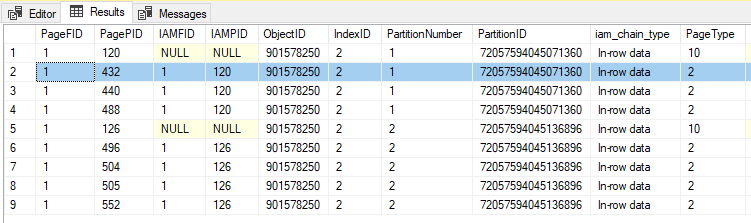
DBCC IND('PartitioningDemo','PartitionedTable',2);
GO

PageID 432 is an index page (type 2) so we’ll drop that into DBCC PAGE along with the FileID and have a look: –

DBCC TRACEON(3604);
GO
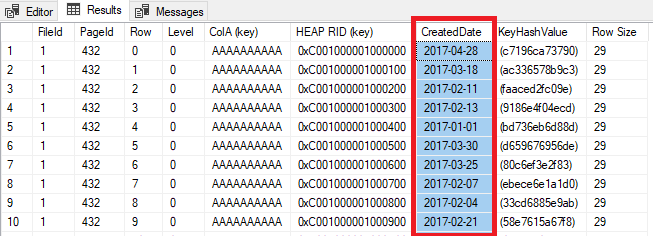
DBCC PAGE ('PartitioningDemo',1,432,3);
GO

This time I have got my results back in a grid. But look! CreatedDate is there!

SQL has implicitly added the partitioning key to my index as an included column.

OK, but why does this matter? Well, this can catch you out in certain situations. Let’s run a quick test on trying to SWITCH a partition from the table we’ve built.

First let’s create the switch table: –

CREATE TABLE dbo.PartitionedTable_Switch
(ID INT IDENTITY(1,1),
 ColA VARCHAR(10),
 ColB VARCHAR(10),
 CreatedDate DATE)
 ON [PRIMARY];


CREATE NONCLUSTERED INDEX [IX_ColA_PartitionedTable_Switch] ON dbo.PartitionedTable_Switch
 (ColA) 
ON [PRIMARY];
GO

Now, this table is not partitioned. Standard really, non-partitioned table as an archive for old data in the table.

Let’s see what happens when we run a SWITCH operation: –

ALTER TABLE [dbo].PartitionedTable
	SWITCH PARTITION 1
TO [dbo].PartitionedTable_Switch;
GO

Oh no!

Msg 4947, Level 16, State 1, Line 122
ALTER TABLE SWITCH statement failed. There is no identical index in source table ‘PartitioningDemo.dbo.PartitionedTable’
for the index ‘IX_ColA_PartitionedTable_Switch’ in target table ‘PartitioningDemo.dbo.PartitionedTable_Switch’ .

This has happened because even though the t-sql statements for both indexes are the same, the partitioned table’s index has the partitioning key as an included column and the switch table does not.

We can check this by altering the index on the switch table: –

CREATE NONCLUSTERED INDEX [IX_ColA_PartitionedTable_Switch] ON dbo.PartitionedTable_Switch
 (ColA) 
    INCLUDE (CreatedDate)
WITH (DROP_EXISTING=ON)
ON [PRIMARY];
GO

And now the switch will work!

ALTER TABLE [dbo].PartitionedTable
	SWITCH PARTITION 1
TO [dbo].PartitionedTable_Switch;
GO

The best way to prevent this from happening is to create a unique clustered index on your partitioning key (with something like an identity integer column if the key isn’t unique by itself). That way the partitioning key will automatically be in all of your nonclustered indexes.

Thanks for reading!

Dealing with stress

Anyone who knows me will know that I’m something of a stress head. I tend to worry about things and have, in the past, let it get the better of me.

But I feel that over the last few years I’ve managed to get a handle of dealing with stress. As a DBA, dealing with stressful situations comes as part of the job. I’ve had to deal with issues where a server has been down and I’ve had to deal with it (generally with a crowd of people surrounding my desk).

Over the years I’ve become pretty good at dealing with situations like that. I’ve learnt to focus on the issue at hand, tuning out all the noise to allow me to isolate, identify, and (eventually) rectify the issue.

However over the last couple of months I’ve had a couple of things to deal with, that I have to admit, stressed me out no end.

Firstly I started a new job, always somewhat stressful but added to that was the fact that I was evicted from my flat in Dublin.

(I should say that my landlord ended my tenancy as it was up for review before a new rent cycle started, I didn’t do anything to get evicted)

Now, this was a bigger problem that it normally would have been as my new job was my first remote working position.

So, yeah, I was pretty stressed.

The way I dealt with it was to take the same approach I do when dealing with issues at work. Focus on the tasks at hand and shut out all the other noise.

So each day, I had a list of things I needed to achieve. Search and book viewings for flats, email Estate Agents to register an interest in renting the property, provide the requested documents, and so forth.

By doing this, I managed to keep my levels of stress down as it felt I was working towards achieving my goal. Every task completed brought me onto the next allowing me to keep my focus.

And now, I’m writing this in my new flat looking forward to SQLBits later this week. 🙂

I’m not saying that this approach would work for anyone else but I thought I’d share what works for me.

Have a good week!

Friday Reading – Speaking Mentors

A new project underway is Speaking Mentors. I think this is an amazing idea and the response that it’s had already seems to have proved me right 🙂

There’s so many talented people involved I thought I’d put together a quick list of those who have written about the project on their blog. So here they are…

Speaking Mentors
Alex Yates (t) announcing the site

Giving back – Speaking Mentors
My post on why I wanted to join

I’m a Speaker Mentor!
Andy Leonard (t)

Exciting News!
Mark Wilkinson (t)

Exciting New Projects
Tracy Boggiano (t)

I’m a speaking mentor!
Angela Henry (t)

I’ve become a mentor
Alexander Arvidsson (t)

Setting mentoring ground rules
Although not part of Speaking Mentors, I thought I’d drop this blog post in by Paul Randal (t) as it has some great advice

Have a good weekend!