5

Review of Minion Reindex

Back in October 2014 Midnight SQL released v1.0 of Minion Reindex, a free, open source index maintenance solution. I’m all for making my day job easier so I once I heard about this I wanted to get it into a development environment asap to see what it can do. Unfortunately other things have gotten in the way so I’m only getting around to reviewing it now.

I’m going to go through the deployment, main objects and an initial test of the solution but first off, let’s address the massive elephant in the room that is, Ola Hallengren’s maintenance solution. Ola’s scripts are tried and tested, I’ve been running them in my production environment for god knows how long so it’s going to take something pretty special to make me change. Midnight SQL are aware of this and have detailed the differences between the two solutions here.

Going through the list, the features of Minion Reindex that caught my eye were:-

  • Minimal job configuration – reduced amount of job/job steps needed
  • Exclude databases/tables without altering jobs
  • Configure database/table thresholds and settings without altering jobs
  • Monitoring/Collecting initial and post fragmentation

Ola’s solution does require a fair amount of configuration in the job steps. It also logs all information into one table, dbo.CommandLog which stores some information as XML. That’s fine to be honest but I’m looking to see if this solution can make my life simpler. Can it reduce the amount of time I spend making adjustments to index maintenance (i.e. – the jobs) on my servers? Will it give me more information than I have now? Will that information be easier to retrieve (i.e. – not having to parse XML)?

Deployment
Deployment is a cinche, just download the .zip file, extract and then run the MinionReindexInstall.sql script in the database you wish to deploy to. One thing I don’t like is the ascii art at the top of the script, it looks a bit tacky for my taste but each to their own.

Another thing to mention is that the script will enable xp_cmdshell, not something I’m particularly keen on because of security concerns surrounding it (see here https://msdn.microsoft.com/en-us/library/ms175046.aspx) so I’d rather have it turned off unless it is absolutely necessary. I’m only testing on one instance of SQL Server 2012 Development Edition and I am not using the centralised logging feature (which is why the script enables xp_cmdshell) so I removed the code that enabled xp_cmdshell from the deployment script.

Objects Created
The script creates its own schema, a scalar function, three stored procs and nine tables. I’m not going to go through what each of them does as they are all detailed in the documentation that comes in the .zip file, but here are the main ones:-

Tables
IndexMaintLog – Index operations breakdown by database
IndexMaintLogDetails – Index operations breakdown by individual database
IndexSettingsDB – Maintenance settings at database level
IndexSettingsTable – Maintenance settings at index level

Stored Procedures
IndexMaintMaster – Main procedure which analyses databases and then calls IndexMaintDB
IndexMaintDB – Performs the actual index maintenance in the databases

SQL Server Agent Jobs
MinionReindexDBs-All-All – Performs the heavy work i.e. – rebuilding indexes
MinionReindexDBs-All-REORG – Performs light weight maintenance (reorganising)

Fairly straightforward, right?

Initial Run
So the table that’ll start you off is IndexSettingsDB. Here you’ll add in rows for each database in your SQL instance OR just leave the default row. There’s loads of settings here, allowing you to finely tune your index maintenance for each database without having to touch the Agent jobs. Initially I just inserted a row for each database (using the default settings) and gave the MinionReindexDBs Agent job a whirl.

Whilst the jog is running, have a look at the IndexMaintLog and IndexMaintLogDetails tables. These will show you what operations the job has performed, what it is currently doing and, in the case of IndexMaintLogDetails, what is queued up.

The level of detail in these tables is fantastic. The IndexMaintLog table will give you a good overview of what has been done in each database, the execution time, the number of tables processed and not only the number of indexes processed but the number of indexes reorganised vs rebuilt.

Moving on to the IndexMaintLogDetails, we’re now getting down to the individual index stats. So we’ve got execution time of both reindex and stats update, initial fragmentation, post fragmentation (if you’ve included that option in IndexSettingsDB) and the index usage stats (seeks,scans, lookups etc.). I’ve always separated out my collection of stats from my maintenance tasks but I’m definitely going to switch on the post frag collection and see how it performs.

These two tables are absolutely screaming out for a SSRS report to be slapped over the top of them. And they’d be pretty easy to write, only two tables to track trends in your databases which would allow you to see changes in fragmentation patterns over time.

Further Testing
The next things for me will be, setting up table level exclusions in certain databases and setting the order of databases and tables to be reindexed. Once that’s all setup I’ll get both Agent jobs on a schedule, start fragmenting my test databases (I’ll shrink them) and then analysing the stats.

Conclusion
I like this solution, it’s easy to deploy, configure and run. I’m going to let this run in my dev environments for a while to see how it performs with a view to deploying to production.

I’d definitely recommend that DBAs should be downloading this, installing in a development environment and playing around.

What’s also encouraging about this solution is that Midnight SQL list on their website features that will be included at a later date. There are some features that I’d like to see, system table maintenance and the ability to rebuild individual partitions would probably be at the top of the list, but it’s good to know that there will be future releases (and with that, hopefully support).

Minion Reindex can be downloaded from here:- http://www.midnightsql.com/minion/

4

Identifying Blocking via Extended Events

There are a number of ways that you can identify blocking that is occurring in your SQL instance. You can run the undocumented sp_who2 stored procedure but that will only give you the session that is being blocked. You could download the excellent sp_whoisactive, written by Adam Machanic, which will give you the session_id and the SQL script that is causing the blocking. However both of these methods will only show you blocking sessions when you run it (obviously). If you want to capture historical blocking information then another method is needed. If you suspect that blocking is occurring in your system, the best way to capture the information is to use Extended Events.

In order to do this, first enable the blocked process report:-

EXEC sp_configure 'Show Advanced Options', 1
RECONFIGURE

EXEC sp_configure 'blocked process threshold (s)', 1
RECONFIGURE

EXEC sp_configure 'Show Advanced Options', 0
RECONFIGURE

N.B. – I’ve set the threshold limit here to one second. Depending on your environment you may wish to change it.

Then create an extended event to capture the information from the report:-

CREATE EVENT SESSION [BlockedProcesses] ON SERVER 
    ADD EVENT sqlserver.blocked_process_report
    ADD TARGET package0.event_file(SET filename=N'C:\SQLServer\XEvents\BlockedProcesses\BlockedProcesses.xel',max_file_size=(128))
WITH (STARTUP_STATE=OFF)
GO

N.B. – Don’t forget to change the file path.

Then start the session:-

ALTER EVENT SESSION [BlockedProcesses] ON SERVER
    STATE = START;

Now that the session is running you can query it:-

SELECT
 [XML DATA] AS [Raw XML],
 [XML Data].value('(/event[@name=''blocked_process_report'']/@timestamp)[1]','DATETIME') AS [TimeStamp],
 [XML Data].value('(/event/data[@name=''database_name'']/value)[1]','SYSNAME') AS [Database Name],
 [XML Data].value('(/event/action[@name=''username'']/value)[1]','SYSNAME') AS [Username],
 [XML Data].value('(/event/data[@name=''transaction_id'']/value)[1]','BIGINT') AS [Transaction ID],
 [XML Data].value('(/event/data[@name=''lock_mode'']/text)[1]','SYSNAME') AS [Lock Mode],
 [XML Data].value('(/event/data[@name=''duration'']/value)[1]','BIGINT')/1024 AS [Duration (ms)],
 [XML Data].value('(/event/data[@name=''blocked_process'']/value/blocked-process-report/blocked-process/process/inputbuf)[1]','SYSNAME') AS [Blocked Query],
 [XML Data].value('(/event/data[@name=''blocked_process'']/value/blocked-process-report/blocked-process/process/@waitresource)[1]','SYSNAME') AS [Wait Resource], 
 [XML Data].value('(/event/data[@name=''blocked_process'']/value/blocked-process-report/blocking-process/process/inputbuf)[1]','SYSNAME') AS [Blocking Query]
FROM
    (SELECT OBJECT_NAME 			  AS [Event], 
		  CONVERT(XML, event_data) AS [XML Data]
	FROM 
	   sys.fn_xe_file_target_read_file('C:\SQLServer\XEvents\BlockedProcesses\BlockedProcesses*.xel',NULL,NULL,NULL)) AS v
ORDER BY [XML Data].value('(/event[@name=''blocked_process_report'']/@timestamp)[1]','DATETIME') DESC

EDIT:- It’s been pointed out in the comments by Jason that the value for username will return as NULL because no action was defined for this value in the CREATE EVENT script. Adding the following piece of code will allow the username to be returned:-

ADD EVENT sqlserver.blocked_process_report(
Action (sqlserver.Username))

This piece of code will output the time of the block, the blocked query, the blocking query, the duration of the block and the resource that the blocked query is waiting on. I’ll run through a quick example now to show what information is retrieved when a block is recorded. So first I’ll create a demo database with one table (I have already run the setup scripts above):-

USE [master];
GO
 
CREATE DATABASE [BlockingExample];
GO
 
USE [BlockingExample];
GO
 
CREATE TABLE dbo.[BlockedTable]
(RecordID INT IDENTITY(1,1) PRIMARY KEY,
 ColA SYSNAME);
 
INSERT INTO dbo.BlockedTable
(ColA)
VALUES
('Blocking TEST');
GO

Then I’ll open two sessions, the first will be an update in a transaction that I’ll leave open (my blocker):-

USE [BlockingExample];
GO
 
BEGIN TRAN
 
UPDATE dbo.[BlockedTable]
SET ColA = 'BlockingTEST1';

The second will be a simple SELECT against the table (my blocked query):-

USE [BlockingExample];
GO

SELECT * FROM dbo.BlockedTable;

I’ll run this for a while, cancel it and commit the first query. Then I queried the extended event, here’s the results:- BlockedProcessScreenShot As you can see, The SELECT is showing up as the blocked query and the update as the blocker. But we’ve also got the resource the SELECT is waiting on:- KEY: 14:72057594039042048 (8194443284a0) Using this information we can identify the exact row in the table. The 14 is the database_id:-

SELECT name from sys.databases WHERE database_id = 14

This gives the name of the test database “BlockingExample”. Next 72057594039042048 is the hobt_id of the table, we can get the table name by running:-

SELECT o.name
FROM sys.objects o
INNER JOIN sys.partitions p ON o.object_id = p.object_id
WHERE p.hobt_id = 72057594039042048

This outputs the name of the test table “Blocked Table”. Finally we can use (8194443284a0) to identify the exact row in the table by running:-

SELECT *
FROM dbo.BlockedTable
WHERE %%LOCKRES%% = '(8194443284a0)'

This will output the test record that was inserted and then locked by the UPDATE statement. A very contrived example, I know, but it does show how verbose Extended Events are when capturing blocking. Not only can we identity the blocker and blockee but the exact record that the blockee was waiting on.

0

Collation Conflicts

I have recently seen some “bad plans” being generated by the optimiser and from investigation, the cause came down to the fact that the collation of the database where the queries were running was different to the tempdb collation.

Consider this situation, you have a stored procedure which collects various records and stores them in a temporary table. This temporary table is then used as a reference to delete records from another table in the database. This is a bit of a contrived example, but I just want to show you the impact differing collations can have.

N.B. – I’m running this in SQL Server 2012

First I’ll create a database with a different collation to the tempdb (the tempdb collation on my local instance is Latin1_General_CI_AS):-

CREATE DATABASE [CollationConflict] COLLATE SQL_Latin1_General_CP1_CI_AS;

Then I’ll create two tables in the database, populate them with data and create some nonclustered indexes.

Here’s the first table in the database:-

USE [CollationConflict];
GO

SET NOCOUNT ON;

IF EXISTS(SELECT 1 FROM sys.objects WHERE name = 'TableA')
    DROP TABLE dbo.[TableA];
GO

IF NOT EXISTS(SELECT 1 FROM sys.objects WHERE name = 'TableA')
    CREATE TABLE dbo.[TableA]
    (RecordID INT IDENTITY(1,1) PRIMARY KEY,
	Name VARCHAR(10));
GO

DECLARE @Counter	INT = 0;
DECLARE @Value		CHAR(10) = 'TEST';

WHILE @Counter <= 50000
BEGIN
    SET @Value = 'TEST' + CONVERT(VARCHAR(4),@Counter)

    INSERT INTO dbo.[TableA]
    (Name)
    VALUES
    (@Value);

    SET @Counter = @Counter + 1;
END

CREATE NONCLUSTERED INDEX [IX_TableA_Name] ON dbo.[TableA](NAME);
GO

And here’s the second table:-

IF EXISTS(SELECT 1 FROM sys.objects WHERE name = 'TableB')
    DROP TABLE dbo.[TableB];
GO

IF NOT EXISTS(SELECT 1 FROM sys.objects WHERE name = 'TableB')
    CREATE TABLE dbo.[TableB]
    (RecordID INT IDENTITY(1,1) PRIMARY KEY,
	Name VARCHAR(10));
GO

DECLARE @Counter	INT = 0;
DECLARE @Value		CHAR(10) = 'TEST';

WHILE @Counter <= 50000
BEGIN
    SET @Value = 'TEST' + CONVERT(VARCHAR(4),@Counter)

    INSERT INTO dbo.[TableB]
    (Name)
    VALUES
    (@Value);

    SET @Counter = @Counter + 1;
END

CREATE NONCLUSTERED INDEX [IX_TableB_Name] ON dbo.[TableB](NAME);
GO

To show the difference in plan’s generated, I’ll now create two temporary tables. The first one will use the same collation as tempdb but the second will be created with a different collation explicitly set.

Here’s the first temporary table using tempdb’s collation:-

CREATE TABLE #TempTableA
    (RecordID	 INT IDENTITY(1,1) PRIMARY KEY,
	Name		 VARCHAR(10));

DECLARE @Counter	INT = 0;
DECLARE @Value		CHAR(10) = 'TEST';

WHILE @Counter <= 500
BEGIN
    SET @Value = 'TEST' + CONVERT(VARCHAR(4),@Counter)

    INSERT INTO #TempTableA
    (Name)
    VALUES
    (@Value);

    SET @Counter = @Counter + 1;
END

CREATE NONCLUSTERED INDEX [IX_TempTableA_Name] ON #TempTableA(NAME);
GO

Here’s the second temporary table using same collation as the user database:-

CREATE TABLE #TempTableB
    (RecordID	 INT IDENTITY(1,1) PRIMARY KEY,
	Name		 VARCHAR(10) COLLATE SQL_Latin1_General_CP1_CI_AS);

DECLARE @Counter	INT = 0;
DECLARE @Value		CHAR(10) = 'TEST';

WHILE @Counter < 500
BEGIN
    SET @Value = 'TEST' + CONVERT(VARCHAR(4),@Counter)

    INSERT INTO #TempTableB
    (Name)
    VALUES
    (@Value);

    SET @Counter = @Counter + 1;
END

CREATE NONCLUSTERED INDEX [IX_TempTableB_Name] ON #TempTableB(NAME);
GO

Now I’m going to run two separate SQL statements which will reference the temp tables. The statements will perform the exact same operation, deleting a set of records from the main tables based on the records in the temp tables.

The only difference is that the COLLATE option is specified in the first (otherwise an error will be generated):-

DELETE A
FROM dbo.[TableA] AS A
INNER JOIN #TempTableA AS B ON A.Name = B.Name COLLATE Latin1_General_CI_AS
WHERE B.RecordID < 20;
GO

DELETE A 
FROM dbo.[TableB] AS A
INNER JOIN #TempTableB AS B ON A.Name = B.Name
WHERE B.RecordID < 20;
GO

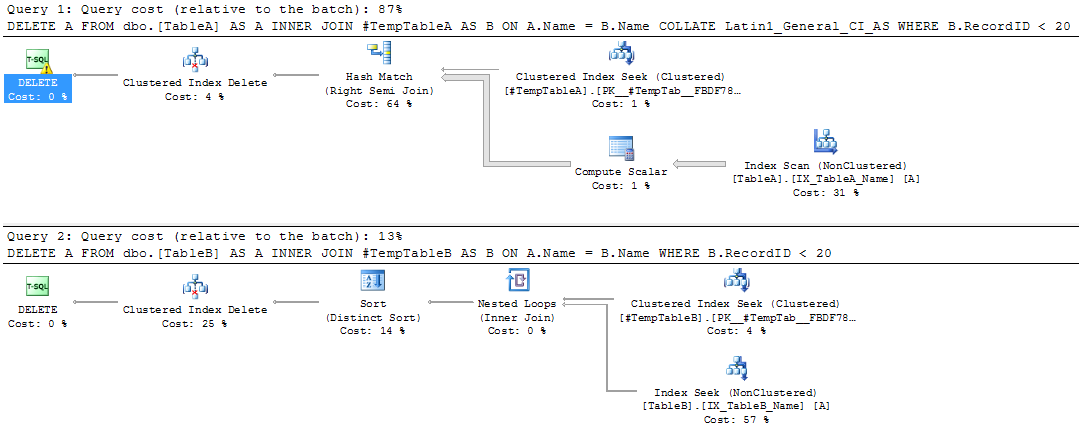
The DELETE statements will generate the following plans when executed:-

Query Plans

The first query is scanning the nonclustered index. The properties of the DELETE operator show why:-

DELETE Operator Properties

SQL is performing an implicit conversion, even though the COLLATE option was specified in the join. This is causing the nonclustered index scan. The impact of this can be seen by comparing the properties of the scan vs the seek in the second plan:-

Comparison

The scan is reading all the records in the table, simply because of the implicit conversion!

So, if your user databases have a different collation than your tempdb ensure that you specify the correct collation when creating your temporary tables. Or just make sure your databases have the same collation as your SQL instance!

0

Happy New Year 2015

I know it’s late but I’ve been away, I hope you all had a good Christmas and New Year.

I try and regularly review my skills as a DBA but more so at the start of a new year. You know the type of questions:-

  • Have I improved my overall skillset over the last year?
  • What areas have I worked specifically on?
  • How do my skills in those areas compare to last year?
  • Are there any areas in which I need to improve upon?
  • What can I do over the next week/month/year in order to keep improving?

2014 was a pretty exciting year for me. I moved to Dublin to work and looking back, it was the completely correct decision. I’ve been involved in a major project over the last few months and all in all (with few exceptions) everything has gone well. Highlights for me include setting up a brand new production environment, migrating our old databases (goodby SQL 2005!) and then learning how to configure our brand new SAN. SAN administration is completely new to me and it’s been fun. Challenging but good fun.

As DBAs we have to constantly keep learning in order to not be left behind. 2014 was no exception, a new version of SQL came out with a bunch of brand new features (think buffer pool extensions and In-memory OLTP). I don’t know about you but I’ve been reading about and experimenting with SQL 2014 like crazy.

So what am I looking forward to doing in the new year? Well, here’s the top three things I want to get done this year:-

  • Implement Always-On availability groups for diaster recovery
  • Further work with In-Memory OLTP (get a lab up and running and do some benchmarking)
  • Completely review replication (I haven’t used it in a production environment, so I have to keep going back over it)

There’s no way that that list will stay as is but it’s good to have something to start with. I bet you’ve all got similar lists, either written down or just in your heads. So here’s to 2015! Let’s hope it’s as exciting and challenging as 2014!

2

Book Review – SQL Server Internals: In-Memory OLTP by Kalen Delaney

The new SQL Server 2014 feature In-Memory OLTP (code-named “Hekaton”) has been attracting a lot of interest since its release, promising to deliver (if you believe the rhetoric) an increase of up to 100 times in performance.

If you’re like me, you’ve got a copy of SQL Server 2014 Developer Edition and have played around, maybe created some memory-optimised objects but not really done much more.

But what is the real power of this feature? Why is it causing such a stir among the SQL Server community? I wanted to learn more, see what exactly In-Memory OLTP is and what it can do.

So when I saw that Red Gate were sending out copies of Kalen Delaney’s book SQL Server Internals: In-Memory OLTP for review, I jumped at the chance. I was hoping for a complete overview of the feature, specifically:-

What is In-Memory OLTP?
How does it provide the promised performance boost?
How does it differ from the existing SQL Server architecture?
How can it be applied in the “real world”?

Does the book deliver? I’ll run through each chapter, detailing what the content is and then summarise if it met my expectations.

(N.B. – The book comes with code examples, all of which can be downloaded from here. I would highly recommend that anyone reading through this book also get the code and follow along in their own instance of SQL)

The introduction to the book explains how the existing SQL Server Engine is optimised for disk based storage and why the need for In-Memory OLTP arose (aka the limitations of IO subsystems). It details the goals that the team at Microsoft were set and that In-Memory OLTP meets all of them. It then sets expectations for the book, explaining what each chapter covers and what it relates to.

I liked the way that the introduction talks about specific performance bottlenecks within SQL Server, explaining what they are, how In-Memory OLTP resolves them and in which chapter that particular feature is covered.

DBCC PINTABLE was before my time as a DBA but I have heard it being mentioned in the same breath as In-memory OLTP. The first thing this chapter 1 does is point out that the two are in no way related. In-memory OTLP is an entirely feature within the SQL Server engine, with its behaviour very different that than of the existing disk based system.

The chapter then covers objects within the new features detailing tables, indexes, stored procedures, how the promised no locking/latching access works and how In-Memory objects deal with the recovery and durability required for objects within SQL Server. Each time detailing the differences against the existing objects within SQL Server.

Each of the areas of In-Memory OLTP is broadly covered in this chapter, giving a good overview of what In-Memory OLTP is, what it can do and how it does it. If you are approaching In-Memory OLTP with no prior knowledge, this will give you a good grounding.

Chapter 2 covers creating databases that will contain memory-optimised tables, detailing the new syntax required and what limitations/restrictions there are.

Of particular interest to me was that In-Memory OLTP tables will only support indexes on character columns with a binary collation (currently). The chapter mentions setting this option at either the column or database level, the book recommends setting this at the column level.
(N.B. – This is something that I really liked about the book. All the way through it provides recommendations on the usage of In-Memory OLTP, giving sound reasoning for them).

We then get to use the first of the provided scripts, creating a database that is configured to contain memory-optimised tables and then creating the tables themselves.

The final part of the chapter talks about how to access the in-memory objects, either by standard t-sql or the new feature, natively compiled stored procedures. We are told that Chapter 7 gives a more in-depth look at natively compiled procedures but for now we are just given a brief listing some of the restrictions when querying memory optimised tables, either via t-sql or the new natively compiled stored procedures.

Chapter 3 explains how memory optimised objects are structured and how they are accessed. We are introduced to the optimistic multi-version concurrency control (MVCC) model, which uses a form of row versioning for accessing/modifying rows in memory optimised tables. This can be a little hard to follow (well it was for me at first) but the book walks us through INSERT, UPDATE and DELETE operations, step by step, detailing the work that SQL performs in the background.

This chapter shows just how differently SQL treats memory optimised tables compared to disk based tables. The book goes through these differences, explaining how SQL avoids read-write/write-write conflicts without acquiring any locks, using simple examples for clarification.

Probably the most technical chapter, chapter 4 explains the new hash and range indexes that are available for memory optimised tables.

We are taken through the new internal structures of both types of indexes, the buckets in the hash indexes and the “Bw-tree” in the range indexes. Then the book goes through how SQL performs internal index operations: consolidation, splitting and merging of pages.

The most useful section of this chapter is where it details when each type of index should be used. Hash indexes being useful for unique data being queried with equality predicates whereas range indexes used for searching for a range of values. I am intrigued with how hash indexes will perform; the book mentions that the correct number of “buckets” must be set for optimum performance but I am confused as to how this figure is to be calculated (I’m guessing trial and error).

Chapter 5 goes through how SQL Server preserves the ACID properties of every transaction against memory optimised tables. It goes through the internal processes that SQL performs for every transaction, detailing the differences in the difference isolation levels.

Of particular interest is the compatibility of the existing isolation levels with memory optimised objects. For instance READ UNCOMMITTED is not supported. What is of real benefit is the advice on when the different isolation levels that are available can be used for cross container queries (queries referencing tables on disk and in memory).

I suspect that when I come to use memory optimised tables “in anger”, I will stick to the default isolation level but having this extra information for reference is definitely useful.

There are more code examples here, allowing us to run queries in different isolation levels and observe how SQL reacts (i.e. – the errors that are generated!).

Chapter 6 explains how SQL Server supports recovery of data in memory optimised tables. It explains how SQL Server writes to the transaction log and details the concept of “reduced logging”. We are given a code example to highlight this. I really like delving into the internals of SQL Server so I thought this was great.

We are introduced to “Checkpoint File Pairs”; the book provides in-depth detail on how they are structured and how they are managed. Code is again provided so that we can observe the processes themselves, querying the relevant system objects to see what SQL is doing in the background. This is something that I’m going to explore further on my own, but it’s really helpful to have the code from the book to give me a start.

Finally the chapter details what SQL does during the recovery process, going through the checkpoint file load process and then replaying the tail of the transaction log.

Another completely new feature is the native compilation of stored procedures that can be used to access memory optimised tables. Chapter 7 explains that stored procedures can be converted to processor instructions that the server’s CPU(s) will execute directly without further compilation. This is where the performance benefit comes from; the CPU having to execute fewer instructions reduces processing time.

It also reveals that memory optimised tables are also natively compiled, so both tables and stored procedures are stored as DLLs, loaded into memory and linked to SQL Server.

The chapter then gives code examples on how to create the objects, highlighting the differences in syntax and then detailing the restrictions. The final part of the chapter, the part that I found most interesting, was focussed on performance comparisons. First we are shown details of the performance comparisons that Microsoft carried out. Then we are shown example code, allowing us to perform our own testing. I really like this, viewing performance data is one thing but being able to run scripts and see the results really drives the point home.

To complete the book, chapter 8 details how In-Memory OLTP is supported and can be managed.
We are taken through feature support, managing the memory allocations required, new reports, additions to catalog views and new dynamic management objects, best practices, current uses and finally the migration process.

The listing of the additions to the catalog views and the new dynamic management objects will be extremely useful. There is a brief summary of each but I would recommend copying out each one, finding the MSDN article and reading that in full. It’s good to know what information is available via these system objects, and the information here will allow you to build your own scripts to analyse the In-Memory OLTP architecture.

Another section that I found helpful was the section detailing current uses of In-Memory OLTP. I came away from the section already thinking about how I could apply the feature to the existing systems I manage in my day job. A little premature maybe, but for me it took In-Memory OLTP from theoretical to something that I could actually implement.

So did the book meet my expectations? Well, I started out with the questions:-

What is In-Memory OLTP?
How does it provide the promised performance boost?
How does it differ from the existing SQL Server architecture?
How can it be applied in the “real world”?

Chapter 1 gives a good overview of what In-Memory OLTP is, giving a good overview of each of the features which sets the reader up nicely for the rest of the book. How In-Memory OLTP delivers its promised performance boost and how it differs from the existing disk based architecture is mentioned throughout the book. As each feature is discussed we are told how it works and how it is different from the existing SQL Server architecture. Finally, the section in chapter 8 which talks about existing applications of In-Memory OLTP answered my final question. This was a nice touch and as I said earlier, got me thinking about how I could implement In-Memory OLTP in the system I manage.

So I have to say, yes, the book definitely met my expectations. By using an informal style (the diagrams are almost cartoonish) the book presents what could have been a very dry subject clearly, relating back to the existing architecture within SQL Server to highlight the differences and advantages of the new In-Memory OLTP features. It provides recommendations on how to implement In-Memory OLTP, providing examples of when it would and would not be useful.

The code used in each of the examples is available for download, allowing the reader to follow along and try out each of the new features. Not only does this code help explain the book subject matter but it will allow analysis of In-Memory OLTP objects when deployed in a Production environment (or at least provide a foundation for the reader to build their own custom scripts).

I would recommend this book to anyone looking to learn/implement SQL Server’s In-Memory OLTP feature.

The book can be purchased from Amazon. There will be a PDF version available in 2015 from http://www.red-gate.com/community/books/.