5

The two types of IT worker

Last week I published this post about something a colleague noticed when playing around with a SQL Server instance running on Linux. Fairly innocuous and I was chuffed when I saw that the guys over at BrentOzar.com had linked to it in their weekly newsletter.

As the day wore on, the post attracted a couple of *ahem* interesting comments about how Linux works. A couple were helpful and a couple were, well not so helpful.

I’m not going into the overall tone of the comments as William Durkin (b|t) pretty but sums it up here but it did remind me of something I used to think when I first started out learning my trade as a SQL Server DBA.

I firmly believe that there are two types of IT worker, which become apparent when they/we are asked for help. One will respond along the lines of “I can’t possibly explain to you now, it’s rather complicated” whereas the second group will say something like “Ah it’s not too hard. Here, let me show you”.

I’ve always tried to be of the latter type, in fact it’s why I started writing this blog. I admit there have been times when I’ve been busy that I haven’t been able to show a colleague what they were asking about, but I’ve always tried to make that up as soon as I possibly could.

My advice? Drop the ones that you meet who fall into the first group and cultivate relationships with members of the second. The only other thing to think about is, which group do you fall into?

Thanks for reading!

0

Monday Coffee 2017-01-16

I’ve been a scribbler for as long as I can remember, in fact I’m not sure that I write everything down because I have a bad memory or if I have a bad memory because I write everything down.

About a year ago I stopped using notepads and tried to go completely digital. I bought a premium Evernote subscription and started using Wunderlist for reminders. I have to say that it was a difficult transition for me, I’m so used to jotting things down constantly that it was difficult to start typing away on my tablet or phone. I found that I’d have to force myself to do it as it just didn’t feel as natural but slowly it became easier.

Now a year later, my Evernote account is a hugely valuable resource. One of the best tools for it is the chrome extension that allows you to clip web pages. Combine those notes with the ones that I entered in manually from my many notebooks and I honestly don’t know what I’d do without it.

That being said, I have found I’ve started taking rough notes back on a notepad (which then I copy into Evernote if I find I need them) so when a colleague showed me this Kickstarter Project I immediately backed it. I’ve never backed anything on Kickstarter before so I really don’t know what to expect. Hopefully it’ll turn up but until then I’m back scribbling away on a traditional pad of paper.

Have a good week.

1

Friday Reading 2017-01-13

Ahh, is it really Friday the 13th?!! So before Jason gets me, I’ll be reading…

A whole day of PowerShell & SQL
Join Rob Sewell and Chrissey LeMaire at SQL Sat Vienna on the 20th of Jan for a pre-con on PowerShell and SQL Server

Why open offices are bad for us
I’ve only ever worked in open plan offices and I have to admit, the noise can be an issue.

The MongoDB hack and the importance of secure defaults
The cynic in me says that if this happened to a MS product, how much of a backlash would there have been?

Ooops! Was that was me?
Monica Rathbun details a mistake she made setting up SQL Server alerts and sets a challenge for others to blog about mistakes they’ve made whilst working with SQL Server

An Introduction to SQL Server Containers
Paul Stanton from Windocks runs through a quick intro into the world of containers running SQL Server

Have a good weekend!

18

Killing databases in SQL Server on Linux

Bit of fun this week with something that a colleague of mine noticed when playing around with SQL Server on linux.

The first thing you do when playing with a new technology is see how you can break it right? Always good fun 🙂

So I’m going to break a database in a SQL Server instance that’s running on linux. I’m not going to go through the install process as there’s a whole bunch of resources out there that detail how to do it. See here

Once you have your instance up and running, connect it to as normal in SSMS and create a database with one table:-

CREATE DATABASE [GoingToBreak];
GO

USE [GoingToBreak];
GO

CREATE TABLE dbo.Test
(PKID INT IDENTITY(1,1) PRIMARY KEY,
 ColA VARCHAR(10),
 ColB VARCHAR(10),
 DateCreated DATETIME);
GO

Then insert some data: –

INSERT INTO dbo.Test
(ColA, ColB, DateCreated)
VALUES
(REPLICATE('A',10),REPLICATE('B',10),GETUTCDATE());
GO 1000

What we’re going to do is delete the database files whilst the instance is up and running. Something you can’t do to a database running in an instance of SQL on windows as the files are locked.

First, find where the files are located: –

USE [GoingToBreak];
GO

EXEC sp_helpfile;
GO

databasefiles

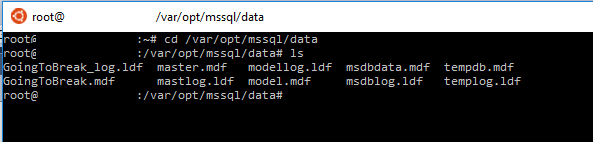
Then jump into your favourite terminal client (I’m using bash on windows) and connect to the linux server.

Then run: –

cd /var/opt/mssql/data/
ls
databasefiles2

Ok, so now to delete the files we can run: –

rm GoingToBreak.mdf GoingToBreak_log.ldf

databasefiles3

And the files are gone! That database is deader than dead!

But….wait a minute. Let’s have a look back in SSSMS.

Run the following: –

USE [GoingToBreak];
GO

SELECT * FROM dbo.Test;

Hmm, data’s returned! Ok, it could just be in the buffer pool. Let’s write some data: –

USE [GoingToBreak];
GO

INSERT INTO dbo.Test
(ColA, ColB, DateCreated)
VALUES
(REPLICATE('A',10),REPLICATE('B',10),GETUTCDATE());
GO 1000

What? It completed successfully??? Err, ok. Let’s run that select statement one more time…

SELECT * FROM dbo.Test;

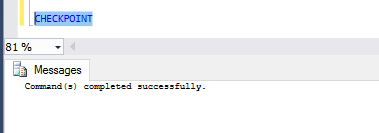
Ok, that returned 2000 rows right? Hmm, what happens if we run CHECKPOINT?

CHECKPOINT
checkpoint

Errr, ok. That worked as well.

Alright, enough of this. Let’s break it for sure. Back in your terminal session run: –

sudo systemctl restart mssql-server

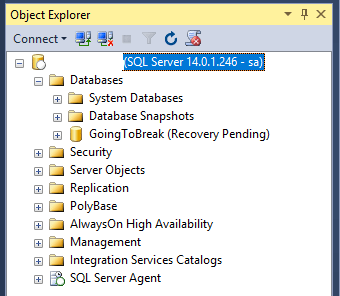
Once that’s complete, jump back into SSMS and refresh the connection: –
objectexplorer

Ha ha! Now it’s dead. That’s pretty weird behaviour though eh? I expect there’s a linux person out there who can explain why that happened ‘cos I’m really not sure.

EDIT – Anthony Nocentino (b|t) has come back to me and said that the files when deleted get unlinked from the directory so we can no longer see them but the SQL process will still have them open; hence being able to execute queries. Once the instance is restarted the file handle will be released, the underlying blocks and inodes get deallocated; hence the database going into recovery pending. Thanks Anthony!

One thing I do know is that SQL databases on linux will continue to allow queries to be executed against them after their underlying files have been deleted. Pretty worrying imho, you could have a problem and not even know about it until your next server restart!

0

Monday Coffee 2017-01-09

I’m almost back into the swing of things now after the Xmas break, that holiday feeling has just about left me.

For most people, there’s a good break over the Xmas period but most IT workers that I know had to be on-call for some or most of the holiday period. Being on-call is part and parcel of being a DBA and I honestly don’t mind doing it but I guess it’s really dependent on how much you get called! Ever been called when out at a restaurant? It does kinda suck…

I’ve been in roles where being on call that evening pretty much guaranteed that I’d be getting a call, which I admit, I wasn’t too keen on. Especially when the factors that lead to a problem with a system were out of my control and I’d just be firefighting the whole time.

I’m lucky now that my current role has allowed me to build a system that very rarely has problems and as such, I very rarely get called. Maybe that’s what being a good DBA (I like to think I am anyway) comes down to?

All the training courses, read articles & blogs, all the extra work that we put in is done so that we get bothered less? 🙂

Have a good week!