5

Disabling the identity cache in SQL Server 2017

One of the changes that’s been brought into the database engine in SQL Server 2017 is the ability to disable the cache that SQL keeps on identity values by using the ALTER DATABASE SCOPED CONFIGURATION command.

What disabling the cache will do is prevent any gaps in the IDs happening if there is an unexpected restart or a failover to a secondary database.


So a caveat to this, I had to play around a bit to get this to work correctly. This is why I drop and recreated the table in the demo below.

If you don’t drop the table and continue to add rows with the cache disabled you’ll need to run the CHECKPOINT command immediately after the ALTER DATABASE statement (otherwise there’ll be a gap in the IDs when the more rows are inserted after the restart).

I’m not entirely sure why this is needed but when I was looking into this I came across this connect item so it seems that odd behaviour around uncontrolled shutdowns and identity columns isn’t unusual. I think I know what’s going on but I don’t want to post anything here that’s incorrect so I’ll just say I’m not sure.

If anyone out there knows why the CHECKPOINT is needed, please let me know!


Anyway, let’s run through a demo showing the difference in behaviour (btw, I’m running this in SQL Server 2017 CTP 2.1.).

First, let’s remind ourselves about the old behaviour so create a test database: –

USE [master];
GO

DROP DATABASE IF EXISTS [TestDB];
GO

CREATE DATABASE [TestDB];
GO

Then create a test table and insert 5 rows: –

USE [TestDB];
GO

CREATE TABLE [dbo].[TestTable]
(PKID INT IDENTITY(1,1) PRIMARY KEY,
 ColA DATETIME);
GO

INSERT INTO [dbo].[TestTable]
(ColA)
VALUES
(GETUTCDATE())
GO  5

Now we’re going to insert another 5 rows within a transaction but we’re not going to commit: –

BEGIN TRAN

INSERT INTO [dbo].[TestTable]
(ColA)
VALUES
(GETUTCDATE())
GO  5

In another query window run the following to simulate a uncontrolled shutdown of the SQL instance: –


SHUTDOWN WITH NOWAIT

Once that’s completed, immediately restart the SQL instance via SQL config manager and open up a new query window and run the following: –

USE [TestDB];
GO

INSERT INTO [dbo].[TestTable]
(ColA)
VALUES
(GETUTCDATE())
GO  5

Now we can check the data in the table: –


SELECT * FROM [dbo].[TestTable]
GO

As expected, there’s a gap in the IDs. Why it jumps to 1002 is discussed in the connect item.

OK, now let’s try running the same code again but this time we will disable the identity cache.

So, reset the demo: –

USE [TestDB];
GO

DROP TABLE IF EXISTS [dbo].[TestTable];
GO

CREATE TABLE [dbo].[TestTable]
(PKID INT IDENTITY(1,1) PRIMARY KEY,
 ColA DATETIME);
GO

OK, now disable the identity cache (leaving the CHECKPOINT there if you want to try without dropping the table): –

ALTER DATABASE SCOPED CONFIGURATION SET IDENTITY_CACHE = OFF
--CHECKPOINT
GO

The change can be viewed in the following DMV: –

SELECT * FROM sys.database_scoped_configurations;
GO
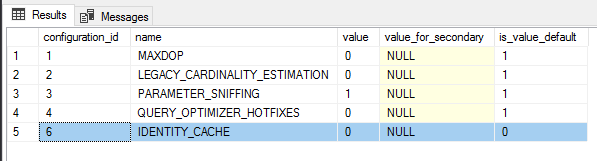
OK, now that the cache is disabled we can run the test again: –

INSERT INTO [dbo].[TestTable]
(ColA)
VALUES
(GETUTCDATE())
GO  5

And same transaction again, insert 5 rows but do not commit: –

BEGIN TRAN

INSERT INTO [dbo].[TestTable]
(ColA)
VALUES
(GETUTCDATE())
GO  5

Simulate the uncontrolled shutdown: –


SHUTDOWN WITH NOWAIT

Last thing is to restart the SQL instance and run the INSERTs: –

USE [TestDB];
GO

INSERT INTO [dbo].[TestTable]
(ColA)
VALUES
(GETUTCDATE())
GO  5

Now we can check the data in the table: –


SELECT * FROM [dbo].[TestTable]
GO
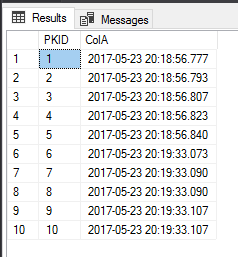
This time no gaps; we have an uninterrupted sequence in the ID column. So now we have an option for preventing gaps in an identity field without having to use trace flag 272 or setup a sequence manually.

Thanks for reading!

0

Monday Coffee 2017-05-22

I hope everyone had a good weekend. I spent mine watching probably the most dismal performance of rugby I’ve seen for a long time but there’s still a bunch of matches on before the end of the season so fingers crossed for the next one (not to mention the Lions Tour coming up).

Anyway, I’ve been hearing a lot of good things about Microsoft’s new coding environment Visual Studio Code so bit the bullet last Friday and downloaded it.

I’ve used multiple editors for coding over the years (sublime, atom, powershell plus etc.) but I’ve always ended up back with either Notepad++ or the built-in powershell ISE that comes with Windows. Not sure why but I guess when it comes down to it, all I want is a simple editor that I can configure with minimal fuss. Or maybe it’s just the fact that I don’t write a lot of code, so a simple text editor and SSMS is all I really need.

That’s been changing over the last year, I’ve been working with containers a lot and I’m finding that I’m spending more and more time write powershell code. So I guess it was time to try out Microsoft’s stab at a code editor (it’s been out for a while, and my friend Rob Sewell uses it extensively).

First impressions? I like it, it’s easy to get to grips with and has a really cool feature called Zen Mode that allows you to focus solely on writing code. I’ve also installed the mssql extension but I’m not sure I’ll be using that much, it would be very hard to see what advantages it has over SSMS but I’ll give it a whirl and see how it goes.

Have a good week!

0

Friday Reading 2017-05-19

Everyone finished patching all their servers? In-between patching this week I’ve been reading…

Why VS Code Increases my Productivity
Rob talks about how using Visual Studio Code as his primary IDE increases his output

The Setup
Jessie Frazelle talks about her hardware, OS and software configs.

Try new SQL Server command line tools to generate T-SQL scripts and monitor Dynamic Management Views
Official SQL Server blog detailing two new command line tools

SQL Server on Docker with new Environment Variables
James Anderson goes through the new env switches available when creating a container running SQL Server

The 22-year-old Brit who stopped the global cyberattack is donating his $10,000 reward to charity
Fair play to the guy

Have a good weekend!

0

Update to DBCC LOGINFO in SQL Server 2017

One of the new features included in SQL Server 2017 that Microsoft has detailed here is a new DMF called sys.dm_db_log_info

This new DMF is intended to replace the (not so) undocumented DBCC LOGINFO command. I say undocumented as I’ve seen tonnes of blog posts about it but never an official Microsoft page.

This is great imho, we should all be analyzing our database’s transaction log and this will help us to just that. Now there are other undocumented functions that allow us to review the log (fn_dblog and fn_dump_dblog, be careful with the last one).

So, let’s run the new command. It’s really, really simple to get details of the log for a database called TestDB: –

SELECT *
FROM sys.dm_db_log_info(DB_IB('TestDB'));
GO

I’m not going to go through what each of the columns are but the main ones that I’d initially focus on (based on my previous usage of DBCC LOGINFO) are: –

  • vlf_size_mb
  • vlf_active
  • vlf_status

So, at a glance I can see the active part of the log and its size. We could also set up this to run on a schedule so that we could also track the internal usage of the log, pretty cool eh?

One of the other columns that’s caught my eye is: – vlf_first_lsn

DBCC LOGINFO gave us the LSN of the record that created the VLF but now we have the first LSN in the VLF which means that we can track where in the log a particular transaction was recorded (without having to use the older functions).

I like this as DBCC LOGINFO was undocumented but everyone was using it so Microsoft has now supplied an official DMF that we can use that not only replicates the information in the old command but improves upon it.

Thanks for reading!

0

Monday Coffee 2017-05-15

After the latest cyber attack I’ve had a fun weekend making sure all my devices are fully up-to-date with the latest patches. If you’re unaware of what’s been happening, you can read about it here.

I took this as an opportunity to go over all my backups as well. It would be kind of embarrassing for someone who spends as much time as I do at work monitoring and testing backups to not have good backups of my personal devices.

This latest attack one again highlights the need for everyone (companies and individuals alike) to patch regularly and move off unsupported systems.

There is absolutely no reason for anyone to be running older versions of Windows considering that Microsoft offered free upgrades to Windows 10 for over a year.

Sadly it does seem that it takes an incident like this to get some people to upgrade.

Have a good week!