Last week I saw a thread on twitter about how to get replication setup for SQL Server running in a container. Now I know very little about replication, it’s not an area of SQL that I’ve had a lot of exposure to but I’m always up for figuring stuff out (especially when it comes to SQL in containers).
So let’s run through how to set it up here.
First, create a dockerfile to build an image from the SQL Server 2019 CTP 2.2 image with the SQL Server Agent enabled: –
FROM mcr.microsoft.com/mssql/server:2019-CTP2.2-ubuntu

RUN /opt/mssql/bin/mssql-conf set sqlagent.enabled true

CMD /opt/mssql/bin/sqlservr
Now build the image: –
docker build -t sqlreplication .
The next step is to create a custom docker network: –
docker network create repnet
Confirm the network has been created: –
docker network ls

This stage is the key, containers running on the same network can communicate with each other by container name or IP address. More information about docker networking can be found here.
Once the network is created, run two containers using the network: –
docker run -d -p 15111:1433 `
    --env ACCEPT_EULA=Y --env SA_PASSWORD=Testing1122 `
        --net repnet `
            --name container1 `
                sqlreplication

docker run -d -p 15222:1433 `
    --env ACCEPT_EULA=Y --env SA_PASSWORD=Testing1122 `
        --net repnet `
            --name container2 `
                sqlreplication
The last (docker) step is to create a directory within container1 for the replication data: –
docker exec -it container1 mkdir /var/opt/mssql/data/ReplData/
And that’s it docker-wise! We can now setup replication within SQL itself. The steps below are taken from the Microsoft documentation here that goes through how to setup replication for SQL on Linux (slightly modified but not by much).
So let’s run through and see it in action!
Connect to container1 and create the database, table, and insert data that we want to replicate: –
USE [master];
GO

CREATE DATABASE [Sales];
GO

USE [SALES];
GO

CREATE TABLE CUSTOMER([CustomerID] [int] NOT NULL, [SalesAmount] [decimal] NOT NULL);
GO

INSERT INTO CUSTOMER (CustomerID, SalesAmount) VALUES (1,100),(2,200),(3,300);
GO
Connect to container2 and create (just) the database to receive the replicated data: –
USE [master];
GO

CREATE DATABASE [Sales];
GO
Connect back to container1 and configure the distributor (following the MS example the publisher will also be the distributor): –
USE [master];
GO

DECLARE @distributor AS SYSNAME;
DECLARE @distributorlogin AS SYSNAME;
DECLARE @distributorpassword AS SYSNAME;
DECLARE @Server SYSNAME;

SELECT @Server = @@servername;

SET @distributor = @Server;
SET @distributorlogin = N'sa';
SET @distributorpassword = N'Testing1122';

EXEC sp_adddistributor @distributor = @distributor;

EXEC sp_adddistributiondb @database = N'distribution'
    ,@log_file_size = 2
    ,@deletebatchsize_xact = 5000
    ,@deletebatchsize_cmd = 2000
    ,@security_mode = 0
    ,@login = @distributorlogin
    ,@password = @distributorpassword;
GO

USE [distribution];
GO

DECLARE @snapshotdirectory AS NVARCHAR(500);

SET @snapshotdirectory = N'/var/opt/mssql/data/ReplData/';

IF (NOT EXISTS (SELECT * FROM sysobjects WHERE name = 'UIProperties' AND type = 'U '))
    CREATE TABLE UIProperties (id INT);

IF (EXISTS (SELECT * FROM::fn_listextendedproperty('SnapshotFolder', 'user', 'dbo', 'table', 'UIProperties', NULL, NULL)))
    EXEC sp_updateextendedproperty N'SnapshotFolder'
        ,@snapshotdirectory
        ,'user'
        ,dbo
        ,'table'
        ,'UIProperties'
ELSE
    EXEC sp_addextendedproperty N'SnapshotFolder'
        ,@snapshotdirectory
        ,'user'
        ,dbo
        ,'table'
        ,'UIProperties';
GO
Configure the publisher: –
USE [distribution];
GO

DECLARE @publisher AS SYSNAME;
DECLARE @distributorlogin AS SYSNAME;
DECLARE @distributorpassword AS SYSNAME;
DECLARE @Server SYSNAME;

SELECT @Server = @@servername;

SET @publisher = @Server;
SET @distributorlogin = N'sa';
SET @distributorpassword = N'Testing1122';

EXEC sp_adddistpublisher @publisher = @publisher
	,@distribution_db = N'distribution'
	,@security_mode = 0
	,@login = @distributorlogin
	,@password = @distributorpassword
	,@working_directory = N'/var/opt/mssql/data/ReplData'
	,@trusted = N'false'
	,@thirdparty_flag = 0
	,@publisher_type = N'MSSQLSERVER';
GO
Configure the publication job run: –
USE [Sales];
GO

DECLARE @replicationdb AS SYSNAME;
DECLARE @publisherlogin AS SYSNAME;
DECLARE @publisherpassword AS SYSNAME;

SET @replicationdb = N'Sales';
SET @publisherlogin = N'sa';
SET @publisherpassword = N'Testing1122';

EXEC sp_replicationdboption @dbname = N'Sales'
	,@optname = N'publish'
	,@value = N'true';

EXEC sp_addpublication @publication = N'SnapshotRepl'
	,@description = N'Snapshot publication of database ''Sales'' from Publisher ''''.'
	,@retention = 0
	,@allow_push = N'true'
	,@repl_freq = N'snapshot'
	,@status = N'active'
	,@independent_agent = N'true';

EXEC sp_addpublication_snapshot @publication = N'SnapshotRepl'
	,@frequency_type = 1
	,@frequency_interval = 1
	,@frequency_relative_interval = 1
	,@frequency_recurrence_factor = 0
	,@frequency_subday = 8
	,@frequency_subday_interval = 1
	,@active_start_time_of_day = 0
	,@active_end_time_of_day = 235959
	,@active_start_date = 0
	,@active_end_date = 0
	,@publisher_security_mode = 0
	,@publisher_login = @publisherlogin
	,@publisher_password = @publisherpassword;
GO
Create the articles: –
USE [Sales];
GO

EXEC sp_addarticle @publication = N'SnapshotRepl'
	,@article = N'customer'
	,@source_owner = N'dbo'
	,@source_object = N'customer'
	,@type = N'logbased'
	,@description = NULL
	,@creation_script = NULL
	,@pre_creation_cmd = N'drop'
	,@schema_option = 0x000000000803509D
	,@identityrangemanagementoption = N'manual'
	,@destination_table = N'customer'
	,@destination_owner = N'dbo'
	,@vertical_partition = N'false';
GO
Configure the subscription run, note the name of the subscriber (it’s the name of the second container): –
USE [Sales];
GO

DECLARE @subscriber AS SYSNAME
DECLARE @subscriber_db AS SYSNAME
DECLARE @subscriberLogin AS SYSNAME
DECLARE @subscriberPassword AS SYSNAME

SET @subscriber = N'container2'
SET @subscriber_db = N'Sales'
SET @subscriberLogin = N'sa'
SET @subscriberPassword = N'Testing1122'

EXEC sp_addsubscription @publication = N'SnapshotRepl'
	,@subscriber = @subscriber
	,@destination_db = @subscriber_db
	,@subscription_type = N'Push'
	,@sync_type = N'automatic'
	,@article = N'all'
	,@update_mode = N'read only'
	,@subscriber_type = 0;

EXEC sp_addpushsubscription_agent @publication = N'SnapshotRepl'
	,@subscriber = @subscriber
	,@subscriber_db = @subscriber_db
	,@subscriber_security_mode = 0
	,@subscriber_login = @subscriberLogin
	,@subscriber_password = @subscriberPassword
	,@frequency_type = 1
	,@frequency_interval = 0
	,@frequency_relative_interval = 0
	,@frequency_recurrence_factor = 0
	,@frequency_subday = 0
	,@frequency_subday_interval = 0
	,@active_start_time_of_day = 0
	,@active_end_time_of_day = 0
	,@active_start_date = 0
	,@active_end_date = 19950101;
GO
Cool! Now we can run the Agent jobs: –
USE [msdb];
GO

DECLARE @job1 SYSNAME;

SELECT @job1 = name FROM msdb.dbo.sysjobs
WHERE name LIKE '%-Sales-SnapshotRepl-1'

EXEC dbo.sp_start_job @job1
GO


USE [msdb];
GO

DECLARE @job2 SYSNAME;

SELECT @job2 = name FROM msdb.dbo.sysjobs
WHERE name LIKE '%-Sales-SnapshotRepl-CONTAINER2-1'

EXEC dbo.sp_start_job @job2
GO
Awesome stuff, let’s check the data over on container2: –
SELECT * from [Sales].[dbo].[CUSTOMER]
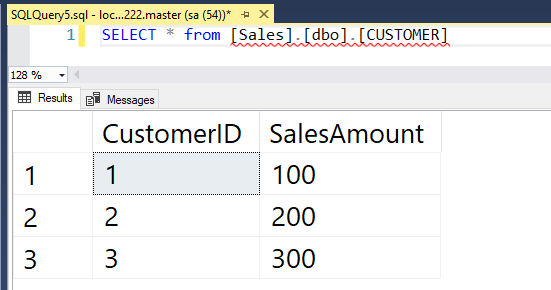
Great stuff! We have data being replicated from a SQL instance in one container to a SQL instance in another container 🙂
Thanks for reading!