0

Two years of working remotely

I’ve been working remotely for just over 2 years now and my current position is my first remote post.

Before joining my current company I (and them) had concerns about me working from home. Would I like it? Would I find it isolating? Would I go completely mad?

Actually that last question is one I’ve been asked a lot when I tell people that I work from home. My usual response is….”If I’ve gone mad, how would I know??”

My office buddy, Spuddy!

Anyway as it turns out, I absolutely love working from home!

I do want to say that I think remote working is not for everyone though. If you enjoy the social aspect of working in an office you probably won’t enjoy working from home. It also really depends on how the team that you work with. If your team can communicate effectively out of the office, then you’re in good stead.

I’ve been lucky in that the team I work with was used to having purely remote members. I wasn’t the first DBA they’d hired from Ireland (the majority of my team is based in the U.S.) and they are really good at using virtual meetings and Google Chat.

To be honest it doesn’t really matter which chat program you use, as long as you use one, and use it well! I’ve often thought about how my job would be if I had to communicate solely via email and I just…shudder.

So, I don’t want this post to be a list of guidelines for what you should do when working from home, nor will it be a list of equipment that you should buy. What I want to do is talk about what works for me, and you can then decide if any of things mentioned here will work for you.

For example, I don’t listen to music when I work. I prefer to work in pretty much complete silence…I can concentrate better. I’ve only ever really listened to music when I’ve been working on something pretty boring and repetitive…something that (thankfully) doesn’t happen much in my current role.

There are probably people who read that and couldn’t imagine the thought of working in complete silence…what works for me doesn’t work for them, we’re all different so I don’t think that there could ever be a definitive guide to “how to work from home”. This post is just to talk about my experiences.

One thing that people told me when I first started working from home was that they would have difficult focusing as there’s too many distractions. This was something that I was concerned about as I’m definitely not the most disciplined of people…would I just while away the hours surfing online?

To be honest, it really hasn’t been an issue. Once I’ve started working…I’m working. Ok, there have been times where I’ve spent half an hour on chores that I really should have done in the evening but I’ve used that time to try and step away from a problem that I was stuck on, and come back to it fresh(er). Ack, I’ve had mixed results…sometimes it works and sometimes it doesn’t…but hey, at least I’ve done my washing! One thing it does do is prevent me from getting overly frustrated and end up really getting in a tangle.

With regards to work areas, a lot of people have a separate office…which I’d LOVE to have. I don’t have a separate room for work, my work desk is in a corner of my living room. This is fine for me as I live on my own but I do make efforts to ensure that I don’t start to feel like I spend all of my life in one room.

My work area

So I try to get out of my flat every chance I get. I go to the gym, go for a walk along the beach…hit the pub (AFTER work, honestly). One thing that I always do no matter what, is go and buy a coffee down the street at around 10am. It gives me a break an hour into the day, gets me some fresh air, and then I can get back to work.

Lunch time is another chance to get away from the desk, even if it’s just a stroll around the block, just something to get out. Then I’ll pretty much work straight through to 6pm but then, again, I try to get out. Of course, this is all weather permitting so with me being in Ireland, this doesn’t happen every day.

It can also be difficult just to tear myself away some days. I’ll get deep into something, stay glued to the desk but I’d say I get out of the flat at least twice a day. Just to make sure those walls don’t start closing in on me!

Another great way of breaking up the day is a standing desk. Although this’ll work no matter where you are (office or at home). I bought a cheap converter desk and would highly recommend it to anyone who’s looking at buying their first standing desk.

I’ll stand up for the first part of the morning, sit down after I get my coffee, back standing after lunch, and then sit down for the rest of the day. It seems to break the day up nicely.

Then, when the day’s over, I get away from my work area. If I have to continue using a computer to work on blog posts, sessions etc. I’ll get out of the flat for a bit and then when I come back, I’ll work from either my settee, or my dining table.

Some of the things I’ve talked about here won’t work for you but the BEST thing about working remotely is that you get to find out what DOES work for you. You have (almost?) total control over your work environment and you can tailor it to how you want it.

Thanks for reading!

1

Merge kubectl config files on Windows

When working with multiple Kubernetes clusters, at some point you’ll want to merge your kubectl config files.

I’ve seen a few blogs on how to merge kubectl config files but haven’t seen any on how to do it on Windows. It’s pretty much the same process, just adapted for powershell on Windows.

In this example, I’ll merge a new config file in C:\Temp to my existing config file in C:\users\andrew.pruski\.kube

N.B.- If you’re working with AKS, az aks get-credentials will do this for you

Firstly, backup the existing config file:-

cp C:\users\andrew.pruski\.kube\config C:\users\andrew.pruski\.kube\config_backup

Copy the new config file into the .kube directory: –

Copy-Item C:\Temp\config C:\users\andrew.pruski\.kube\config2

Set the KUBECONFIG environment variable to point at both config files:-

$env:KUBECONFIG="C:\users\andrew.pruski\.kube\config;C:\users\andrew.pruski\.kube\config2"

Export the output of the config view command (which references both config files) to a config_tmp file: –

kubectl config view  --raw > C:\users\andrew.pruski\.kube\config_tmp

Check all is working as expected (all clusters can be seen):-

kubectl config get-clusters --kubeconfig=C:\users\andrew.pruski\.kube\config_tmp

If all is working as expected, replace the old config file with the config_tmp file: –

Remove-Item C:\users\andrew.pruski\.kube\config
Move-Item C:\users\andrew.pruski\.kube\config_tmp C:\users\andrew.pruski\.kube\config

Finally, confirm it’s working: –

kubectl config get-clusters

Thanks for reading!

0

Chaos Engineering and SQL Server

Recently I’ve been delving into Chaos Engineering, reading books, watching videos, listening to podcasts etc. and I find it really intriguing….I mean, it just sounds exciting, right?
CHAOS Engineering!

N.B.- if you want a great resource for how to get into Chaos Engineering, I’d recommend Learning Chaos Engineering by Russ Miles. I’m using concepts and methods from that book to base this (hopefully) series of posts focusing on SQL Server but if you want a more in-depth dive…grab a copy of the book.

OK, before we move onto applying to SQL Server…first, a bit of history.

Back in 2010 Netflix migrated their platform to the cloud. When they did so they decided to adopt a mindset of: –

The best way to avoid failure is to fail constantly

The idea behind this is that if the platform cannot withstand a (semi)controlled outage, how will it react to an uncontrolled outage?

Out of that mindset came Chaos Monkey. A tool that’s designed to randomly terminate instances within their environment. Sounds nuts, right?

This is where Chaos Engineering comes from. So what exactly is it?

Principlesofchaos.org defines Chaos Engineering as: –

Chaos Engineering is the discipline of experimenting on a system in order to build confidence in the system’s capability to withstand turbulent conditions in production.

Chaos Engineering is a practice in which we run experiments against a system to see if it reacts the way we expect it to when it encounters a failure.

We’re not trying to break things here…Chaos Engineering is not breaking things in production.

If I said to my boss that we’re now going to be experiencing an increased amount of outages because, “I AM AN ENGINEER OF CHAOS”, I’d be marched out the front door pretty quickly.

What we’re doing is investigating our systems to see if they will fail when faced with certain conditions.

We don’t even have to touch production with our tests, and to be honest, I’d recommend running in a development or sandbox environment for you first few experiments. As long as the configuration of the SQL instances in those environments mirrors your production servers then you can definitely get some benefit from running chaos experiments in them.

Now, I know what you’re thinking. “Is Chaos Engineering really just a buzz phrase for resilience testing?”.

Well, yep. Resilience testing is pretty much what we’re doing here but hey, Chaos Engineering sounds cooler.

Anyway, moving on….So how can we apply Chaos Engineering to SQL Server?

The first thing we need to do is identify a potential weakness in SQL Server and the best way to do that is by performing a Past Incident Analysis.

Performing a past incident analysis is a great way to start looking for potential weaknesses/failures in your environment. The main reason being, we want to run a Chaos experiment for a condition that is likely to happen. There’s really no point in running an experiment against a perceived failure/weakness that’s never going to happen (or is extremely unlikely) because we want to get some actionable results from these tests.

The end goal here is to increase our confidence in our systems so that we know that they will react as we expect them to when they encounter failure.

So we want to identify an potential failure that’s pretty likely to happen and could potentially have a significant impact.

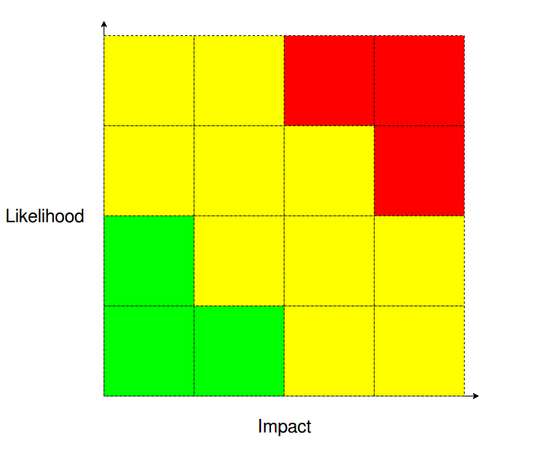
If an incident analysis hasn’t thrown up any candidates another good method is to perform a Likelihood-Impact analysis.

You sit your team down and think about all the ways SQL Server (and the systems around it) can possibly fail.

N.B. – this is really good fun

Then you rank each failure it terms of how likely it is and how impact of an impact it would have. After doing this, you’ll end up with a couple (few?) failures in the red areas of the graphs…you first candidates for your Chaos experiments 🙂

OK, let’s think about some failures…

High Availability
We have a two node cluster hosting an availability group. One test we could run is to failover the availability group to make sure that it’s working as we expect it to. Now we could run

ALTER AVAILABILITY GROUP [NAME] FAILOVER

but that’s a very sanitised way of failing over the AG. How about running a Chaos experiment that shuts down the primary node? Wouldn’t that be a more realistic test of how the AG could fail out in the “wild”?

Monitoring
We don’t just have to test SQL Server…we can test the systems around it. So how about our monitoring systems? Say we run a query against a (test) database that fills the transaction log? When did we get alerted? Did we only get an alert once the log had filled up or did we get preemptive alerts? Did we only get an alert when there was an issue? Is that how we want our monitoring systems to behave? Monitoring systems are vital to our production environments so testing them is an absolute must.

Backups
When was the last time we tested our backups? If we needed to perform a point-in-time restore of a production database right now, would we be able to do it quickly and easily? Or would we be scrambling round getting scripts together? A restore strategy is absolutely something that we want to work when we need it to so we can run experiments to test it on a regular basis (dbatools is awesome for this).

Disaster recovery
OK, let’s go nuclear for the last one. Do we have a DR solution in place? When was the last time the we tested failing over to it? We really don’t want to be enacting our DR strategy for the first time when production is down (seriously).

Those are just a few examples of areas that we can test…there are hundreds of others that can be run. Literally any system or process in production can have a Chaos Engineering experiment run against it.

So now that we’ve identified some failures, we need to pick one and run an experiment…which I’ll discuss in an upcoming post.

Thanks for reading!

0

Looking forward to 2020

2019 was a busy year for me. I presented sessions in over 10 countries, averaging speaking at two conferences per month. I also helped organise Data Relay and attended all five days which is always a fun (yet tiring) experience.

All in all, I thoroughly enjoyed myself last year and I hope 2020 brings more of the same! I do intend on not speaking at as many conferences this year although to be honest I did say that at the start of 2019.

I do want to get back into blogging more often this year. I didn’t publish as often as I wanted to last year and the simple reason for that was….time. So this year I plan on getting some cool stuff out there.

I’m currently writing this in Dublin airport waiting to head over to London to present my Chaos Engineering for SQL Server session at Conf42.com. I’ve been diving into the world of Chaos Engineering recently so hope to get a few posts out about it in the next few months.

I’ll also be continuing to explore running SQL Server in Docker containers and on Kubernetes. There’s so much great stuff happening in those areas that it can be difficult to keep up at times! The two main things I’m looking forward to are running SQL Server Edge on a Raspberry Pi (if they ever give me access to the container image) and WSL 2 going GA.

Another thing I’ve been enjoying is delving into the world of Linux. I’ve been using Ubuntu as my primary OS for a while now but had to refresh my laptop over Christmas in order to install Windows 10 as it’s needed for an upcoming project that I’m working on (can’t say too much about that at the moment but it’s quite exciting!). So I installed Windows 10 and then decided to install Fedora 31 instead of re-installing Ubuntu.

I can’t really say why I went for Fedora. There’s a tonne of distros out there (I seriously looked at Manjaro) but I guess the main reason was that Microsoft has two linux SQL Server 2019 container images, one for Ubuntu and one for Red Hat. Plus I suffer from Shiny Tech Syndrome so wanted to try something new.

I’ve also recently purchased a Pinebook Pro. I needed a backup laptop for when I travel (at least that’s what I’m telling myself) so nabbed one. The price can’t be argued with ($200) and the reviews online are all very positive so am looking forward to getting my hands on it. One of the really cool things is that it will boot from a SD card so I’ll get to try out Manjaro after all! 🙂 I’ll definitely be posting a review about it once I’ve had it for a couple of weeks (in fact that might get wrapped up into a larger post about either my linux experiences so far or my current travel kit…haven’t decided yet).

Finally to mention, I’ve also started helping organise a brand new conference in Ireland, Data Céilí. This conference is run by the team behind SQL Saturday Dublin and the response we’ve had so far as been amazing. We’ll be selecting sessions in the next couple of weeks and then prompting the heck out of it!

I reckon that should be enough projects to keep me occupied for the foreseeable future.

Thanks for reading and I hope 2020 is a blast.

0

Remote sessions at Data Céilí

At Data Céilí 2020 we want to be as green as possible and one idea we’ve had is to run a Green Track that will host remote sessions from speakers around the world.

This track will allow speakers to present without clocking up the associated air miles. It will also allow for speakers who can’t make the trip to Ireland to present their sessions from the comfort of their own home.

If you’d like to submit a session for our Green Track, the call for speakers is open until the 31st of January. Select the Green Session option from the drop down: –

The Green Track sessions are completely separate from the other on-site sessions, so if you’ve submitted a regular session it won’t be considered for the Green Track.

We think this will be a great way of expanding the range of speakers that we can host at our first event and should be good fun!

Data Céilí is brought to you by the team behind SQL Saturday Dublin and Cork, the event will run be held at Trinity College in the centre of Dublin, with pre-cons on the 9th of July 2020 and the main event on the 10th.

Hope to see you there!