Imposter syndrome

Last week I posted the following “joke” on twitter: –

I’ve called it a “joke” but I wasn’t really joking. This is a subject that I’ve wanted to talk about for a while but have really stalled on it because I don’t think that I can tackle it sufficiently, but here goes anyway.

First things first, here’s the definition of Imposter (or Impostor) Syndrome: –

Impostor syndrome (also known as impostor phenomenon, fraud syndrome or the impostor experience) is a concept describing individuals who are marked by an inability to internalize their accomplishments and have a persistent fear of being exposed as a “fraud”

Sound like anyone you know?

OK, so here’s a (maybe) unpopular opinion.

I think Imposter Syndrome can be a good thing.

Let me explain why.

I get impostor syndrome, a lot. However I’ve learnt to recognise when it’s affecting me and can push through it. Don’t get me wrong, it still sucks. I question myself over and over but I don’t want my own head to stop me from achieving what I want.

I guess that this has come from experience. I’ve succeeded in a few things and a failed in a few as well.

And as much of a clichΓ© as it is, I have learnt more from the failures than the successes.

I’ve failed and the world didn’t end. All that happened was that I needed to go back, review what went wrong, and make sure that it won’t happen again (I know that can be easier said than done).

So if you’re reading this and are thinking about starting to blog or speak or anything…I urge you to go for it.

Yes it’s hard work, you may fail, but the rewards for just trying are unbelievable.

All I can say is…Go for it πŸ™‚

Have a good week!

How I became a Data Platform MVP

As I spent last week attending my first MVP Summit in Seattle I thought I’d write this post about how I became an MVP.

It’s not atypical but I want to share how I went from really not having any direction in my career to becoming a DBA; starting to blog and speak at events; and then becoming a Data Platform MVP.

First we must go waaaaaay back to 2011.

I was living in England and had spent the previous 4 years working as a “database developer” and I’ve put that in quotes as really I was a report writer. Crystal Reports to be exact (ugh).

During those 4 years I realised that if I wrote my queries in such a way, they’d run faster. I spent an inordinate amount of time researching why, and discovered SQLServerCentral.com

There was (and still is) a huge amount of people putting information out there, many of whom had a job title of “DBA”. I started researching into exactly what that role was and eventually decided that I wanted to become a SQL Server DBA.

I have to admit, it wasn’t easy. I went for a lot of interviews, and because my experience was limited I got rejected…a lot.

That didn’t dissuade me though, I kept applying and eventually got another interview.

I went, suited and booted, and did the interview.

I didn’t think it went well.

I got asked a question about capacity planning and as I was answering I noticed the expression on the interview’s face. I asked, “that’s not right is it?”

“No it’s not”

(I still maintain that I was right but hey, I’m an arrogant such and such when I want to be)

I died a little inside and wrote it off as another failed interview.

But whoa! A month later I got an offer, I was a SQL Server DBA!

I’ll never forget my first day, I asked, “Where are the other SQL DBAs?”

“We’ll get you on a training course”

Alright, I wasn’t on my own. There were Oracle DBAs there who had been looking after the SQL side of things but I was the only dedicated SQL DBA.

I needed to learn fast. So I went on a course and started reading every technical article I could get my hands on.

Ok, I wasn’t great technically, but I worked hard. One of my favourite memories is going on a course, coming back and being asked how I dealt with the amount of work thrown my way.

There were two people covering for me when I was away and they thought the level of work I had was crazy.

And that’s when I met a certain Rob Sewell (b|t). Rob had originally been hired as an Oracle DBA but because of the level of work I had he was moved over to work with me.

Rob and I worked together for a few months but I then moved onto another role. He carried on and has since become a world renowned DBA and powershell expert (go and check his blog out).

Anyway, whilst working for that company, I started my blog. Literally just to see if I could do it. I mean writing a technical blog is haaaaaaaaaard. Who wants to know what I think?

I persevered, but only published one blog a month and I laboured over each one of those posts. It was painful, writing each post took me a long time.

But I kept at it.

18 months later a recruiter rang me up and asked if I would consider moving to Ireland. There was a good position going with a company that were looking for a DBA.

Now, I’d never been to Ireland but sure, why not? I wasn’t really enjoying the role that I was in so I went for the interview.

I did one technical phone interview and then a Skype interview. To say I was surprised when they offered me the role would be something of an understatement.

I immediately accepted.

Have to say, moving to Ireland wasn’t much fun. I lived in a hotel for two weeks (over Xmas and New Year just to make things worse) but I managed to get a flat just before I got kicked out of the hotel πŸ™‚

My first day working in Ireland still makes me smile. I turned up suited and booted (c’mon I didn’t know the dress code) and sat down next to the Senior DBA.

“So you like Ireland, been here a few times?”

“No, I’ve never been here before in my life”

“And you’ve moved here??”

He must have thought I was nuts (and rightly so) but we ended up working really well together (imho).

During this period I’d managed to keep writing one post a month but I wanted to build more of an online presence. So I started to blog a lot more, I started to write three posts a week.

One editorial (like this post), one technical post, and then a links post of articles that I’ve been reading during the week.

It was difficult but I kept writing, mainly about things I that I was working on or stuff I thought was cool. As I wrote more I became better, much better. Writing one post a month doesn’t really help you improve as you’re not practicing enough. By writing three posts a week I found it easier each time. What used to take days now takes hours.

To my surprise, I found that I developed a style of writing. I’ve had people comment on my style but to be honest, this isn’t something I’ve deliberately tried to do. It’s just come from me writing and writing and writing and writing and writing…(you get the point).

Anyhoo, during this period Rob (remember that guy? πŸ™‚ ) had started speaking and let’s be honest, was (is) pretty good at it. He started to push me into speaking at technical events.

Now public speaking is/was one of my two greatest fears (the other one is butterflies but that’s a separate story).

Eventually I bit the bullet and wrote a lightning talk.

My local UG (Dublin) does a Xmas Extravaganza which involves multiple 5 minute sessions. So I signed up, went, spoke, and won best new Speaker!

I was so chuffed I decided to write a 60 minute session and submit to every single event that I could.

The first one was SQL Saturday Iceland. Great for me! If I messed up, no-one I knew would be there to see πŸ™‚

I freaked out the entire day, but when my session came, I had practiced so much that it was just automatic. Ok, I was nervous (and it definitely showed) but I got through it.

Goal complete! I was a technical speaker! YEEEEEEEEEEEEEESSSSSSSSSSSSSS!

SQL Saturday Iceland is also were I met Alex Yates (b|t) for the first time. Alex is an accomplished speaker, and a few months later when I met him in Dublin he asked if I wanted to do a joint session with him. I was very flattered but completely terrified.

I didn’t want to screw up and let him down (still don’t) but despite my nerves, I said yes.

Which turned out to be a great decision.

Over the next few months I presented at multiple events, got a bit more confidence (although I still freak out for about 10 minutes before a session), and started improving. SQL Saturdays at Cambridge, Holland, Denmark, all came and went.

Then SQL Relay kicked off.

5 days, 5 locations, 5 events. It’s nuts.

I was speaking at 4 of these. 2 on my own and 2 with Alex.

The second presentation with Alex has to be the most fun I’ve had presenting. The session went smoothly (apart from the fact that neither of us can use zoom-it) and we bounced off each other well.

The third session was on my own, in a cinema in Birmingham. Now, presenting is a lot different with a cinema screen. It absolutely rocks! I didn’t have to worry about using zoom-it so flowed through the slides and absolutely nailed my demos. It’s still by far the best session that I’ve ever presented.

Anyway after SQL Relay I went home and relaxed. I’d done a lot of events in the autumn so took November and December off (mainly because I’d started a new job and had to move apartments).

So there’s me relaxing, heading to Britain to see a friend to go and see a rugby game and whilst I’m in the airport, I get an email.

Congratulations Data Platform MVP

I was blown away.

I knew I’d been nominated but really didn’t think that MS would pick me. And to be honest, I still don’t really think it’s sunk in but I will admit, I was a little excited on the plane over to the UK (to see a mate who couldn’t have cared less πŸ™‚ ).

So as I said at the start, it’s not an atypical story of how to become an MVP. I blogged, spoke a lot and was lucky enough to not only be nominated but be selected as well.

What’s great is that now I have access to a whole load of new resources which means that becoming an MVP wasn’t the end goal for me, if anything I’m just getting started.

I still have so much to learn, and I hope that never stops.

Thank you for reading.

A gotcha when switching partitions

When working with partitioning the SWITCH operation has to be my favourite. The ability to move a large amount of data from one table to another as a META DATA ONLY operation is absolutely fantastic.

What’s also cool is that we can switch data into a non-partitioned table. Makes life a bit easier not having to manage two sets of partitions!

However, there is a bit of a gotcha when doing this. Let’s run through a quick demo.

First create a database with a partitioned table: –

CREATE DATABASE [PartitioningDemo]
GO


USE [PartitioningDemo];
GO

CREATE PARTITION FUNCTION PF_PartitionedTable(DATE)
	   AS RANGE RIGHT
    FOR VALUES ('2011-01-01','2012-01-01','2013-01-01',
                '2014-01-01','2015-01-01','2016-01-01',
                '2017-01-01');
GO

CREATE PARTITION SCHEME PS_PartitionedTable
    AS PARTITION PF_PartitionedTable
ALL TO ([PRIMARY]);
GO

CREATE TABLE dbo.PartitionedTable
(ID INT IDENTITY(1,1),
 ColA VARCHAR(10),
 ColB VARCHAR(10),
 CreatedDate DATE)
 ON PS_PartitionedTable(CreatedDate);
GO

For a more in-depth look at what I’m doing, my series on partitioning can be found here

So let’s insert some test data:-

SET NOCOUNT ON;

DECLARE @FromDate date = '2011-01-01';
DECLARE @ToDate date = '2017-01-01';

INSERT INTO dbo.PartitionedTable
SELECT 
    REPLICATE('A',10),
    REPLICATE('B',10),
    DATEADD(DD,FLOOR(RAND()*(DATEDIFF(DD,@FromDate,@ToDate))),@FromDate);
GO 1000

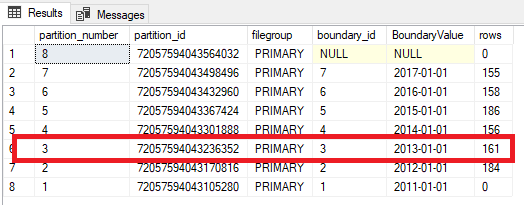
We can check the data and partitions by running: –

SELECT 
	p.partition_number, p.partition_id, fg.name AS [filegroup],
	r.boundary_id, CONVERT(DATE,r.value) AS BoundaryValue, p.rows
FROM 
	sys.tables AS t
INNER JOIN
	sys.indexes AS i ON t.object_id = i.object_id
INNER JOIN
	sys.partitions AS p ON i.object_id = p.object_id AND i.index_id = p.index_id 
INNER JOIN 
    sys.allocation_units a ON a.container_id = p.hobt_id 
INNER JOIN 
    sys.filegroups fg ON fg.data_space_id = a.data_space_id 
INNER JOIN
	sys.partition_schemes AS s ON i.data_space_id = s.data_space_id
INNER JOIN
	sys.partition_functions AS f ON s.function_id = f.function_id
LEFT OUTER JOIN 
	sys.partition_range_values AS r ON f.function_id = r.function_id 
									AND r.boundary_id = p.partition_number
WHERE 
	i.type <= 1 AND a.type = 1
AND 
	t.name = 'PartitionedTable'
ORDER BY 
	p.partition_number 
		DESC;

Now let’s create the “switch” table: –

USE [PartitioningDemo];
GO

CREATE TABLE dbo.PartitionedTable_Switch
(ID INT IDENTITY(1,1),
 ColA VARCHAR(10),
 ColB VARCHAR(10),
 CreatedDate DATE)
 ON [PRIMARY];
GO

N.B. – Keeping it simple, a non-partitioned table on the PRIMARY filegroup (the same filegroup as all my partitions in the “source” table).

OK, let’s switch one of the partitions to the switch table: –

ALTER TABLE [dbo].PartitionedTable
	SWITCH PARTITION 3
TO [dbo].PartitionedTable_Switch;
GO

All good! Worked exactly as expected πŸ™‚

But what happens when say, because of some issue, we need to switch that data back?

ALTER TABLE [dbo].PartitionedTable_Switch
    SWITCH 
TO [dbo].PartitionedTable
    PARTITION 3;
GO

Oh no!

Msg 4982, Level 16, State 1, Line 4
ALTER TABLE SWITCH statement failed. Check constraints of source table ‘PartitioningDemo.dbo.PartitionedTable_Switch’
allow values that are not allowed by range defined by partition 3 on target table ‘PartitioningDemo.dbo.PartitionedTable’.

What’s happened??

Well, we’re trying to insert data into a partition that has constraints on it. The partition has a lower boundary of 2012-01-01 and an upper boundary of 2013-01-01. Meaning that no data can go into that partition that has values in the CreatedDate field that isn’t greater than or equal to 2012-01-01 and less than 2013-01-01.

But our switch table doesn’t have these constraints. SQL thinks that there could be data in the switch table that doesn’t fit into the destination partition.

So we need to tell SQL that the data in the switch table will fit into the partition. And we do that by dropping a constraint onto the table: –

ALTER TABLE dbo.PartitionedTable_Switch
		ADD CONSTRAINT CreatedDate_Switch_CHECK CHECK 
			(CreatedDate >= CONVERT(DATE,'2012-01-01') AND CreatedDate < CONVERT(DATE,'2013-01-01')
            AND CreatedDate IS NOT NULL);
GO

N.B. – notice the IS NOT NULL as well πŸ™‚

And now try the switch again: –

ALTER TABLE [dbo].PartitionedTable_Switch
    SWITCH 
TO [dbo].PartitionedTable
    PARTITION 3;
GO

Woo hoo! We’ve got our data back into our main table. So, you don’t have to partition tables that you want to switch data out to, but just be aware that if you do, you need to be able to switch that data back (just in case).

Thanks for reading!

Indexing and Partitioning

Partitioning tables is a great tool to increase the manageability of your data. Being able to move large amounts of data in and out of a table quickly is incredibly helpful.

However, partitioning comes with a whole bunch of caveats and we need to be aware of what’s going on. This especially applies when creating indexes on partitioned tables, as there are a couple of things we need to be aware of.

So let’s run through a demo so that I can show you how SQL behaves when creating indexes on partitioned tables. First, create a database: –

CREATE DATABASE PartitioningDemo;
GO

And now let’s build a Partition Function & Scheme to partition a table by year: –

USE [PartitioningDemo];
GO

CREATE PARTITION FUNCTION PF_PartitionedTable(DATE)
	   AS RANGE RIGHT
    FOR VALUES ('2017-06-01','2018-01-01','2019-01-01');
GO

CREATE PARTITION SCHEME PS_PartitionedTable
    AS PARTITION PF_PartitionedTable
ALL TO ([PRIMARY]);
GO

N.B. – Keeping it simple, all partitions going to the PRIMARY filegroup. You wouldn’t do this when creating a normal partitioned table but I want to show you the index structure, so for the purposes of this demo, the location of the partitions doesn’t matter.

And now we can create the table. Really simple table, with a DATE column as my partitioning key (the column that defines the partitions): –

CREATE TABLE dbo.PartitionedTable
(ID INT IDENTITY(1,1),
 ColA VARCHAR(10),
 ColB VARCHAR(10),
 CreatedDate DATE)
 ON PS_PartitionedTable(CreatedDate);
GO

Now let’s insert some data into the table: –

SET NOCOUNT ON;
SET STATISTICS IO OFF;

DECLARE @FromDate date = '2017-01-01';
DECLARE @ToDate date = '2018-01-01';

INSERT INTO dbo.PartitionedTable
SELECT 
    REPLICATE('A',10),
    REPLICATE('B',10),
    DATEADD(DD,FLOOR(RAND()*(DATEDIFF(DD,@FromDate,@ToDate))),@FromDate);
GO 1000

Great, now we can look at creating indexes on the table.

First let’s look at creating clustered indexes on this table. Now, when creating a UNIQUE CLUSTERED INDEX on a partitioned table, the partitioning key must be explicitly defined in the index definition.

Try creating this index: –

CREATE UNIQUE CLUSTERED INDEX [IX_ID_PartitionedTable] ON dbo.PartitionedTable
 (ID) 
ON PS_PartitionedTable(CreatedDate);
GO

Whoops!

Msg 1908, Level 16, State 1, Line 26
Column ‘CreatedDate’ is partitioning column of the index ‘IX_ID_PartitionedTable’.
Partition columns for a unique index must be a subset of the index key.

This is generated as we did not specify the CreatedDate column in our index. SQL needs the partitioning key to be explicitly defined in all unique indexes on partitioned tables. This is so that SQL can determine the uniqueness of that index by checking one partition.

So, let’s change the index to be non-unique: –

CREATE CLUSTERED INDEX [IX_ID_PartitionedTable] ON dbo.PartitionedTable
 (ID) 
ON PS_PartitionedTable(CreatedDate);
GO

As it’s non-unique, SQL will create that no problem. But let’s look at what’s happened in the background. I’m going to use DBCC IND & DBCC PAGE to delve into the index. First let’s see what files are assigned to the database: –

EXEC sp_helpfile;
GO

Simple database, so the fileID will be 1 (the .MDF file)

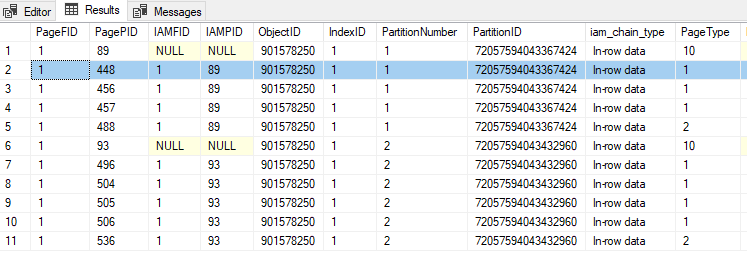
Now look at the pages assigned to the clustered index: –

DBCC IND('PartitioningDemo','PartitionedTable',1);
GO

PageID 448 is a data page (type 1) so we’ll drop that into DBCC PAGE along with the FileID and have a look: –

DBCC TRACEON(3604);
GO
DBCC PAGE ('PartitioningDemo',1,448,3);
GO

Looking at that data page, we can see that SQL has added a UNIQUIFIER column. Now this is standard SQL behaviour, SQL does this to all non-unique clustered indexes whether they are on a partitioned table or not.

But also look at the CreatedDate column. It’s after the ID column on the page. If this was a non-partitioned table, we would see that after ColA & ColB (the order the columns are on the table). This has happened because SQL has implicitly added the partitioning key into the index definition, which has changed the physical order of the data on the page.

OK, so what about nonclustered indexes? Well it’s the same story when it comes to unique nonclustered indexes. The partitioning key must be explicitly defined in the index. But what about non-unique nonclustered indexes? Let’s have a look.

Let’s drop the clustered index created previously and create a non-unique nonclustered index: –

DROP INDEX IF EXISTS [IX_ID_PartitionedTable] ON dbo.PartitionedTable;

CREATE NONCLUSTERED INDEX [IX_ColA_PartitionedTable] ON dbo.PartitionedTable
 (ColA) 
ON PS_PartitionedTable(CreatedDate);
GO

N.B. – this is an aligned nonlclustered index. Meaning that is using the same partition scheme and key as the base table, you can read more about aligned and nonaligned nonclustered indexes here.

Let’s do the same to look at the index data: –

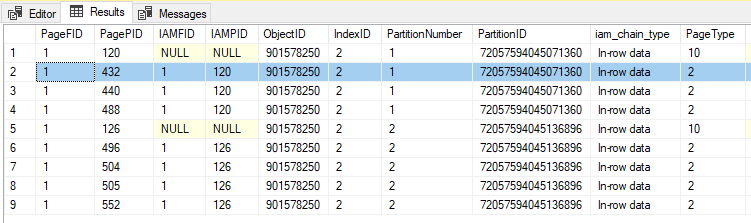
DBCC IND('PartitioningDemo','PartitionedTable',2);
GO

PageID 432 is an index page (type 2) so we’ll drop that into DBCC PAGE along with the FileID and have a look: –

DBCC TRACEON(3604);
GO
DBCC PAGE ('PartitioningDemo',1,432,3);
GO

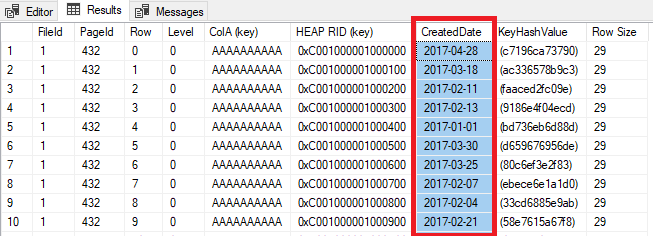
This time I have got my results back in a grid. But look! CreatedDate is there!

SQL has implicitly added the partitioning key to my index as an included column.

OK, but why does this matter? Well, this can catch you out in certain situations. Let’s run a quick test on trying to SWITCH a partition from the table we’ve built.

First let’s create the switch table: –

CREATE TABLE dbo.PartitionedTable_Switch
(ID INT IDENTITY(1,1),
 ColA VARCHAR(10),
 ColB VARCHAR(10),
 CreatedDate DATE)
 ON [PRIMARY];


CREATE NONCLUSTERED INDEX [IX_ColA_PartitionedTable_Switch] ON dbo.PartitionedTable_Switch
 (ColA) 
ON [PRIMARY];
GO

Now, this table is not partitioned. Standard really, non-partitioned table as an archive for old data in the table.

Let’s see what happens when we run a SWITCH operation: –

ALTER TABLE [dbo].PartitionedTable
	SWITCH PARTITION 1
TO [dbo].PartitionedTable_Switch;
GO

Oh no!

Msg 4947, Level 16, State 1, Line 122
ALTER TABLE SWITCH statement failed. There is no identical index in source table ‘PartitioningDemo.dbo.PartitionedTable’
for the index ‘IX_ColA_PartitionedTable_Switch’ in target table ‘PartitioningDemo.dbo.PartitionedTable_Switch’ .

This has happened because even though the t-sql statements for both indexes are the same, the partitioned table’s index has the partitioning key as an included column and the switch table does not.

We can check this by altering the index on the switch table: –

CREATE NONCLUSTERED INDEX [IX_ColA_PartitionedTable_Switch] ON dbo.PartitionedTable_Switch
 (ColA) 
    INCLUDE (CreatedDate)
WITH (DROP_EXISTING=ON)
ON [PRIMARY];
GO

And now the switch will work!

ALTER TABLE [dbo].PartitionedTable
	SWITCH PARTITION 1
TO [dbo].PartitionedTable_Switch;
GO

The best way to prevent this from happening is to create a unique clustered index on your partitioning key (with something like an identity integer column if the key isn’t unique by itself). That way the partitioning key will automatically be in all of your nonclustered indexes.

Thanks for reading!