0

Running SQL Server in a container with sqlcmd

One of the options that I completely missed with the new go-sqlcmd CLI tool is the ability to spin up a container running SQL Server.

Let’s have a look at how it works. It’s nice and easy to install with winget package manager tool: –

winget install sqlcmd

Once installed we can easily run a container (make sure your container runtime is up, in my case I’m using Docker): –

sqlcmd create mssql --accept-eula

Note that we still have to accept the end user license agreement, like when running a container via Docker. Thankfully we can set an environment variable now so that we don’t have to include –accept-eula every time we run a container: –

[System.Environment]::SetEnvironmentVariable('SQLCMD_ACCEPT_EULA','YES', 'Machine')

Let’s have a look at the container it’s spun up: –

docker container ls

Pretty standard…the output of the sqlcmd create command told us that it was using the latest image tag but we can also see that the container has port 1435 on the host mapped to port 1433 in the container. This is so that multiple containers can be run on the same host.

There’s a command to see what images are available: –

sqlcmd create mssql get-tags

Which will give us a big long list of all the tags available for SQL Server in the Microsoft Container Registry (MCR).

If we want to run a container from a different image, we can do this: –

sqlcmd create mssql --tag 2022-CU1-ubuntu-20.04

Cool! And if we want to query that instance we can just say: –

sqlcmd query "SELECT @@VERSION"

Good stuff. OK, when we created the containers the output mentioned a context file, created in our user home directory. Let’s have a look: –

cat C:\Users\dbafromthecold\.sqlcmd\sqlconfig
accept_eula: "YES"
contexts:
    - context:
        endpoint: mssql
        user: dbafromthecold@mssql
      name: mssql
    - context:
        endpoint: mssql2
        user: dbafromthecold@mssql2
      name: mssql2
currentcontext: mssql2
endpoints:
    - asset:
        container:
            id: 5b4118f61d6e68ae7c9a92d3b6f163e40053d84a2e4d27ec4f710cc01fde4949
            image: mcr.microsoft.com/mssql/server:latest
      endpoint:
        address: 127.0.0.1
        port: 1435
      name: mssql
    - asset:
        container:
            id: 2d694f1b1517fd4e6145855ce63df2b8c624ee5dbe81a58227b9d6f0249d91d1
            image: mcr.microsoft.com/mssql/server:2022-CU3-ubuntu-20.04
      endpoint:
        address: 127.0.0.1
        port: 1436
      name: mssql2
users:
    - authentication-type: basic
      basic-auth:
        password: M3ckVDNWKlgkNiE2UHdMNkghdDRZWkszJVRTMiFKIU9DVSRMV2pyMnBHIyNGIyoySTc=
        password-encryption: none
        username: dbafromthecold
      name: dbafromthecold@mssql
    - authentication-type: basic
      basic-auth:
        password: N1AqVTFQJFlAciQzWjVRNlkqMTI4S0U1I1dUNSNLblpVekBGTSUkNDdUISRNKmY3QTQ=
        password-encryption: none
        username: dbafromthecold
      name: dbafromthecold@mssql2
version: v1

In here we can see the details (image, port) of the containers that we spun up. Exactly like working with Kubernetes, sqlcmd uses contexts to connect to different instances.

So if we want to switch to the original container that we spun up: –

sqlcmd config use-context mssql

sqlcmd query "SELECT @@VERSION"

One thing I did notice about the config file was these lines for each container: –

basic-auth:
        password: M3ckVDNWKlgkNiE2UHdMNkghdDRZWkszJVRTMiFKIU9DVSRMV2pyMnBHIyNGIyoySTc=
        password-encryption: none
        username: dbafromthecold

So the password for our custom user is not encrypted by default. Which means if you want to get the password created for the user, it just needs to be decoded. The password can be encrypted, it’s one of the options that we have when running a container.

To view all the options, run: –

sqlcmd create mssql --help

There’s a whole bunch of options there! We can change the container name, port, etc. but the option that interests me the most is the –using flag.

There’s an example in the docs for this: –

sqlcmd create mssql --accept-eula --using https://aka.ms/AdventureWorksLT.bak

And then, another cool feature, is that we can then open Azure Data Studio and connect to the container: –

sqlcmd open ads

Nice!!! We can also do this with .bak files stored in Github. I have a testdatabase.bak in a repo called testrepository (imaginative naming, I know). To use that we would run: –

sqlcmd create mssql --using https://raw.githubusercontent.com/dbafromthecold/testrepository/main/testdatabase.bak

And then connect in ADS again: –

sqlcmd open ads

And there it is! OK, not going to be quite as quick and easy if that’s a large database but hey, if you’re planning on running large databases in SQL then containers probably aren’t the best solution. Although could possibly be an option in a future release to mount a database from the host?

Another option I’d like to see is the ability to retain data changes from one container to another. This could be tricky however as sqlcmd does seem to be designed to be container runtime agnostic…but there are already checks in place to ensure that we don’t lose data.

If we try to delete a container that has a custom database in it: –

sqlcmd delete

We get an error! So we have to go and remove the database manually before the container can be dropped.

Oh, and make sure you’re in the correct context before dropping anything! 🙂

Thanks for reading!
0

VMUG Ireland – Belfast

The second VMUG Ireland event of the year is taking place on the 15th of June in Belfast!

When: Thursday 15th of June @ 2pm until 5pm
Where: Ormeau Baths at 18 Ormeau Ave, Belfast BT2 8HS

Tickets are 100% free and are available here: –
https://my.vmug.com/s/community-event?id=a1Y4x000001x8RhEAI

We will be starting at 2pm with VMWare speaker Niels Hagoort with his session: –

What do migrations to VMware Cloud look like in real life?

Join Niels in this largely demo-led session! We’ll have a closer look into architecting for cloud migration. How do you plan and design for workload migrations into VMware Cloud on AWS? What are the considerations to take into account? This talk helps to execute successful workload migrations, showing multiple options to assist with migrating from an on-prem vSphere environment into VMware Cloud on AWS!

Then we have a session from community expert Johan van Amersfoort: –

What if Jurassic Park had a Modern Workspace?

Ever wondered how a company in the mid 90s would have operated, if they had the tech from today? You will get the answer in this session. Johan will focus on what’s possible when using the VMware Anywhere Workspace to improve employee experience across the entire workspace landscape. Be prepared for a session where you will get answers to the following questions: What should a secure digital workspace look like? How can we reduce the attack service without impacting IT too much and still create a great UX? How can we make the digital workspace fully future proof?

We’ll also have more two sessions that will be announced in the coming days!

Hope to see you there!

1

EightKB 2023 – Schedule and Registration

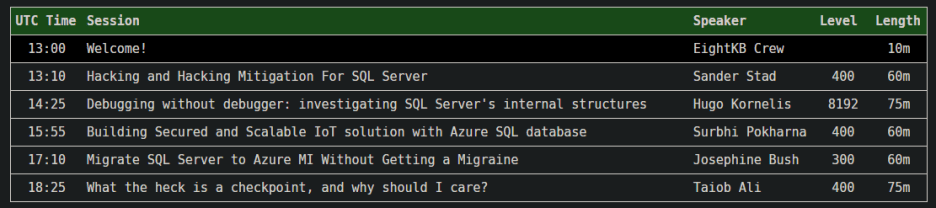
The schedule for EightKB 2023 Edition has been announced!

We’re kicking off at 1pm UTC on May the 24th…here’s the schedule: –

N.B. – If you click on the session on the website, it shows the session abstract…nice touch eh?

Once again we have five top class speakers delivering five great, in-depth sessions on various SQL Server internals topics.

As any conference organiser knows, session selection is the worst part of running a conference. We only have five slots in each event which meant we ended up not picking some amazing sessions. I want to say a MASSIVE thank you to all who submitted.

We’ve also opened up registration for the event, it’s completely free and you can sign up here: – https://eightkb.online/

The event will be in Zoom and we’ll have chat going in the EightKB channel in the SQL Community Slack…please come and hang out with us there!

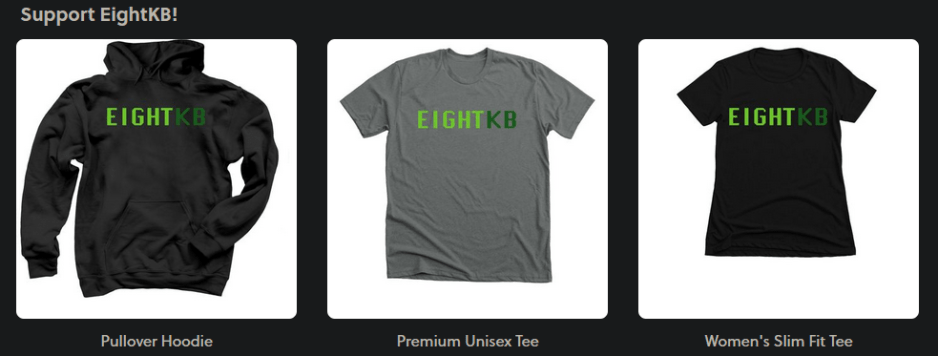
EightKB and Mixed Extents are 100% community driven with no sponsors so, we have our own Bonfire store selling t-shirts!

Don’t they look snazzy?!

Any money generated from the store will be put straight back into the event.

Hope to see you on May the 24th!

0

Video – Recovering data with crash consistent snapshots

A while back I posted a blog on how to recover data with crash consistent snapshots.

Snapshots are pretty handy in certain situations so I thought I’d show you them in action!

In the video below I’m being a little bit more dramatic than in the blog post 🙂

What I’m going to do is: –

  1. Take a crash consistent snapshot of the AdventureWorks database volumes
  2. Corrupt a table in the database with DBCC WRITEPAGE
  3. Overwrite another volume on the server with the snapshot taken
  4. Attach a copy of the AdventureWorks database to the SQL instance
  5. Retrieve the data in the table from the newly attached database

Here we go!

Thanks for watching!

0

EightKB Topics

Hello all, I’ve been speaking to various people about EightKB and there does seem to be a misunderstanding out there about the topics of submissions that we are looking for.

This is entirely our fault…we have marketed ourselves as “The SQL Server internals conference” and people have taken that to mean that we only want submissions on database engine internals…which is 100% not the case.

So I thought it would be handy to list out the topics that we are looking for here.

This list is not exhaustive so please, if you think something is missing please do submit anyway! 🙂

Availability Groups (all types incl. distributed)
Backups & Restores
Basically any new feature in SQL 2022
Cloud Architecture
Collations
Compression
Containers
Encryption
Engine internals
Failover Cluster Instances
In-Memory OLTP
Indexing
Kubernetes
Log Shipping
Managing very large databases
Memory internals
Mirroring
Partitioning
Performance tuning (OS and SQL Server)
Query tuning (APRC, Intelligent Query Processing, Query Store)
QuickAssist Technology
Replication
Resource Governor
S3 object access/polybase
SQL Auditing
SQL Server on Azure (SQL Database, Managed Instance, Arc Data Services)
SQL Waits
Scaling SQL Server
Snapshots
Statistics
Stretch Databases (lol)
TempDB
Virtualisation

So if you have a deep understanding of one of these topics, please do consider submitting to our next event in May. The call for speakers is open until the 22nd of April: –
https://sessionize.com/eightkb-may-2023/

We are looking for experts in areas of SQL Server, not necessarily expert speakers. If you haven’t presented before we will be more than happy to guide you through submitting, preparing, and then presenting your session.

Your session can be 45, 60, or 75 minutes long. You can do as many demos as you’d like…or none at all!

You can answer questions during the session…or questions can be collected during the session and you can respond after the event.

We have no slide template for the event…you can use whatever you’d like for your slides. I personally hate powerpoint!

Finally, after the event we will give you an unbranded recording of your session for you to use however you’d like 🙂

Thanks for reading!