0

Your own personal space

Somewhere to relax, get away from it all (by all I mean pesky Developers wanting code deployed on a bleeding Friday afternoon) and generally unwind. Your worries seem to drift off until there’s a bang on the door…there’s been an issue in Production and you need to investigate. You heave yourself up, over to your desk and connect to your other personal space.

Every DBA should have their own database setup within the environment(s) that they monitor. Depending on the environment there could be one per instance monitored or one central database. Anyway, the point is to have an area specifically for yourself (and any other DBAs) so that you can store scripts for analysis and data on the instance(s) of SQL being monitored.

But what information should be captured? At a (bare) minimum I think the following information on a server should be captured:-

Backups – you want to know about your backups…….right?
Database Size – how big are you databases, how much have they grown over a set period of time?
Disk Space – how much free disk space do you have on your drives hosting SQL databases?
Index Stats – how are the indexes in the databases being used? Are they efficient?
Wait Statistics – what are the top waits on your server?

OK, so there are many third party tools out there that will collect this information (and more) for you. However, I still think a DBA should be able to collect this information by using scripts in their own script archive. By setting up these monitors yourself, you learn about the DMVs within SQL Server and how they can be used to troubleshoot a problem. You don’t want to be using them for the first time after an issue has occurred!

But what else should you be looking at? I’ve recently revamped my monitoring database to include the following:-

Auto-Growth Events – which databases are growing?
Blocking – who is being blocked? Are there any patterns?
Deadlocking – what deadlocks have occurred, what process was the victim?
Log Space – how much log space is being consumed for each database?
Suspect Pages – which pages have generated 823/824 errors?
SQL Error Log Auditing – what errors are being recorded?

Once this data is being collected, you can then decide what alerting you want to place on top. Certain events you’ll want to know about immediately (think deadlocks) but do you want to know about all auto-growth events? Maybe you do…by having your own personal space you can decide what you want to see, and tailor your space to what you need.
0

Shutting down multiple servers with Powershell

I’ve recently helped a company move their infrastructure to a new data centre. Part of this involved shutting down a large number of virtual development application servers. I don’t often shut down servers (maybe an occasional bounce after patching) so I thought about how I wanted to approach it as I wanted the process to be as quick and as painless as possible.

I decided that rather than go to each server individually in vCentre I used that marvelous tool, powershell (I say marvelous now, there have been times when I’ve cursed it, repeatedly).

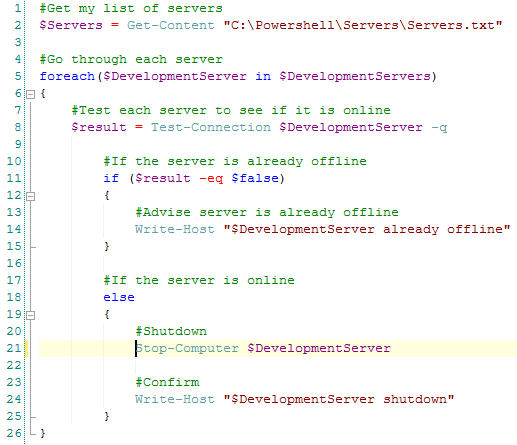
I’m not THE SQL DBA WITH A BEARD but I do like to have a go with powershell, here’s how I scripted it:-

PowershellShutDownServers

Nice and simple, and as I had over 50 servers to go through saved me a load of time!

Quick note – don’t use this script for shutting down any SQL Server boxes, unless you really don’t care about the databases on them.

0

Happy New Year!

Happy New Year!

Hope you all had a good Xmas, ate too much, drank too much and are still telling yourselves that this year you will stick to your New Year’s resolutions (ha).

I didn’t blog in December because…I moved to Ireland to start a new job. I’ve always wanted to work abroad and for a Brit, working in Ireland is like abroad lite. Don’t get me wrong there are a lot of differences between Britain and Ireland but there are similarities which I find comforting (being able to get the same TV channels is a big one).

I’ve been in a hotel for the last several weeks whilst I removed all my furniture from my old flat in England (which I’ve geekily referred to as decommissioning) and whilst I searched for a new one in Ireland. But I’ve got a flat now so can start to relax a little bit on the personal front and start to concentrate on my new position.

I don’t want to blog about my new position or the company that I’m working for but I do want to talk about how I approach a new position in general. DBAs have a tendency to want to change things immediately when starting a new job, for example implementing their own backup and maintenance procedures.

In the past I have spent most of the first couple of weeks reviewing the environments in a new position, mainly to familiarise myself with them but also to make any notes for any changes I am going to recommend. After that I’ll speak to the incumbent DBA about any recommendations I have and go from there. For example, I like to disable the SA login but there may be apps that have been setup to use that account so simply disabling it may not be an option.

I guess the point I’m trying to make is that it’s not a good idea to go into a new job “all guns blazing”, wanting to make radical changes immediately. This can be difficult for me and I have had to restrain myself in the past but all it will do (at best) is make people think, “Who does this guy think he is?”

Introducing changes slowly with sound evidence for the reasons behind them will not put anyone’s nose out of joint and will also get your new colleagues to respect the knowledge that you are bringing to the table.

0

Disaster Recovery Planning

As a SQL Server DBA it is absolutely vital you regularly take backups of the databases you look after. If something goes wrong, a restore is required and there is no (valid) backup, guess who will get the blame? You really don’t want to be sitting in a meeting with fingers pointed at you.

Earlier this year I attended a SQL Skills training course (www.sqlskills.com) and one piece of advice that really stuck with me was that you should think about your restore strategy, not your backup strategy when it comes to disaster recovery planning.

I think this is a great way of approaching disaster recovery, think about it. Do you really want to be restoring hundreds of transaction log backups? How long would that take?

The best way of determining the best recovery strategy is to test restoring the backups taken and seeing if the plan you have put in place meets the RTO and RPO requirements of the system:-

RTO – Recovery Time Objective – What is the acceptable time period to bring the database online?
RPO – Recovery Point Objective – What (if any) is the acceptable data loss in the event of a disaster?

When testing the two questions any DBA should be asking are:-

What will I do if the database becomes corrupt?
What will I do if the server hosting the database fails?

You must be able to recover the database as quickly as possible, with the minimum amount of restores in the event of either the database being corrupted or the server failing. Being able to recover the database with no data loss but taking a week to do so really isn’t going to be very good.

I think there is a danger, with a demanding workload, for DBAs to implement a standard “default” recovery strategy and then not performing any testing to verify its suitability. The only time the plan will get tested is when a live database needs to be restored, a dangerous place to be.

0

My favourite online references

There is a wealth of information about SQL Server online. Absolutely hundreds of blogs, white papers, editorials, the list goes on and on. Trying to filter out the really useful, accurate (!) information from the not so useful (or just plain wrong) can be tricky. There are conflicting opinions out there which can be really confusing when you are researching a problem you are experiencing.

Below are just a few of the sites that have helped me in my day to day work immensely.

SQL Server Central
Contains an absolute wealth of knowledge on SQL Server. Articles, editorials, training and a question of the day. I use the forum on this site more than any others.

Microsoft SQL Server Forums
The official Microsoft SQL Server forum. Loads of people willing to help you out with any problems/queries you may have.

Brent Ozar
These are the guys who wrote sp_Blitz. I’d definitely recommend downloading this proc, it’s a great way of getting a quick overview of a new SQL instance. The site also has a good blog.

Adam Mechanic
Download sp_WhoIsActive. A really useful proc that shows information on currently executing queries.

Twitter
#SQLHelp is a great way of asking quick questions regarding SQL Server

PluralSight
This site provides online training for a monthly fee. It’s not expensive and the information you can get out of the courses is invaluable. However, try not to end up (like me) buying a month subscription and only doing half a course!

SQL DBA With A Beard
An old colleague of mine who is an absolute powershell whizz. If you don’t know how to use powershell, you should start learning!

If you are going to learn powershell you could probably start here powershell.com but Rob’s blog has a lot of good information specifically aimed at DBAs.

SQL Server Central and Brent Ozar’s site send out weekly newsletters which I would strongly recommend that you sign up to. I have learnt so much from both these sites.

Obviously I’ve not even scratched the surface of what is available on the internet regarding SQL Server but the sites listed are an absolute must for your bookmarks.