0

Friday Reading 2017-05-19

Everyone finished patching all their servers? In-between patching this week I’ve been reading…

Why VS Code Increases my Productivity
Rob talks about how using Visual Studio Code as his primary IDE increases his output

The Setup
Jessie Frazelle talks about her hardware, OS and software configs.

Try new SQL Server command line tools to generate T-SQL scripts and monitor Dynamic Management Views
Official SQL Server blog detailing two new command line tools

SQL Server on Docker with new Environment Variables
James Anderson goes through the new env switches available when creating a container running SQL Server

The 22-year-old Brit who stopped the global cyberattack is donating his $10,000 reward to charity
Fair play to the guy

Have a good weekend!

0

Update to DBCC LOGINFO in SQL Server 2017

One of the new features included in SQL Server 2017 that Microsoft has detailed here is a new DMF called sys.dm_db_log_info

This new DMF is intended to replace the (not so) undocumented DBCC LOGINFO command. I say undocumented as I’ve seen tonnes of blog posts about it but never an official Microsoft page.

This is great imho, we should all be analyzing our database’s transaction log and this will help us to just that. Now there are other undocumented functions that allow us to review the log (fn_dblog and fn_dump_dblog, be careful with the last one).

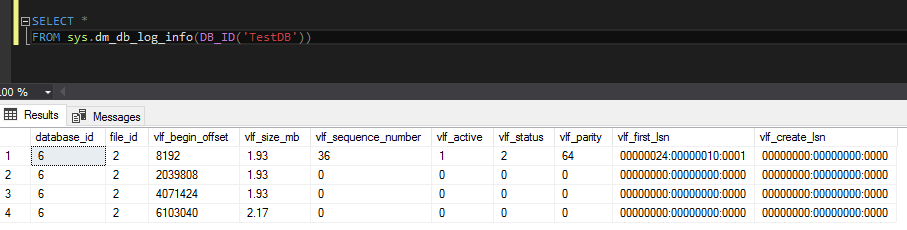
So, let’s run the new command. It’s really, really simple to get details of the log for a database called TestDB: –

SELECT *
FROM sys.dm_db_log_info(DB_IB('TestDB'));
GO

I’m not going to go through what each of the columns are but the main ones that I’d initially focus on (based on my previous usage of DBCC LOGINFO) are: –

  • vlf_size_mb
  • vlf_active
  • vlf_status

So, at a glance I can see the active part of the log and its size. We could also set up this to run on a schedule so that we could also track the internal usage of the log, pretty cool eh?

One of the other columns that’s caught my eye is: – vlf_first_lsn

DBCC LOGINFO gave us the LSN of the record that created the VLF but now we have the first LSN in the VLF which means that we can track where in the log a particular transaction was recorded (without having to use the older functions).

I like this as DBCC LOGINFO was undocumented but everyone was using it so Microsoft has now supplied an official DMF that we can use that not only replicates the information in the old command but improves upon it.

Thanks for reading!

0

Monday Coffee 2017-05-15

After the latest cyber attack I’ve had a fun weekend making sure all my devices are fully up-to-date with the latest patches. If you’re unaware of what’s been happening, you can read about it here.

I took this as an opportunity to go over all my backups as well. It would be kind of embarrassing for someone who spends as much time as I do at work monitoring and testing backups to not have good backups of my personal devices.

This latest attack one again highlights the need for everyone (companies and individuals alike) to patch regularly and move off unsupported systems.

There is absolutely no reason for anyone to be running older versions of Windows considering that Microsoft offered free upgrades to Windows 10 for over a year.

Sadly it does seem that it takes an incident like this to get some people to upgrade.

Have a good week!

0

Friday Reading 2017-05-12

The weather this week in Dublin has been absolutely fantastic, please hold out for the weekend. Anyway, whilst I’ve been stuck inside this week I’ve been reading…

Why PowerShell?
Why indeed? 🙂 Anthony Nocentino talks about why he got into powershell

Thoughts on public speaking / presenting / teaching
Erin Stellato from SQLSkills.com writes about how she got into public speaking.

How to attach a SQL Server database in a Linux Docker container
Mat Hayward-Hill goes through how to attach a database into a SQL instance in a linux container

How I became a DBA
Garland MacNeill tells us his career path towards becoming a DBA

Fighting for equality in big-wave surfing
These people are nuts! BBC article about a group of female surfers who want to take part in big wave surfing competitions

Have a good weekend!

1

Copying files from/to a container

Last week I was having an issue with a SQL install within a container and to fix I needed to copy the setup log files out of the container onto the host so that I could review.

But how do you copy files out of a container?

Well, thankfully there’s the docker cp command. A really simple command that let’s you copy whatever files you need out of a running container into a specified directory on the host.

I’ll run through a quick demo but I won’t install SQL, I’ll use an existing SQL image and grab its Summary.txt file.

If you don’t have the 2017 SQL image, you can pull it from the docker hub by running: –

docker pull microsoft/mssql-server-windows

Once you have the image, execute the following to spin up a container: –

docker run -d -p 15789:1433 --env ACCEPT_EULA=Y --env sa_password=Testing11@@ --name testcontainer microsoft/mssql-server-windows
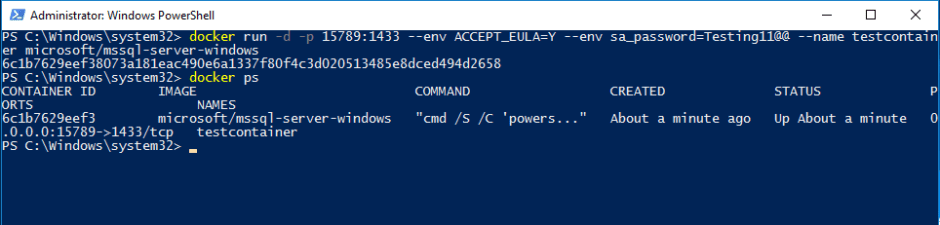
Excellent! Now we can open up a powershell session within the container: –

docker exec -it testcontainer powershell

Once we’re in we can verify where the file is: –

cd "C:\Program Files\Microsoft SQL Server\140\Setup Bootstrap\Log\"

ls
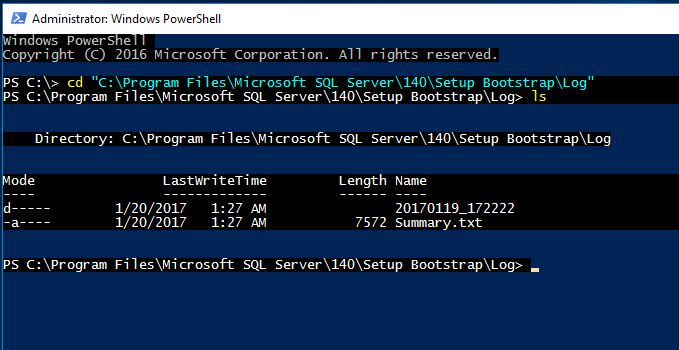
Now exit out of the powershell session within the container. What we’re going to do is copy the Summary.txt file from the container into the C:\temp directory on the host. To do this run (on the host): –

docker cp testcontainer:"C:\Program Files\Microsoft SQL Server\140\Setup Bootstrap\Log\Summary.txt" C:\temp
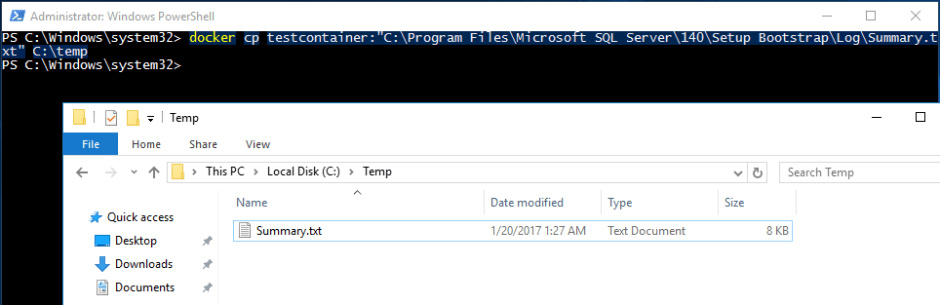
Cool! Now we have the file on the host and can review.

Of course this also works for copying files into a container. Say we want to copy test.txt from C:\temp on our host into C:\ in the container. We simply run: –

docker cp C:\temp\test.txt testcontainer:C:\

Nice and easy! All we need to remember is that we always specify the source directory in the cp command first.

Thanks for reading!