2

Time to find a new place to live

Over the last couple of weeks I’ve been looking at various different locations around Dublin as my tenancy in the current flat that I’m in has run out.

There’s a bit of a housing problem in Dublin at the moment so it really hasn’t been easy but I’ve managed to find a place that ticks all the boxes. And you know what was the number one thing I looked at when searching for a place?

Broadband speed.

OK, so I didn’t just look at that. I did take the area, location to local amenities, and the size/price of the property into consideration but on all those things I was willing to compromise, not so with broadband.

I’ve been told that this is “a first world problem” and I agree but due to the industry I work in and my personal commitments, living in a place with terrible (or even worse, no) internet would be an absolute disaster for me.

The next year is going to be critical and I need a place that I can base myself and not have to worry about whether or not the internet is going to be an issue.

Hopefully the place I’ve found will provide that and I can concentrate on what matters. Really looking forward to it if I’m honest (apart from the actual process of moving, that sucks).

So, what’s the one thing that you look for when deciding on where to live? How high up is broadband speed on your list?

Have a good week!
0

Friday Reading 2018-01-11

Phew, what a week! Have been looking for a new flat to live so it’s been a bit mad. Have hopefully found a place, let the paperwork begin!

In between running around like a madman, I’ve been reading…

Free SQL Server Quizzes
Kendra Little (t) has written a whole bunch of tests on various aspects of SQL! Try your knowledge 🙂

RIP Swag Bags (and some other changes for SQL Relay 2018)
Alex Yates (t) drawing on experiences from SQL Relay 2017 and the changes to SQL Relay 2018

SQL Server 2017 CU2 Bug with msdb Compatibility Mode
Tracy Boggiano (t) details a bug with SQL Server 2017 CUs (yep, it’s in CU3 too)

SQL Server Configurations – Back to Basics
I’ve been working on automated checking of SQL config settings. Always good to have a refresher, here’s Jason Brimhall’s (t) back to basics article

Kubernetes Deployments Compared To Docker Swarm Stacks
With Docker announcing support for Kubernetes (it’s out for Docker on MAC), what is the difference between K8 & Swarm? Viktor Farcic (t) discusses

Have a good weekend!

0

Roll on 2018!

Hey everyone, hope you all had a great Christmas and New Year!

I took December off from blogging as had started a new job and wanted to focus on getting to grips with my new role. But back now and have a load of ideas for new blogs!

Going to keep looking at containers, initially focusing on Azure Container Services (AKS) but I’m waiting for Docker to release support for Kubernetes on Docker for Windows so will be jumping on that asap! I’m also going to presenting a couple of sessions on partitioning so will more than likely be posting a few blogs on that.

Looking back, 2017 was a great year for me. I went from presenting my first session at SQL Saturday Iceland to being made a Microsoft Data Platform MVP! Highlights include: –

  • Exploring Iceland after SQL Saturday (it’s an amazing country)
  • Presenting at SQL Bits for the first time (I was terrified)
  • Cycling through Copenhagen at around 9pm (the end of a long, stressful day)
  • Working with all the great ppl at SQL Relay (although I’ve never been so tired)

I’m hoping that 2018 is just as kind. I’ve already got a couple of session lined up so here’s to 2018, bring it on! 🙂

Have a good week!

0

Checking SQL Configuration with Pester & Dbatools

I know, I know, there’s loads of different ways to test the configuration of SQL Server but I’ve started playing around with Pester recently and it’s pretty cool!

The script I’ve written here will use Pester & Dbatools to check all settings in sys.configurations against values stored in a .csv file. The script will then alter the settings in SQL Server if they differ. So be warned!! 🙂

Here’s the script: –

Import-Module Pester
Import-Module dbatools

[string]$SqlServer = ''

$csv = Import-Csv .\ExampleServerConfigValues.csv
foreach($row in $csv){
        $ConfigName = $row.Name
        $ConfigValue = $row.Value

        $ConfigTest = Invoke-Pester -Script @{Path = '.\Test-SqlConfig.ps1'; `
            Parameters = @{SqlServer = $SqlServer; `
                ConfigName = $ConfigName; `
                    ConfigValue = $ConfigValue}} `
                        -TestName '*Testing configuration*' `
                            -PassThru

        $ConfigTest.TestResult.foreach{
            if($_.Result -ne "Passed"){
                Write-Host "Setting $ConfigName on $SqlServer..." -ForegroundColor Yellow
                    Set-DbaSpConfigure -SqlInstance $SqlServer -ConfigName $ConfigName -Value $ConfigValue
            }
        }   
    }

N.B. – This can easily be altered to reference, say, a Central Management Server that holds the server names to test and the desired config values

The Pester test [.\Test-SqlConfig.ps1] that it’s referencing is: –

param(
    [Parameter(Mandatory)] 
    [ValidateNotNullOrEmpty()]
    [string]$SqlServer,
    [string]$ConfigName,
    [string]$ConfigValue
)

Describe "Testing configuration $ConfigName of Sql Instance $SqlServer"{
    Context "SqlConfig"{
        It "$ConfigName should be $ConfigValue"{
            $value = Get-DbaSpConfigure -SqlServer $SqlServer -Config $ConfigName
            $value.ConfiguredValue | Should be $ConfigValue
        }
    }
}

N.B. – This code is also on GitHub here.

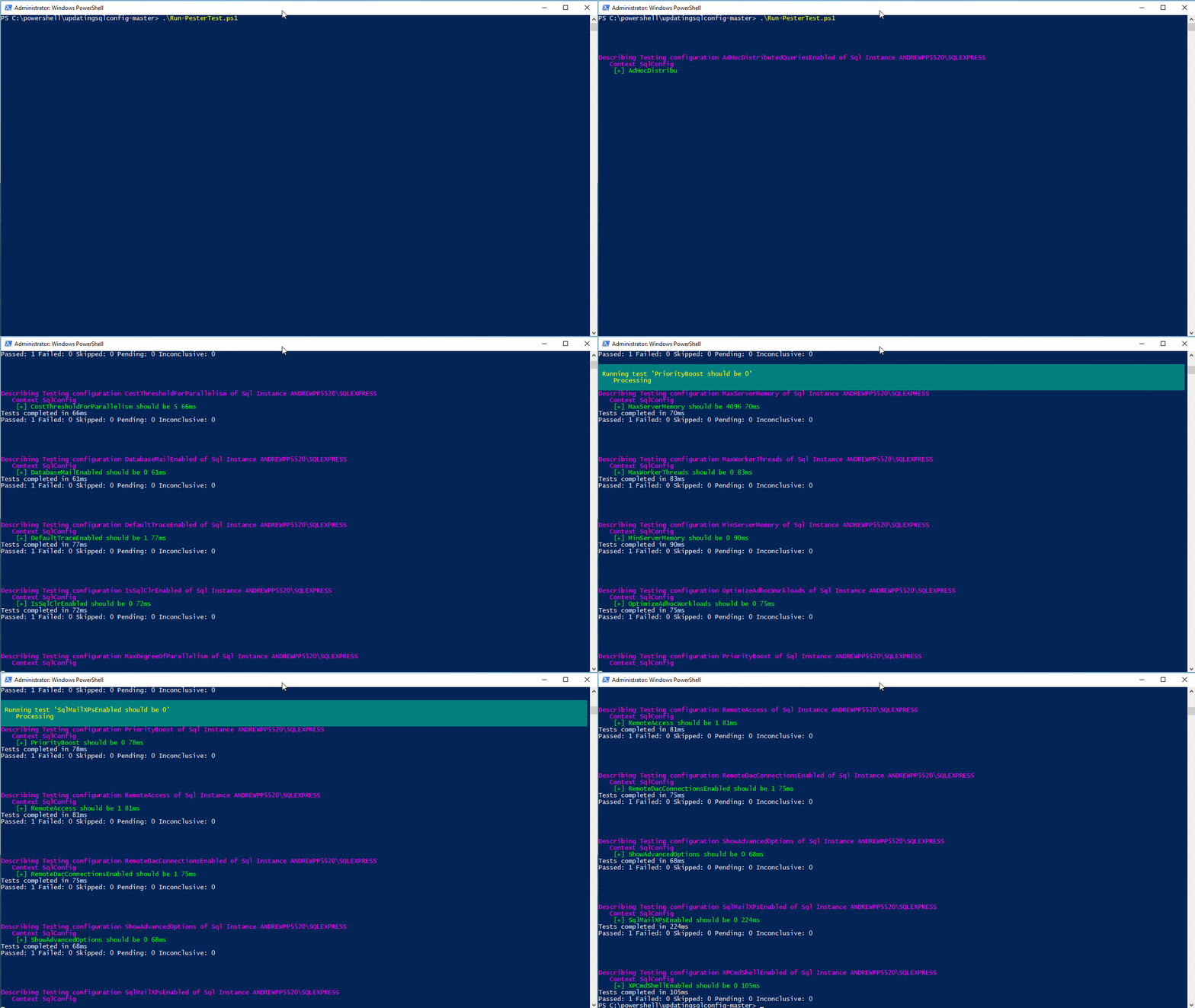
So run the first script and, BOOM!

One Pester test running!

What I like about this is that it can be easily dropped into a job scheduler (e.g.- Jenkins) and then you’ve got a way to routinely check (and correct) all the configuration settings of the SQL instances that you monitor.

Thanks for reading!

0

Friday Reading 2017-11-17

Fun week, lots of stuff to organise and prepare for! Whilst I’ve had some downtime I’ve been reading…

Write your first Pester test today
Rob (t) takes us through the steps to write a Pester test (something I’ve been meaning to do for ages)

How To Enlarge Your Columns With No Downtime
Gianluca (t) demonstrates how to make column enlargement less painful

Do not pass GO
Monica Rathbun (t) talks about the GO statement in SSMS

Streamlining SQL Server Management Objects (SMO) in PowerShell Core
Max Trinidad’s (t) cool post on using SMO objects

Introducing Visual Studio Live Share
VS Blog detailing the new Live Share feature (this looks very cool)

Have a good weekend!