0

EightKB – A new virtual SQL Server event

With all the events that have been cancelled over the next few months due to the on-going COVID-19 crisis, Mark Wilkinson (b|t), Anthony Nocentino (b|t), and I wanted to do something for the SQL community.

So, why not put on a virtual event?

There are a few great new events coming up so how do we make our event stand out?

Enter, EightKB. A new virtual event running on June 17th that focuses solely on SQL Server internals hosting level 300 sessions and above.

We want this event to delve into SQL Server…with some truly mind melting sessions! We’re looking for in-depth technical sessions, with the more demos, the better!

Our call for speakers is open until the end of April. So if you have a session focusing on internals, we would love for you to submit!

If this sounds like an event you’d want to attend, it’s completely free and you can sign up here.

We’ll announce the full schedule at the start of May and from the quality of the sessions already submitted…it looks to be a good one!

Hope to see you there!

3

Adjusting pod eviction time in Kubernetes

One of the best features of Kubernetes is the built-in high availability.

When a node goes offline, all pods on that node are terminated and new ones spun up on a healthy node.

The default time that it takes from a node being reported as not-ready to the pods being moved is 5 minutes.

This really isn’t a problem if you have multiple pods running under a single deployment. The pods on the healthy nodes will handle any requests made whilst the pod(s) on the downed node are waiting to be moved.

But what happens when you only have one pod in a deployment? Say, when you’re running SQL Server in Kubernetes? Five minutes really isn’t an acceptable time for your SQL instance to be offline.

The simplest way to adjust this is to add the following tolerations to your deployment: –

      tolerations:
      - key: "node.kubernetes.io/unreachable"
        operator: "Exists"
        effect: "NoExecute"
        tolerationSeconds: 10
      - key: "node.kubernetes.io/not-ready"
        operator: "Exists"
        effect: "NoExecute"
        tolerationSeconds: 10

N.B.- You can read more about taints and tolerations in Kubernetes here

This will move any pods in the deployment to a healthy node 10 seconds after a node is reported as either not-ready or unreachable

But what if you wanted to change the default setting across the cluster?

I was trying to work out how to do this last week and the official docs here reference a flag for the controller manager: –

–pod-eviction-timeout duration Default: 5m0s
The grace period for deleting pods on failed nodes.

Great stuff! That’s exactly what I was looking for!

Unfortunately, it seems that this flag no longer works.

The way to set the eviction timeout value now is to set the flags on the api-server.

Now, this is done differently depending on how you installed Kubernetes. I installed this cluster with kubeadm so needed to create a kubeadm-apiserver-update.yaml file: –

apiVersion: kubeadm.k8s.io/v1beta2
kind: ClusterConfiguration
kubernetesVersion: v1.18.0
apiServer:
  extraArgs:
    enable-admission-plugins: DefaultTolerationSeconds
    default-not-ready-toleration-seconds: "10"
    default-unreachable-toleration-seconds: "10"

N.B.- Make sure the kubernetesVersion is correct

And then apply: –

sudo kubeadm init phase control-plane apiserver --config=kubeadm-apiserver-update.yaml

You can verify that the change has been applied by checking the api-server pods in the kube-system namespace (they should refresh) and by checking here: –

cat /etc/kubernetes/manifests/kube-apiserver.yaml

Let’s see it in action! I’ve got one pod running SQL Server in a K8s cluster on node kubernetes-w1. Let’s shut down that node…

Alright, that’s not exactly 10 seconds…there’s a couple of other things going on. But it’s a lot better than 5 mins!

The full deployment yaml that I used is here.

Ok, it is a bit of a contrived test, I’ll admit. The node was shutdown gracefully and I haven’t configured any persistent storage BUT this is still better than having to wait 5 minutes for the pod to be spun up on the healthy node.

N.B.- If you’re working with a managed Kubernetes service, such as AKS or EKS, you won’t be able to do this. You’ll need to add the tolerations to your deployment.

Thanks for reading!

0

Data Céilí 2020 Cancelled

Yesterday we announced that Data Céilí 2020 has been cancelled due to the continuing threat of COVID-19.

As much as we wanted to put this event on, the safety of all attendees is paramount and we can’t guarantee that at this moment in time.

I want to thank all the speakers who submitted to our event. I’m pretty sure a lot of you got sick of me badgering you to submit 🙂

This would have been the first year we were to run and the response we had absolutely blew us away. We wanted Data Céilí to be the biggest and best MS Data Platform event in Ireland and I’m certain with the quality of submissions that we had, that would have been the case.

We’re going to regroup and start planning, because Data Céilí will be back in 2021.

In the meantime, the Irish SQL User Groups have come together to run regular virtual meetups

If you would like to present please contact me on twitter @dbafromthecold or at dbafromthecold@gmail.com

Thank you, and stay safe.

Andrew

0

Two years of working remotely

I’ve been working remotely for just over 2 years now and my current position is my first remote post.

Before joining my current company I (and them) had concerns about me working from home. Would I like it? Would I find it isolating? Would I go completely mad?

Actually that last question is one I’ve been asked a lot when I tell people that I work from home. My usual response is….”If I’ve gone mad, how would I know??”

My office buddy, Spuddy!

Anyway as it turns out, I absolutely love working from home!

I do want to say that I think remote working is not for everyone though. If you enjoy the social aspect of working in an office you probably won’t enjoy working from home. It also really depends on how the team that you work with. If your team can communicate effectively out of the office, then you’re in good stead.

I’ve been lucky in that the team I work with was used to having purely remote members. I wasn’t the first DBA they’d hired from Ireland (the majority of my team is based in the U.S.) and they are really good at using virtual meetings and Google Chat.

To be honest it doesn’t really matter which chat program you use, as long as you use one, and use it well! I’ve often thought about how my job would be if I had to communicate solely via email and I just…shudder.

So, I don’t want this post to be a list of guidelines for what you should do when working from home, nor will it be a list of equipment that you should buy. What I want to do is talk about what works for me, and you can then decide if any of things mentioned here will work for you.

For example, I don’t listen to music when I work. I prefer to work in pretty much complete silence…I can concentrate better. I’ve only ever really listened to music when I’ve been working on something pretty boring and repetitive…something that (thankfully) doesn’t happen much in my current role.

There are probably people who read that and couldn’t imagine the thought of working in complete silence…what works for me doesn’t work for them, we’re all different so I don’t think that there could ever be a definitive guide to “how to work from home”. This post is just to talk about my experiences.

One thing that people told me when I first started working from home was that they would have difficult focusing as there’s too many distractions. This was something that I was concerned about as I’m definitely not the most disciplined of people…would I just while away the hours surfing online?

To be honest, it really hasn’t been an issue. Once I’ve started working…I’m working. Ok, there have been times where I’ve spent half an hour on chores that I really should have done in the evening but I’ve used that time to try and step away from a problem that I was stuck on, and come back to it fresh(er). Ack, I’ve had mixed results…sometimes it works and sometimes it doesn’t…but hey, at least I’ve done my washing! One thing it does do is prevent me from getting overly frustrated and end up really getting in a tangle.

With regards to work areas, a lot of people have a separate office…which I’d LOVE to have. I don’t have a separate room for work, my work desk is in a corner of my living room. This is fine for me as I live on my own but I do make efforts to ensure that I don’t start to feel like I spend all of my life in one room.
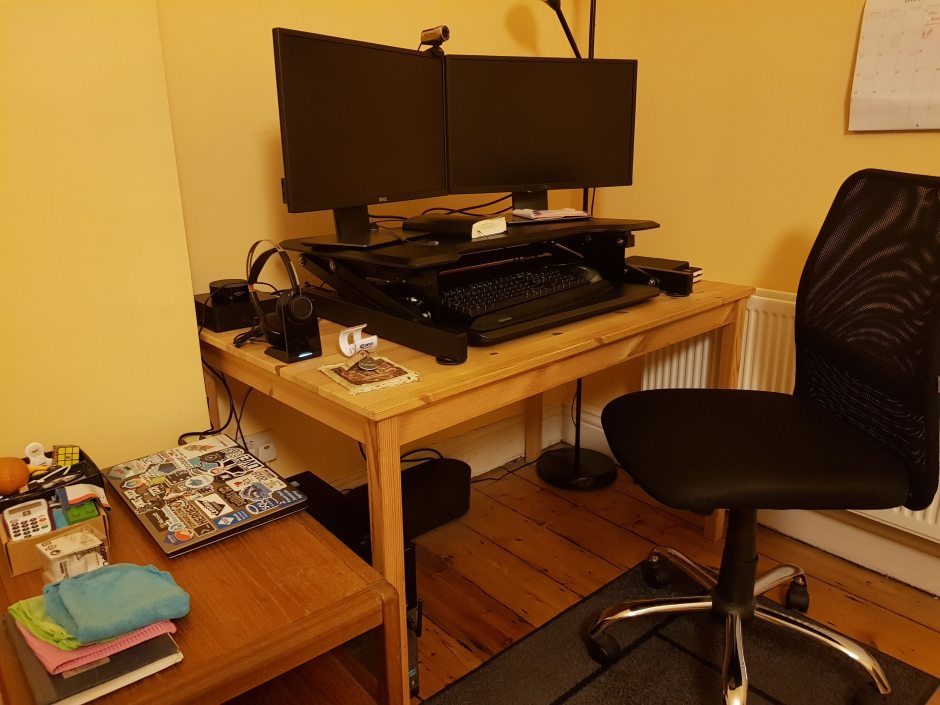
My work area

So I try to get out of my flat every chance I get. I go to the gym, go for a walk along the beach…hit the pub (AFTER work, honestly). One thing that I always do no matter what, is go and buy a coffee down the street at around 10am. It gives me a break an hour into the day, gets me some fresh air, and then I can get back to work.

Lunch time is another chance to get away from the desk, even if it’s just a stroll around the block, just something to get out. Then I’ll pretty much work straight through to 6pm but then, again, I try to get out. Of course, this is all weather permitting so with me being in Ireland, this doesn’t happen every day.

It can also be difficult just to tear myself away some days. I’ll get deep into something, stay glued to the desk but I’d say I get out of the flat at least twice a day. Just to make sure those walls don’t start closing in on me!

Another great way of breaking up the day is a standing desk. Although this’ll work no matter where you are (office or at home). I bought a cheap converter desk and would highly recommend it to anyone who’s looking at buying their first standing desk.

I’ll stand up for the first part of the morning, sit down after I get my coffee, back standing after lunch, and then sit down for the rest of the day. It seems to break the day up nicely.

Then, when the day’s over, I get away from my work area. If I have to continue using a computer to work on blog posts, sessions etc. I’ll get out of the flat for a bit and then when I come back, I’ll work from either my settee, or my dining table.

Some of the things I’ve talked about here won’t work for you but the BEST thing about working remotely is that you get to find out what DOES work for you. You have (almost?) total control over your work environment and you can tailor it to how you want it.

Thanks for reading!

1

Merge kubectl config files on Windows

When working with multiple Kubernetes clusters, at some point you’ll want to merge your kubectl config files.

I’ve seen a few blogs on how to merge kubectl config files but haven’t seen any on how to do it on Windows. It’s pretty much the same process, just adapted for powershell on Windows.

In this example, I’ll merge a new config file in C:\Temp to my existing config file in C:\users\andrew.pruski\.kube

N.B.- If you’re working with AKS, az aks get-credentials will do this for you

Firstly, backup the existing config file:-

cp C:\users\andrew.pruski\.kube\config C:\users\andrew.pruski\.kube\config_backup

Copy the new config file into the .kube directory: –

Copy-Item C:\Temp\config C:\users\andrew.pruski\.kube\config2

Set the KUBECONFIG environment variable to point at both config files:-

$env:KUBECONFIG="C:\users\andrew.pruski\.kube\config;C:\users\andrew.pruski\.kube\config2"

Export the output of the config view command (which references both config files) to a config_tmp file: –

kubectl config view  --raw > C:\users\andrew.pruski\.kube\config_tmp

Check all is working as expected (all clusters can be seen):-

kubectl config get-clusters --kubeconfig=C:\users\andrew.pruski\.kube\config_tmp

If all is working as expected, replace the old config file with the config_tmp file: –

Remove-Item C:\users\andrew.pruski\.kube\config
Move-Item C:\users\andrew.pruski\.kube\config_tmp C:\users\andrew.pruski\.kube\config

Finally, confirm it’s working: –

kubectl config get-clusters

Thanks for reading!