A few weeks ago I was presenting at SQL Saturday Raleigh and was asked a question that I didn’t know the answer to.
The question was, “can you change the location of named volumes in docker?”
This is one of the things that I love about presenting, being asked questions that I don’t know the answer to. They give me something to go away and investigate (many thanks to Dave Walden (b|t) for his help!)
N.B. – I’ve previously written about persisting data using named volumes here
First let’s have a look at a named volume. To create one, run: –
docker volume create sqlserver
And now let’s have a look at it: –
docker volume inspect sqlserver

You can see above where the named volume lives on the host. But what if we want to change that location?
UPDATE – February 2022
This article originally only talked about using a docker volume plugin called Local Persist to change the location of a named volume.
However, you can do this without using a plugin by using the docker local driver and the bind option, which I’ll go through here.
I’ve left the details of how to use the plugin below as it does work to move a named volume but the plugin has not been updated for a while so using the local driver is the preferred way.
So let’s create a directory to point our named volume to: –
mkdir /sqlserver
And now create the named volume using the local driver and the bind option, setting the device to our custom location: –
docker volume create --driver local -o o=bind -o type=none -o device=/sqlserver sqlserver
Let’s have a look at it: –
docker volume inspect sqlserver
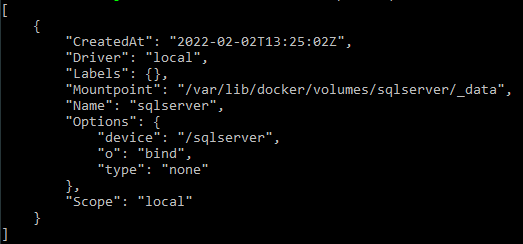
There we can see the device listed, /sqlserver, and the mount point, /var/lib/docker/volumes/sqlserver/_data.
What will happen when this named volume is used in a container is that /sqlserver will be mounted to /var/lib/docker/volumes/sqlserver/_data
And there you have it, a named volume in a custom location
Original post using the docker volume plugin – 2018
Well, in order to do so we need to use a docker volume plugin. Which unfortunately means that this functionality is not available on Windows or on Macs (as plugins aren’t supported on those platforms). The workaround is to run the plugin from a container but I would just mount a volume from the host (see here).
The plugin that I’m going to use is the Local Persist Plugin
Really simple to install: –
curl -fsSL https://raw.githubusercontent.com/CWSpear/local-persist/master/scripts/install.sh | sudo bash

And we are good to go!
Ok, let’s create a directory to point our named volume to: –
mkdir /sqlserver
And now we can create our named volume: –
docker volume create -d local-persist -o mountpoint=/sqlserver --name=sqlserver2
Let’s have a look at it: –
docker volume inspect sqlserver2

And there you have it, the named volume pointing to a custom location.
Thanks for reading!
 DBA From The Cold