Monday Coffee 2017-04-03

Last week Pass announced changes to how speakers are going to be selected for their annual conference (you can read the announcement here.

There’s been a bit of a debate about the changes but as far as I can tell, these seem to be for the better (right?).

Inviting speakers with a proven track record of delivering high-quality presentations can only be a good thing and guaranteeing that a (albeit) small number of new speakers will be there will hopefully prevent presenting at Pass Summit becoming only available to a certain circle of people.

I’ve only been to the event once and I have to say, I found quite a few of the sessions there to be below-par. Don’t get me wrong, I also saw a few great sessions but if these changes improve the overall quality then I say that they are a good thing. Of course, it’s all about the execution so only time will tell if these make the expected improvements but I think Pass are doing this right.

They’ve asked for feedback here and have organised two online meetings so that we, as the community, have the chance to speak directly to them and voice any concerns that we may have.

Have a good week.

Friday Reading 2017-03-31

SQLBits is only a week away! But before that I’ve been reading…

Backing up SQL Server on Linux using Ola Hallengrens Maintenance Solution
Rob goes through how to use Ola Hallengren’s scripts to back up databases in SQL Server on Linux (now that the agent is supported)

Setting the default backup directory for SQL Server on Linux
Slava Murygin shows us three steps to set the default backup directory for an instance of SQL Server running on Linux

Top 5 Questions about Basic Availability Groups
Pieter Vanhove goes through 5 common questions about AGs.

What the heck is a DTU?
Good post explaining what the performance metric for Azure SQL DB is

Have a good weekend!

Using SQL Client Aliases

SQLServerCentral.com recently published my case study on how my company implemented Windows Containers running SQL Server to streamline our QA setup process. If you haven’t seen it, it’s here.

One of the problems that we ran into when moving to using containers was how to get the applications to connect. Let me explain the situation.

The applications in our production environment use DNS CNAME aliases that reference the production SQL instance’s IP address. In our old QA environment, the applications and SQL instance lived on the same virtual server so the DNS aliases were overwritten by host file entries that would point to 127.0.0.1.

This caused us a problem when moving to containers as the containers were on a separate server listening on a custom tcp port. Port numbers cannot be specified in DNS aliases or host file entries and we couldn’t update the application string (one of the pre-requisites of the project) so we were pretty stuck until we realised that we could use SQL client aliases.

The client aliases would allow us to replicate the DNS aliases that we had in production and we wouldn’t have to change the app connection string.

Setting up aliases is simple enough if you have the SQL configuration manager installed. Simply navigate down to the SQL Native Client section within the config manager, right click and fill out the name, server IP and port number: –
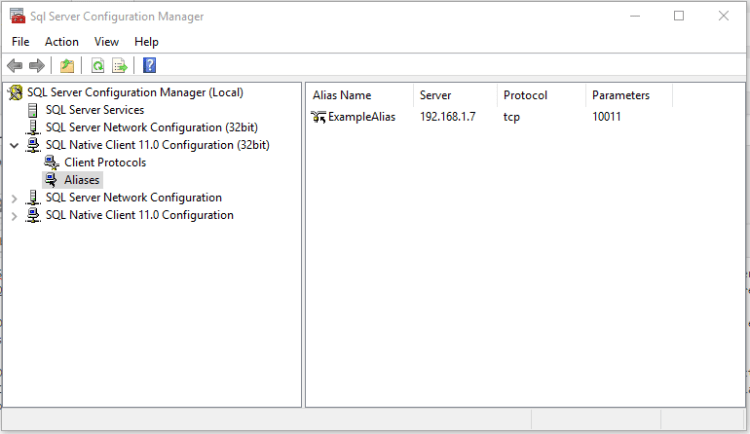
N.B. – I always do both 64 and 32-bit sections to be safe

But we didn’t want to install the config manager on the QA servers and also, that’s a very manual process. So we scripted it out.

First thing to do was get the SQL Native Client installed on all the VMs. The way we did this was to install it on one and then create a VM template that all the other servers were built from. The SQL Native Client installer can be downloaded from here. (that’s for SQL 2012 btw as that’s the version of SQL that we worked with).

Once that was done we then ran a powershell script to create the aliases directly in the registry of the server. Here’s a sample of the script: –

# First of all create the registry keys to hold the aliases
New-Item -Path "HKLM:\Software\Microsoft\MSSQLServer\Client\" -Name ConnectTo -Force -ErrorAction Stop | Out-Null
New-Item -Path "HKLM:\Software\Wow6432Node\Microsoft\MSSQLServer\Client\" -Name ConnectTo -Force -ErrorAction Stop  | Out-Null

# Then create the aliases
$ServerName = "192.168.1.7";
$dbPort     = "10010";
$TCPAlias   = "DBMSSOCN," + $ServerName + "," + $dbPort

$Aliases = @("Alias1","Alias2")

foreach($Alias in $Aliases)
{
    New-ItemProperty -Path "HKLM:\Software\Microsoft\MSSQLServer\Client\ConnectTo\" -Name $Alias -PropertyType String -Value $TCPAlias -ErrorAction Stop | Out-Null
    New-ItemProperty -Path "HKLM:\Software\Wow6432Node\Microsoft\MSSQLServer\Client\ConnectTo\" -Name $Alias -PropertyType String -Value $TCPAlias -ErrorAction Stop | Out-Null
}

Obviously we wrapped the script up in a load of try…catch blocks to make sure that if the keys were already there then it would drop & re-create but the core of what it does is above. What the script above will do is create two aliases that map to server 192.168.1.7 on port 10010: –
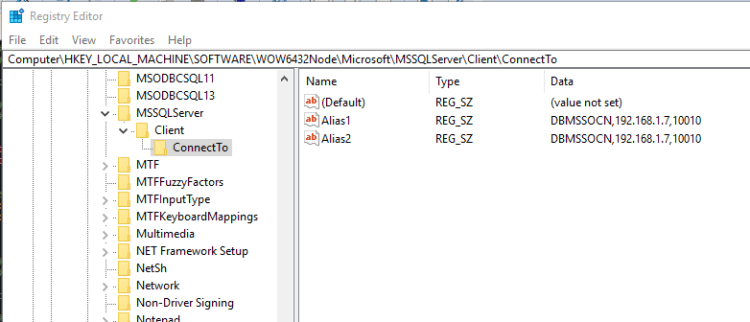
This allowed us to move the apps from using local instances of SQL to using containers listening on a custom port on a remote server without having to change anything in the app configuration. This reduced our server setup time significantly and freed up resources on the app server. Also, we could control what container the apps were pointing to via the registry entries! Very handy.

Thanks for reading, let me know if you have any questions.

Monday Coffee 2017-03-27

Hey all, I’m back after attending SQL Saturday in Iceland. This week’s going to be busy!

I’ve said before that SQL Saturday Iceland was the first time that I presented a full hour session. It seemed to go well although having it start at 14:50 wasn’t the best as I was kinda nervous so I stressed out for most of the day! But done now and I was pretty pleased with it as I finished on time whilst getting all my material in and I answered all the questions.

I don’t really want to write an “Advice for first time presenters” post as there are plenty of them out there but I will say a couple of things that really helped me. First one, don’t wing it. I made notes on each of the slides that I had in my deck and worked through them one by one to make sure I got everything in that I wanted to say. I then grabbed a meeting room after hours in work and went through it over and over, making sure that it flowed nicely and that I got used to referring to slides whilst talking.

Also, my demos would have required a lot of typing and parts that required things like server bounces which would have taken too long to do live so I invested in decent video editing software and it paid for itself imho. The demos worked well and I was able to talk whilst they were playing, something that I don’t think that I’d have been able to do if I was doing everything live.

So all in all, really chuffed that I’ve done it and it’s now onto SQL Bits!

Final word, Iceland is an absolute amazing country. I hired a car and went driving round for a couple of days and the scenery is nothing sort of spectacular. My advice, if you have an chance, go.

Have a good week!

Friday Reading 2017-03-17

As this is being posted I’m on my way up to Dublin Airport to catch my flight to Iceland ready for SQL Saturday Iceland tomorrow! Been looking forward to this for a while now, my first opportunity to give a full session on a subject that I’ve become quite involved in, containers.

After the session I’m hanging around for a few days afterwards to explore, it’s going to be amazing but that does mean no posts next week 😦 (ha)

A bit of shameless self promotion first: –

Summary of my Container Series
I’ve added this because I’ve written a few posts about containers and thought it’d be handy to have one page that references them all.

Ding – The World’s Largest Mobile Top-up Network Streamlines QA with SQL Server Containers
SQLServerCentral.com has published a case study I wrote on how Ding.com implemented containers to improve their QA processes. This could be handy for anyone looking at doing the same

So anyway, this week I’ve been reading: –

Defending Invoke-SqlCmd
Should this cmdlet be used? Some think not, others…

The Biggest Danger to your Database: Me
Love articles like this! Everyone makes mistakes and it takes guts to post them online.

The Database Corruption Challenge
I’ve linked to this (lots of times) before but it’s really good practice for DBAs so want to keep putting it out there

DevOps Isn’t Perfect
DevOps is all the rage at the moment. Steve Jones talks about how the process should lead to fewer mistakes

Alright that’s it from me. Have a good weekend and I’ll see you in just over a week.