Automating installation of Docker & SQL command line tools on Linux

I’ve been getting to grips with Docker SQL Containers on Linux (specifically Ubuntu 16.04) and have found that I’ve been running the same commands over and over when I’m configuring a new server.

The old adage goes that if you run anything more than once it should be automated, right?

So I’ve created a repository on GitHub that pulls together the code from Docker to install the Community Edition and the code from Microsoft to install the SQL command line tools.

The steps it performs are: –

  • Installs the Docker Community Edition
  • Installs the SQL Server command line tools
  • Pulls the latest SQL Server on Linux image from the Docker Hub

To run this yourself, first clone a copy of the repository onto the server: –

git clone https://github.com/dbafromthecold/InstallDockerOnUbuntu.git

Then navigate to the directory: –

cd InstallDockerOnUbuntu

Make the script executable: –

chmod +x installdocker.sh

Then run the script!

./installdocker.sh

N.B. – This is setup for Ubuntu 16.04 so it will not work on other distros

Contact me @dbafromthecold on twitter or email dbafromthecold@gmail.com if you have any issues or have any improvements to the script 🙂

Thanks for reading!

SELECT…INTO in SQL Server 2017

One of the new options available in SQL Server 2017 is the ability to specify a filegroup when using SELECT..INTO to create a table.

Previous versions would create the new table on the PRIMARY filegroup which isn’t ideal so this is a pretty nifty option imho. Let’s run through a quick demo for which I’m going to restore the AdventureWorks database that’s available here.

The first thing to do once the database has been restored is to set the database to the SQL 2017 compatibility level:-

USE [master]
GO

ALTER DATABASE [AdventureWorks] SET COMPATIBILITY_LEVEL = 140
GO

Then I’m going to add a new filegroup to the database (so that I can create my new table on it): –

USE [master];
GO

ALTER DATABASE [AdventureWorks] ADD FILEGROUP [TempData]
GO

ALTER DATABASE [AdventureWorks] ADD FILE 
(	NAME = N'AdventureWorks_TempData', 
	FILENAME = N'C:\Program Files\Microsoft SQL Server\MSSQL14.MSSQLSERVER\MSSQL\DATA\AdventureWorks_TempData.ndf' , 
	SIZE = 8192KB , 
	FILEGROWTH = 65536KB ) TO FILEGROUP [TempData]
GO

Now I can run the SELECT…INTO statement using the new ON FILEGROUP option. I’m going to run an example SELECT statement to capture Sales in the UK: –

USE [AdventureWorks];
GO

SELECT c.CustomerID, c.AccountNumber, p.FirstName, p.LastName, p.EmailAddress

	INTO dbo.CollectedData ON TempData

FROM Sales.Customer c
INNER JOIN Sales.CustomerPII p ON c.CustomerID = p.CustomerID
INNER JOIN Sales.SalesTerritory t ON p.TerritoryID = t.TerritoryID
WHERE t.Name = 'United Kingdom';
GO

Once that has completed I can check that the new table is on the filegroup that I specified by running: –

SELECT f.name AS [Filegroup]
FROM sys.indexes i
INNER JOIN sys.filegroups f ON i.data_space_id = f.data_space_id
INNER JOIN sys.objects o ON i.object_id = o.object_id
WHERE o.name = 'CollectedData'
GO

Pretty cool huh? So what’s the benefits of this?

Well, this allows us to have a separate filegroup for all user created tables (in this manner). The files behind that filegroup could be on a separate drive allowing you to separate the IO of these processes away from the day-to-day database operations.

What it comes down to is that it gives us more flexibility when working with data and that’s a good thing, right?

Finally, I did have a go a specifying a memory optimised filegroup but unfortunately it’s not supported.
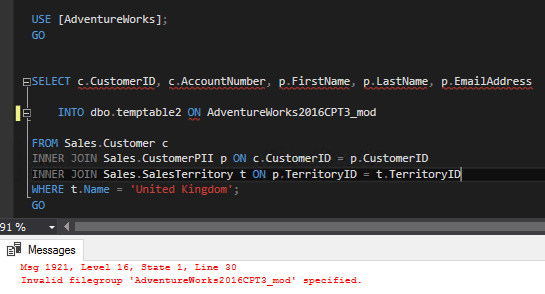
Now that would be really useful as it would be blazingly fast. Hopefully something for a future version?

Thanks for reading!

Monday Coffee: The evolving DBA

Over the weekend I saw a few tweets about the role of the DBA. These tweets (and corresponding blog posts) come around once every so often and are generally along the lines of “Is the DBA role dead?” (or something to that ilk).

Here’s my two cents on the matter, the DBA role is nor ever will be dead.

However that doesn’t mean that I don’t think the role will change. It’s definitely changing, DBA roles twenty years from now will be very different just as DBA roles twenty years ago are very different to what they are now.

And that’s a good thing right? Who wants to be doing exactly the same thing for their entire careers?

I think DBAs are probably one of the best IT roles to cope with change. We have to learn a broad spectrum of skills, from system administration to database development which allows us to move into other areas as focuses change.

With all the new technologies that are coming out we have options to specialise in Data Science or even say, Linux administration as our priorities shift away from the traditional backup/restore, query tuning etc. tasks.

I personally think it’s the most exciting time to be a DBA and I look forward to the changes of my role continuing.

Have a good week!

Friday Reading 2017-07-28

Hope you all had a good week. Been pretty chilled out here so I’ve been reading…

Announcing Azure Container Instances
Microsoft blog about a new Azure service allowing us to deploy containers from the Azure CLI

sp_WhoIsActive Documentation
All of the supporting docs for Adam Machanic’s excellent sp_WhoIsActive

13 things you should know about Statistics and the Query Optimizer
Old post but always good to have a refresher into how the Query Optimizer works

Remove all user defined variables without restarting the PowerShell Console or ISE
Interesting post on how to reset variables in powershell

Downloadable SQL Server Desktop Wallpapers
Kendra Little’s awesome handdrawn SQL wallpapers. I’ve got my eye on the partitioning one 🙂

Have a good weekend!

Automatically restarting Docker containers

One of the problems that I’ve encountered since moving my Dev/QA departments to using SQL Server within containers is that the host machine is now a single point of failure.

Now there’s a whole bunch of posts I could write about this but the one point I want to bring up now is…having to start up all the containers after patching the host.

I know, I know…technically I shouldn’t bother. After patching and bouncing the host, the containers should all be blown away and new ones deployed. But this is the real world and sometimes people want to retain the container(s) that they’re working with.

I have found it best practice to stop all containers before restarting the host (with the docker stop command) and then starting them back up (with the docker start command) once the host has come online.

However I need not have bothered! Docker gives you the option of setting a restart policy for your containers with the following options: –

  • no: Never automatically restart (the default)
  • on-failure: Restart if there’s been an issue which isn’t critical
  • unless-stopped: Restart unless Docker stops or is explicitly stopped
  • always: Always restart unless explicitly stopped

Let’s run through a quick test using Docker on Windows Server 2016. First let’s run a container: –

docker run -d -p 15789:1433 --restart always --env ACCEPT_EULA=Y --env SA_PASSWORD=Testing1122 --name testcontainer microsoft/mssql-server-windows

docker ps

I’ve used the always option here, so Docker won’t restart my container, but what happens when I bounce the server?

restart-computer -force

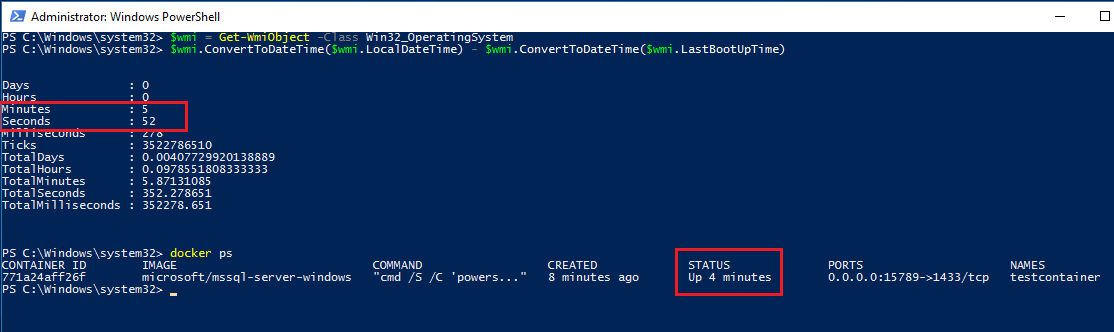
Wait for the server to restart and then I can compare system uptime to container uptime: –

$wmi = Get-WmiObject -Class Win32_OperatingSystem
$wmi.ConvertToDateTime($wmi.LocalDateTime) - $wmi.ConvertToDateTime($wmi.LastBootUpTime)

docker ps

N.B. – code to check system uptime is from here

From the above screen shot I can see that the server came up ~6 mins ago and the container came up ~4 mins ago. OK, there’s a bit of a delay there (probably due to the host OS booting, my Azure VMs aren’t really high spec) but the container has come up automatically! So with this switch there’s no need to have to manually start up all the containers on the host.

I’d recommend specifying this switch for all containers if they are being used for active development as this would be pretty handy if there was ever a case of an unexpected host reboot. I don’t want to have to be running start commands whilst a load of developers are waiting for their SQL instances to spin up 🙂

Thanks for reading!