Taking the Linux plunge

I’m a Windows guy.

Kinda have had to be, given my profession as a SQL Server DBA. But recently I’ve become a bit discontent with Windows. Nothing out of the usual has contributed to this, just things like UAC, updates etc.

Now in the past, I’ve had to suck these annoyances up and deal with them. But the world (well Microsoft) has changed.

With the release of SQL Server Operations Studio, Visual Studio Code, and powershell available as a snap on Linux; I now have tools required to be a SQL Server DBA on multiple platforms. Even SQL Server itself runs on Linux! (Anyone else still getting over that?)

So last week I took the plunge and bought a Dell XPS 13 running Ubuntu.

I’ve dual booted with Ubuntu for years so have always had the fallback to Windows there (just in case) but I’ve always seemed to manage. This isn’t to say that my Linux skills are up to par, I have a huge learning curve ahead of me.

Alright, I’ll admit that there’s a bit of shiny tech syndrome going on here but I am really looking forward to using something other than Windows as my primary laptop.

I’ll write a post after a couple of weeks of using it, hopefully I won’t have reformatted and installed Windows 10 πŸ™‚

Have a good week!

Friday Reading 2018-07-20

Haven’t posted one of these for a while! It’s good to have some time back to be able to read/write.

I’ve had a pretty mixed week, but the highlight has definitely been pulling the trigger on buying a Dell XPS 13 running Ubuntu. The Dell is a pretty slick machine, I’ve seen a few people at events with them and I’ve always been really envious so I finally went and bought myself one πŸ™‚

Will write a post about how I get on with it after a couple of weeks. Anyway, this week I’ve been reading…

Azure Container Registry Build Supports All Windows Versions
I’ve been playing around with ACR build recently (see here), more options are always welcome!

Azure Container Instances now available in Australia East, East US 2, and Central US
New regions available for deployment of ACIs

Public Preview of Row Mode Memory Grant Feedback in Azure SQL Database
More adaptive query processing improvements in Azure SQL Database

Day 1 of 4 – My life as a Production DBA (Technical Lead)
Garry Bargsley’s (t) series on his day to day life as a DBA

RESTORE VERIFYONLY what does WITH LOADHISTORY do?
Kenneth Fisher (t) tells us about the LOADHISTORY option. I honestly didn’t know this existed.

Have a good weekend!

Creating SQL images in Azure with ACR Build – Part One

EDIT – 2018-10 – ACR Build is now known as ACR Tasks

Whenever I’ve pushed images up to an Azure Container Registry I’ve been building them locally (using Docker for Windows) and then manually pushing them up. However, I don’t need to do this. What I can do instead is use the Azure Container Registry Build service.

Let’s have a look at how it works.


To follow along with the code here you will need the Azure-CLI installed and Docker for Windows running


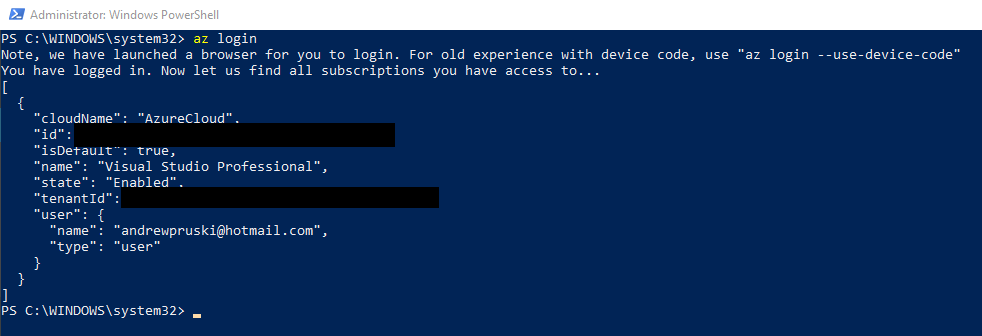
First things first, log into azure: –

az login

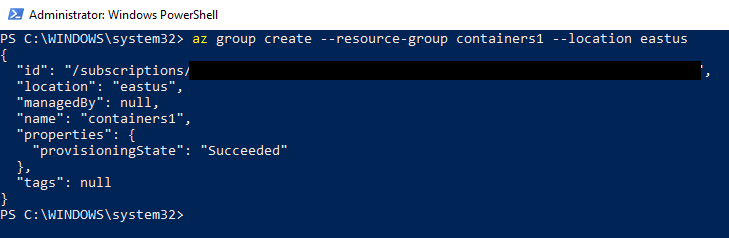
Then create a resource group: –

az group create --resource-group containers1 --location eastus
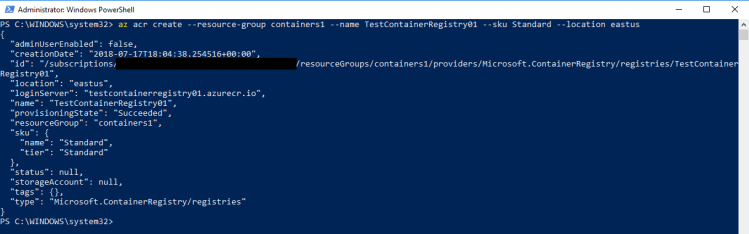
Create a registry (the ACR): –

az acr create --resource-group containers1 --name TestContainerRegistry01 --sku Standard --location eastus
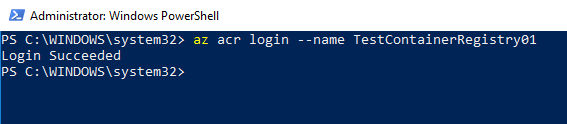
And then login to the registry: –

az acr login --name TestContainerRegistry01
Now create a directory on your local machine to hold the repo that we’re going to use to build the image: –

mkdir c:\git\dbafromthecold
cd c:\git\dbafromthecold

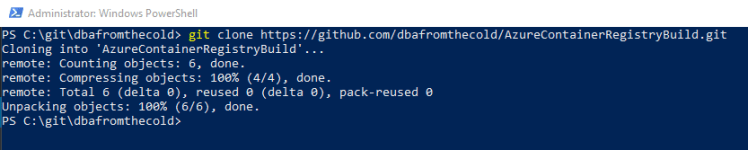
And then pull the repo down: –

git clone https://github.com/dbafromthecold/AzureContainerRegistryBuild.git

The dockerfile within this repo is pretty simple. All it’s going to do is build us an image that when run will have a database named TestDatabase already there. For more info on building images from a dockerfile, check out my blog here

Now navigate to the repo: –

cd c:\git\dbafromthecold\AzureContainerRegistryBuild

Great! We’re ready to build the image and push it to the Azure Container Registry.
To do this, run: –

az acr build --registry TestContainerRegistry01 --image testimage:latest .

Hmm…that does look like it hasn’t worked but trust me…it has (just wait a few minutes) πŸ™‚

To verify that the new repository has been created: –

az acr repository list --name TestContainerRegistry01 --output table

And to view the tagged image within it: –

az acr repository show-tags --name TestContainerRegistry01 --repository testimage

Awesome! Our custom image is in our ACR!

But has it worked? Has it really? Oh ye of little faith…

I guess the only way to find out is to run a container! So let’s run a Azure Container Instance from our new image.

I’ve already blogged about creating ACIs here so I’m just going to run through this quickly but don’t worry, everything you need to deploy an ACI is in the following code.

In order for the ACI to pull the image from our new ACR we need to store credentials that can be used to grant access. So first, create a keyvault: –

az keyvault create --resource-group containers1 --name aptestkeyvault01

Once the vault is created, we need to create a service principal with read permissions to the ACR and store its credentials in the vault: –

az keyvault secret set `
  --vault-name aptestkeyvault01 `
  --name testcontainerregistry-pull-pwd `
  --value $(az ad sp create-for-rbac `
  			--name testcontainerregistry-pull `
  			--scopes $(az acr show --name testcontainerregistry01 --query id --output tsv) `
  			--role reader `
  			--query password `
  			--output tsv)

Then we grab the service principal’s appId which will be the username passed to the Azure Container Registry: –

az keyvault secret set `
  --vault-name aptestkeyvault01 `
  --name testcontainerregistry-pull-usr `
  --value $(az ad sp show `
  		--id http://testcontainerregistry-pull --query appId --output tsv)

Ok, now we can run a Azure Container Instance from our custom image!

az container create `
    --resource-group containers1 `
    --image testcontainerregistry01.azurecr.io/testimage:latest `
	--registry-username $(az keyvault secret show `
						--vault-name aptestkeyvault01 `
						--name testcontainerregistry-pull-usr `
						--query value --output tsv) `
	--registry-password $(az keyvault secret show `
						--vault-name aptestkeyvault01 `
						--name testcontainerregistry-pull-pwd `
						--query value --output tsv) `
	--name testcontainer1 `
	--cpu 2 --memory 4 `
	--environment-variables SA_PASSWORD=Testing1122 `
	--ip-address public `
	--ports 1433

Ok, we need to wait for the ACI to spin up. We can monitor for this by running: –

az container show --name testcontainer1 --resource-group containers1
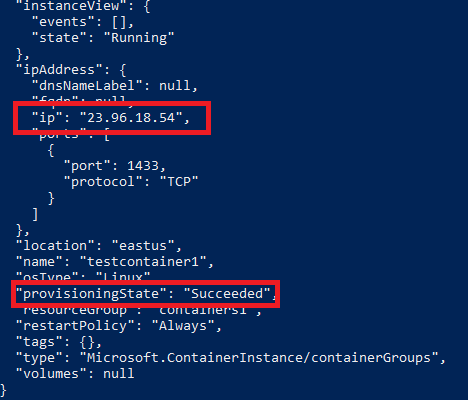
Once the above command comes back with a status of Succeeded and an IP address we can drop that into SSMS: –
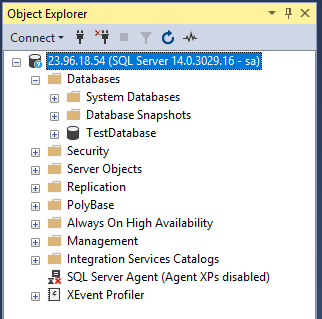
And boom! We’ve connected to an ACI created from our custom image built using Azure Container Registry Build!

So that’s an intro into ACR Build. There’s plenty more that we can do with it and I’ll explore that in future posts.

Thanks for reading!
Downtime

I was speaking at a conference recently and when I bumped into a friend, the first thing she said to me was “have you burnt out yet?”

Now this was a joke but it did get me thinking. I’ve been speaking at quite a few events this year and tbh I’ve loved it. However I am well aware that it has been taking up a significant part of my time and I never want to get to a point where I get fed up with going to events to speak.

Getting into technical presenting has been one of the best things that I’ve ever done.

So how do I prevent myself from becoming burnt out? I have a really busy schedule over the next few months so I can’t really go on any holidays.

The best way I’ve found is to take one day a week where I don’t touch a computer. Obviously on a weekend πŸ™‚

It may not sound like much but I’ve been working my day job, blogging during the evenings, and practicing sessions/researching topics on the weekends. It’s been pretty full on so taking one day to chill out and relax really has helped. (the world cup being on has made this a lot easier as well).

Taking one day out of a week has also allowed me to come back to issues that I’ve been faced with anew, and allowed me to resolve them.

So if you’re working all hours under the sun, I ask you to stop. Take a day for yourself. It may be hard at first but it will benefit you in the long run.

SQL Saturday Cork 2018

This coming weekend (9th of June) is SQL Saturday Cork!

I’ve been really looking forward to this SQL Sat as there’s only one in Ireland each year. I’m not from Ireland but have been here for over 4 years now and the User Group in Dublin is where I first started speaking.

I won best lighting talk at SQL Saturday Dublin in 2016 and that pretty much convinced me that I could go on and present full length sessions. So I owe a lot to the event in Ireland and consider it my “home” event.

It’s the first time that the event has been held in Cork and it looks to be a cracker. The venue is at University College Cork and there’s a great line-up of speakers (myself included πŸ™‚ )

There’s also two fantastic pre-cons on the Friday before: –

Move your database to the Cloud
by Jose Manuel Jurado & Roberto Cavalcanti

50 Things All SQL Server Developers Need to Know
by Kevin Kline

So if you’re based in Ireland (or even if you’re not) I highly recommend that you come for a weekend of fantastic SQL Server training.

Hope to see you there!

