Monday Coffee 2017-02-27

Ergh, not a fun weekend rugby wise. But anyway…

Last week Microsoft released an image for SQL Server 2016 SP1 Developer Edition in containers. Previously the only edition available was vNext Enterprise Evaluation which was a real problem in making containers a viable option for many businesses.

There’s no point in having a development environment referencing a SQL instance that is not the same version as production. How many people would be running vNext in production? I bet there’s a few (mad) early adopters out there but in the main, I would say most businesses would be running 2016, 2014 or 2012.

Having this image available means that developers/DBAs can now seriously look at containers as an option when building development environments. Need to build an environment quickly? That’s what containers give you. I’d love to see this technology become widely used in the SQL Server world. I’ve been working with them for over a year now and being able to spin up a new instance of SQL Server in seconds is really cool.

It does beg the question are Microsoft going to release images for other, earlier versions of SQL Server? I’m honestly not sure that they will but if they want containers to become more widespread that would be the way to do it. We’ll see what happens but even if they don’t there are other options out there.

Have a good week!

Friday Reading 2017-02-24

Wow that week absolutely flew by! Here’s what I’ve been reading…

Seatbelt learning with Uncle Buck
Buck Woody goes through how he learns on the move (great article)

Hardware selection for a home lab – Part 1
Glen Berry goes through using the Intel NUC series for a home lab environment

DevOps – A DBA’s Perspective
Paul Ibison gives his views on what DevOps means from a DBA perspective

Lots of Learning at SQL Bits
Steve Jones talks about why SQLBits is his favourite SQL event

NASA Telescope Reveals Largest Batch of Earth-Size, Habitable-Zone Planets Around Single Star
This is seriously cool

Have a good weekend!

Remotely Administering the Docker Engine on Windows Server 2016

Continuing on my series in working with Docker on Windows, I noticed that I always open up a remote powershell window when working with Docker on servers. Nothing wrong with this, if you want to know how to do that you can follow my instructions here.

However what if we want to connect to the Docker engine remotely? There’s got to be a way to do that right?

Well it’s not quite so straightforward, but there is a way to do it involving a custom image downloaded from the Docker Hub (built by Stefan Scherer [g|t]) whichs creates TLS certs to allow remote connections.

EDIT – I should point out that this is a method of administering a remote docker engine securely. You can expose a docker tcp endpoint and connect without using TLS certificates but given that docker has no built-in security, I’m not going to show you how to do that 🙂

Anyway, let’s go through the steps.

Open up a admin powershell session on your server and navigate to the root of the C: drive.

First we’ll create a folder to download the necessary certificates to: –

cd C:\
mkdir docker

Now we’re going to follow some of the steps outlined by Stefan Scherer here

So first, we need to create a couple more directories: –

cd C:\docker
mkdir server\certs.d
mkdir server\config
mkdir client\.docker

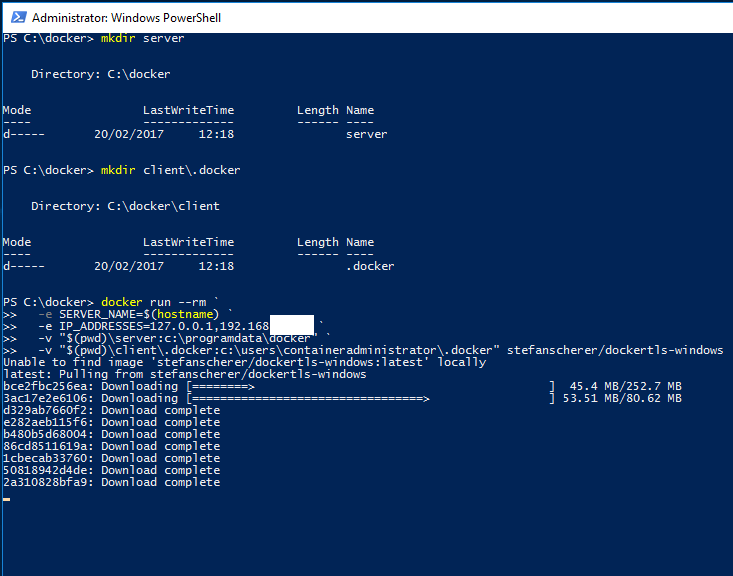
And now we’re going to download a image from Stephan’s docker hub to create the required TLS certificates on our server and drop them in the folders we just created (replace the second IP address with the IP address of your server): –

docker run --rm `
  -e SERVER_NAME=$(hostname) `
  -e IP_ADDRESSES=127.0.0.1,192.168.XX.XX `
  -v "$(pwd)\server:c:\programdata\docker" `
  -v "$(pwd)\client\.docker:c:\users\containeradministrator\.docker" stefanscherer/dockertls-windows
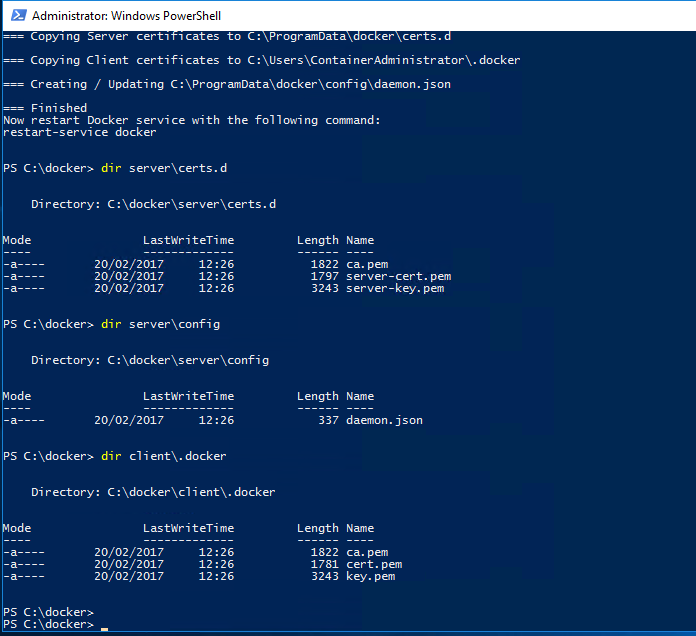
dir server\certs.d
dir server\config
dir client\.docker
dockercerts

Once complete you’ll see: –

image

Now we need to copy the created certs (and the daemon.json file) to the following locations: –

mkdir C:\ProgramData\docker\certs.d
copy-item C:\docker\server\certs.d\ca.pem C:\ProgramData\docker\certs.d
copy-item C:\docker\server\certs.d\server-cert.pem C:\ProgramData\docker\certs.d
copy-item C:\docker\server\certs.d\server-key.pem C:\ProgramData\docker\certs.d
copy-item C:\docker\server\config\daemon.json C:\ProgramData\docker\config

Also open up the daemon.json file and make sure it looks like this: –

{
    "hosts":  [
                  "tcp://0.0.0.0:2375",
                  "npipe://"
              ],
    "tlscert":  "C:\\ProgramData\\docker\\certs.d\\server-cert.pem",
    "tlskey":  "C:\\ProgramData\\docker\\certs.d\\server-key.pem",
    "tlscacert":  "C:\\ProgramData\\docker\\certs.d\\ca.pem",
    "tlsverify":  true
}

Now restart the docker engine: –

restart-service docker

N.B. – If you get an error, have a look in the application event log. The error messages generated are pretty good in letting you know what’s gone wrong (for a freaking change…amiright??)

Next we need to copy the docker certs to our local machine so that we can reference them when trying to connect to the docker engine remotely

So copy all the certs from C:\ProgramData\docker\certs.d to your user location on your machine, mine is C:\Users\Andrew.Pruski\.docker

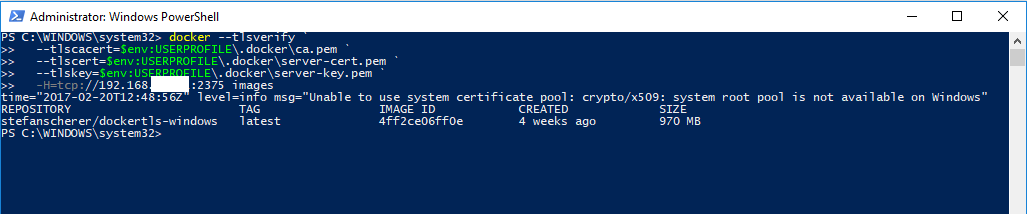
We can then connect remotely via: –

docker --tlsverify `
  --tlscacert=$env:USERPROFILE\.docker\ca.pem `
  --tlscert=$env:USERPROFILE\.docker\server-cert.pem `
  --tlskey=$env:USERPROFILE\.docker\server-key.pem `
  -H=tcp://192.168.XX.XX:2375 version
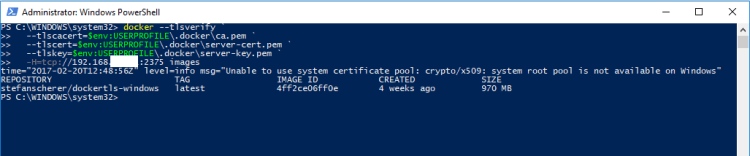
dockerremoteconnect

Remember that you’ll need to open up port 2375 on the server’s firewall and you’ll need the Docker client on your local machine (if not already installed). Also Microsoft’s article advises that the following warning is benign: –

level=info msg=”Unable to use system certificate pool: crypto/x509: system root pool is not available on Windows”

Whatever that means. Maybe I’ll just stick to the remote powershell sessions 🙂

Thanks for reading!

Monday Coffee 2017-02-20

No rugby on last weekend so I didn’t have anything to distract me from working. On another note, my flat has never been cleaner!

So last week Microsoft announced Availability Groups for SQL Server on Linux.

This is a big announcement as one of the first things I noticed when playing around with a SQL instance on Linux was the lack of high availability features. (I wrote a post on manually setting up transaction log shopping here).

Microsoft hasn’t released a stripped down version of Availability Groups either. They’ve said in the post that:-

all capabilities that make Availability Groups a flexible, integrated and efficient HADR solution are available on Linux as well

So are we looking at SQL on Linux moving towards an edition that will rival its windows counterpart in features and usability? I think that’s what Microsoft’s end goal will be, a platform independent relation database system.

That for us as SQL Server DBAs mean interesting times ahead. In the future not only will we be looking at the usual options when building our SQL Server instances, we’ll be looking at the pros and cons of the supporting operating system and then making our decisions. Could lead to some interesting design room discussions.

I’ve said before that I think this is great. It’s opening up a whole new world to me as a DBA, I love learning new areas of technology so I can’t wait to get my hands on this and start playing around.

Have a good week!

Friday Reading 2017-02-17

Is it me or is February dragging? Anyway, mixed in with this crazy week I’ve been reading: –

SQL Server vs SQL Server vNext
Henrico Bekker runs through a performance comparison of SQL Server against SQL Server on Linux

What Are FeFETs?
Article about a new memory type (FeFETs) that Startup FMC is developing

SQL Server in a Azure VM – What’s new
Channel 9 video in which Luis Vargas goes through what’s new for SQL Server in Azure

New Flagship Xeon E5 and E7 Processors
Glen Berry looks at the new Xeon processors

Altering a Job Step on Hundreds of SQL Servers with PowerShell
Rob Sewell details how he was able to make an alteration to hundreds of backup jobs in 5 mins (in an airport no less)

Have a good weekend!