Presenting with Visual Studio Code

A while back I wrote a quick post on setting up key mappings in Visual Studio Code…they make presenting (and generally working) in Visual Studio Code really smooth.

But one thing that kinda bugs me is the location of the terminal…I’ve always had it at the bottom, which is generally fine, and I know you can move it around (top, right, left)…however I’ve found that when presenting, space is at a premium. I bump up the font size and this can result in a lot of scrolling through results in the terminal, which ain’t great.

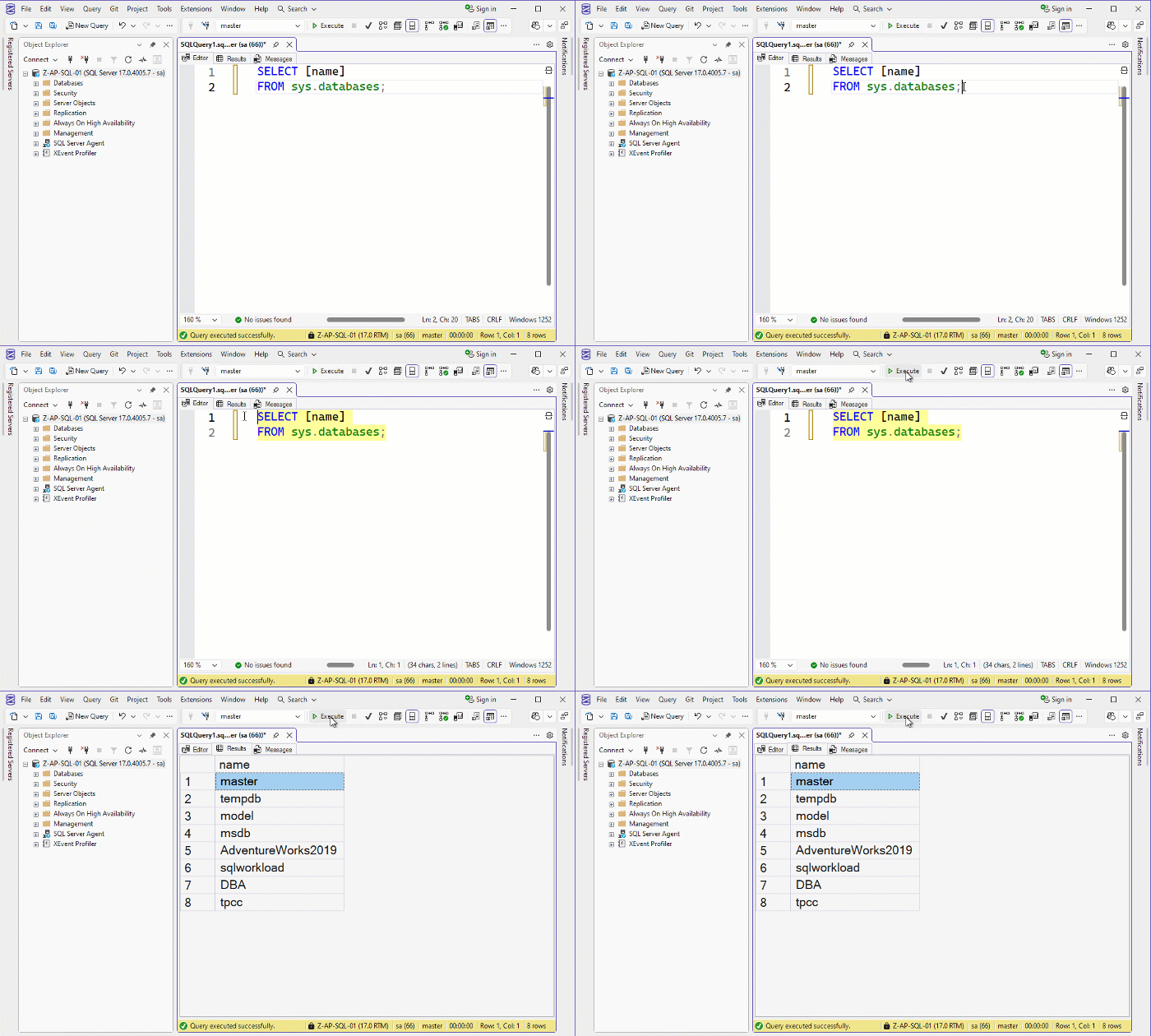
But what if we could have a similar setup to how Paul Randal has his SQL Server Management Studio configured.

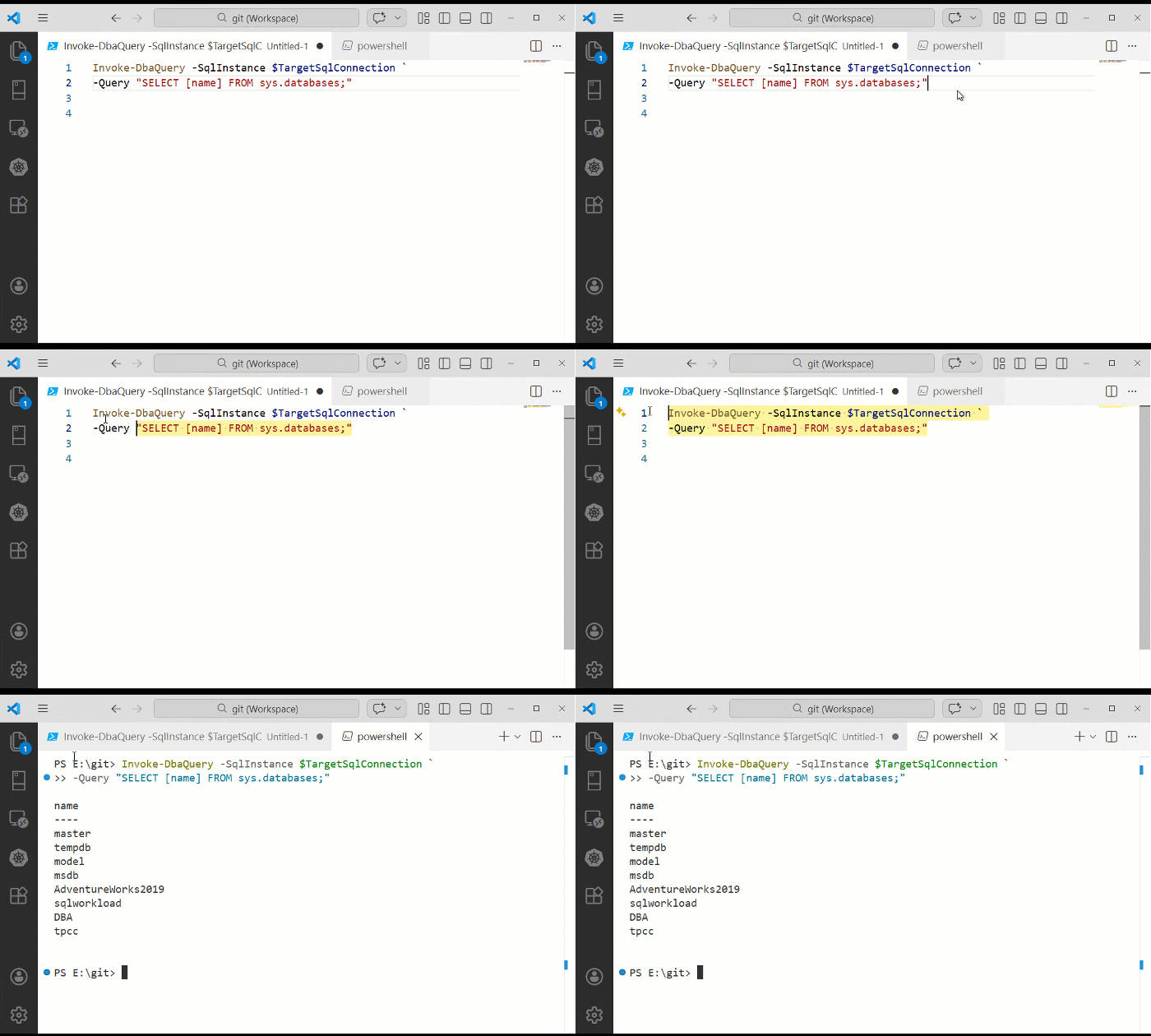
What I mean is, can we have a powershell terminal as a tab next to the editor? This would be great when running scripts with a large output, no more scrolling!

Here’s how it looks in SQL Server Management Studio: –

So let’s make VS Code open a powershell terminal in a separate tab. Add this to settings.json: –

"terminal.integrated.defaultLocation": "editor"

And let’s make the highlighting yellow: –

"workbench.colorCustomizations": {
"editor.selectionBackground": "#fff59d",
"editor.selectionHighlightBackground": "#fff59d80",
"editor.wordHighlightBackground": "#fff59d66",
"editor.wordHighlightStrongBackground": "#fff17699"
},

Here’s what VS Code looks like now: –

OK, I’ll bet loads of people know about this but hey, hope this helps someone out there…I think it looks really good!

Combining this with the key mappings and ZoomIt (Ctrl+2 call outs) allows me to present code clearly and smoothly…no more waving the mouse around 🙂

Oh and remember…when presenting, don’t use dark mode 😀

Thanks for reading!

Creating presentations with Reveal and Github pages

I really don’t like Powerpoint.

I’ll do pretty much anything to avoid writing a presentation in it. Thankfully for the last few years there’s been a service called GitPitch which allowed me to write presentations in markdown, push to Github, and it publishes the presentation at a custom URL.

I really liked this service as it made updating my presentations really easy and if anyone asked for my slides I could give them the URL.

Unfortunately, GitPitch is shutting down on March 1st so all my presentations will become unavailable after that date.

So I had to find an alternative and as there’s no way I was going to use Powerpoint, I was kinda stuck.

Thankfully, Mark Wilkinson (b|t) came to my rescue and told me about Reveal.

(He also gave me some (ok, a LOT) of pointers in how to get up and running, thank you Mark!)

Reveal combined with Github Pages pretty much gives me the same setup that I had with GitPitch so I was saved from Powerpoint!

Let’s run through how to create a presentation using both.

First, clone down the Reveal repo: –

git clone https://github.com/hakimel/reveal.js.git

Create a directory for the new presentation locally: –

mkdir demopresentation

Navigate to the new directory: –

cd demopresentation

Initialise the repo: –

git init

N.B. – you can confiure git to initialise a main branch instead of master by running: –

git config --global init.defaultBranch main

We need to populate the repo with something before we can do anything else. So create a test file: –

new-item test.txt

Commit test.txt to main branch: –

git add test.txt
git commit -m "added test.txt"

Now go to Github and create the repository that we’re going to push the local one to: –

Once the repo is created, Github will give instructions on how to link and push our local repository to it: –

So run: –

git remote add origin https://github.com/dbafromthecold/demopresentation.git
git branch -M main
git push -u origin main

And there’s the repo with our test file in it on Github: –

Now that the main branch has been initialised and the first commit executed we can create a gh-pages branch.

The gh-pages branch, when pushed to Github, will automatically create a URL that we can use to publish our presentation.

So let’s create the branch: –

git branch gh-pages

Switch to the gh-pages branch: –

git checkout gh-pages

Copy the required files into the gh-pages branch from the Reveal repo: –

copy-item ..\reveal.js\index.html
copy-item ..\reveal.js\css -recurse
copy-item ..\reveal.js\dist -recurse
copy-item ..\reveal.js\js -recurse
copy-item ..\reveal.js\plugin -recurse

Open the index.html file and replace: –

<div class="reveal">
    <div class="slides">
        <section>Slide 1</section>
        <section>Slide 2</section>
    </div>
</div>

With the following: –

<div class="reveal">
    <div class="slides">
        <section data-markdown="slides.md"
                 data-separator="^^\r?\n---\r?\n$"
                 data-separator-vertical="^\r?\n------\r?\n$"
                 data-separator-notes="^Note:"
                 data-charset="iso-8859-15"
                 data-transition="slide">
        </section>
    </div>
</div>

The index.html file should now look like this.

What this is doing is allowing us to use a slides.md file to create our presentation (data-markdown=”slides.md”). Check out this page for what the other lines are doing.

Now create the slides.md file (just going to have a title slide initially): –

echo '## Demo Presentation' > slides.md

Now run a commit on the gh-pages branch: –

git add .
git commit -m "created demo presentation"

And finally, add the remote location for the branch and push: –

git push --set-upstream origin gh-pages

And that’s it! Give it a few minutes and the presentation will be available at dbafromthecold.github.io/demopresentation

The URL can be checked in the settings of the repo: –

And there’s the presentation! To add more slides, simply update the slides.md file. For an example, check out my Docker Deep Dive slides.

DISCLAIMER! – that doesn’t contain the greatest markdown if I’m honest, but it works for what I want 🙂

Finally…what happens if you’re at a conference and the wifi is sketchy? No bother, if you have Python installed you can navigate to where your presentation is locally and run: –

python -m http.server 8080

And the presentation will be available at localhost:8080

Pretty cool eh?

Thanks for reading!
First foray into presenting

It’s been a while since I’ve posted as the run up to Xmas last year and this January have been particularly busy. February doesn’t seem to be going to be any quieter but at least I’m being kept on my toes.

Anyway, waaaay back in December the SQL Server Ireland User Group (website) ran a Xmas “extravaganza” in which they held a series of lightening talks. Presenting is something that I’ve wanted to get into for a while so with a bit of pushing from one of the guys on the panel, I signed myself up. The talk only needed to be 5 minutes long but this was ideal for me considering I’ve never presented before.

The talk I did was on how I implemented partitioning on a set of existing tables within my company’s OLTP databases. First time presenting? Stick with something you know. I also felt pretty safe from awkward questions (or people pointing out how I could have implemented the solution more effectively!) as I wanted the session to be very specific to the environment I was working with and the limitations/restrictions I had to deal with.

So how did I do? Well considering I was quite convinced that I was going to stammer, freeze up and then flee the room (honestly, I thought this WAS what was going to happen)…quite well really. I did have a minor technical glitch…I was duplicating my desktop onto the projected screen and it started reverting back to extend (as I have it in the office), so the screen on the projector went blank. Not a problem at first as this happened when I was setting up so I quickly went into settings and set it back to duplicate.

However, I did this too quickly and forgot to click the “Keep Changes” option so after 10 seconds it reverted and the screen went blank again. So I went back into the settings, fixed it, forgot to click “Keep Changes” and ended up in this loop until one of the other presenters helped me out (thankfully). In the end I managed to laugh it off, continue and ended up winning a bottle of champagne for “Best New Speaker” so I’m not going to obsess about that too much (I promise).

In the end I really enjoyed the whole experience…OK…looking back with rose tinted glasses I enjoyed it, at the time I was too nervous. I’m not going to turn this post into another “Best pieces of advice for first time presenters” (although I can’t promise I won’t do one of those posts in the future) but one thing I will say is know, really know your presentation. Go over it over and over, practice continuing when making mistakes and don’t stick to a rigid script. By this I mean, if you go off track slightly, you’ll be able to make it through without stumbling over or losing track.

So what now? Well I’ve been accepted to present another lightening talk at SQL Saturday Exeter. It’s only 10 minutes I know but it’s double what I’ve done previously and the SQL Saturday events are much bigger. I’ll post about how it went afterwards but for now I’m looking forward to it, until the panic sets in!