Creating a STONITH resource for a pacemaker cluster on VMWare virtual machines

A while back I wrote a post about creating a pacemaker cluster to run SQL Server availability group using the new Ubuntu images in Azure.

Recently I had to create another pacemaker cluster, this time on-premises using VMWare virtual machines. The steps to create the pacemaker cluster and deploy an availability group where pretty much the same as in my original post (minus any Azure marlarkey) but one step was different, creating the STONITH resource.

A STONITH resource is needed in a pacemaker cluster as this is what prevents the dreaded split brain scenario…two nodes thinking that they’re the primary node. If the resource detects a failed node in the cluster it’ll restart that node, hopefully allowing it to come up in the correct state.

There are different types of STONITH resources, in my original post I used a fence_azure_arm type, not available to me for my on-premises cluster.

So which type do you use and how do you configure it?

N.B. – This was a three node cluster running Ubuntu 20.04 and I configured it using crmsh

In order to list which types are available, run:-

crm ra list stonith

There are a few ones related to VMWare, I ended up going with the fence_vmware_rest type.

To test the resource before deploying: –

fence_vmware_rest -a <VSPHERE IP ADDRESS> -l <LOGIN> -p <PASSWORD> --ssl-insecure -z -o list | egrep "(<NODE1>|<NODE2>|<NODE3>)"
fence_vmware_rest -a <VSPHERE IP ADDRESS> -l <LOGIN> -p <PASSWORD> --ssl-insecure -z -o status -n <NODE1>

Now we can create the resource: –

sudo crm configure primitive fence_vmware stonith:fence_vmware_rest \
params \
ipaddr="<VSPHERE IP ADDRESS>" \
action=reboot \
login="<LOGIN>" \
passwd="<PASSWORD>" \
ssl=1 ssl_insecure=1 \
pcmk_reboot_timeout=900 \
power_timeout=60 \
op monitor \
interval=3600 \
timeout=120

There are a whole load of properties that can be set, to check them out run: –

crm ra info stonith:fence_vmware_rest

We can also configure additional properties: –

sudo crm configure property cluster-recheck-interval=2min
sudo crm configure property start-failure-is-fatal=true
sudo crm configure property stonith-timeout=900

A good explanation of these properties can be found here.

Now enable the STONITH resource: –

sudo crm configure property stonith-enabled=true

Now that the resource has been created and enabled, confirm the cluster status: –

sudo crm status
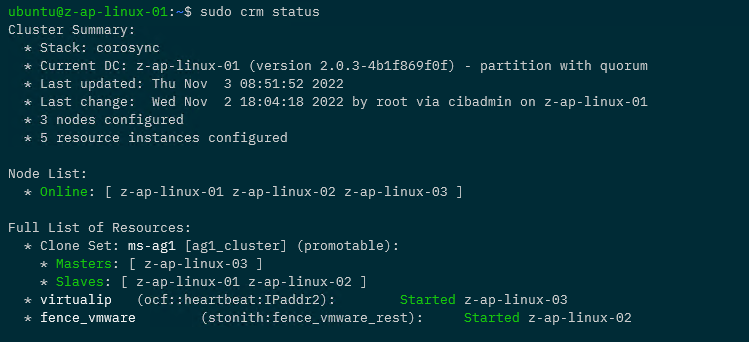
Awesome, we have our STONITH resource up and running in the cluster!

If you want to test the resource, this will fence a node: –

sudo crm node fence <NODE>

So that’s how to deploy a STONITH resource for a pacemaker cluster on VMWare virtual machines. If you want to see the whole process of creating the cluster, the code is available here.

One word of caution, there are a lot of STONITH and cluster properties that can be set…please remember to test your configuration fully before deploying to production!

Thanks for reading!

Operating system error 995 when adding a database to an availability group

I was adding databases to an availability group (SQL Server 2017 CU20 instance) the other day and one database failed to automatically seed to the secondary.

When I looked in the SQL Server error log I saw this error message: –

BackupIoRequest::ReportIoError: write failure on backup device ‘{GUID}’. Operating system error 995(The I/O operation has been aborted because of either a thread exit or an application request.).

Followed up by: –

Automatic seeding of availability database ‘databasename’ in availability group ‘availabilitygroup’ failed with a transient error. The operation will be retried.

BackupVirtualDeviceFile::RequestDurableMedia: Flush failure on backup device ‘{GUID}’. Operating system error 995(The I/O operation has been aborted because of either a thread exit or an application request.).

Write on “{GUID}” failed: 995(The I/O operation has been aborted because of either a thread exit or an application request.)

A nonrecoverable I/O error occurred on file “{GUID}:” 995(The I/O operation has been aborted because of either a thread exit or an application request.).

OK I was a little concerned…until I went and checked the secondary.

The issue was, even though I’d created the file paths on the secondary for the data files…I hadn’t created the file path for the database’s log file.

So I removed the database from the availability group, created the file path for the database’s log file, and readded to the availability group.

This time the database automatically seeded over to the secondary no problem…phew!

Thanks for reading!

DBCC CLONEDATABASE in SQL Server 2014

In SQL Server 2014 SP2 an interesting new DBCC command was included, DBCC CLONEDATABASE

This command creates a “clone” of a specified user (not supported for the system databases) database that contains all objects and statistics of the specified database. Hmm, could be useful, but, how does it work? Let’s have a look.

First create a database: –

USE [master];
GO

CREATE DATABASE [Test];
GO

And then create a test table: –

USE [TEST];
GO

CREATE TABLE dbo.TestTable 
(PK_ID	   INT IDENTITY(1,1),
 ColA	   VARCHAR(10),
 ColB	   VARCHAR(10),
 ColC	   VARCHAR(10),
 CreatedDate DATE,
 CONSTRAINT [PK_ID] PRIMARY KEY (PK_ID));
GO

Insert some data and then make sure stats have been generated: –

INSERT INTO dbo.TestTable
(ColA,ColB,ColC,CreatedDate)
VALUES
(REPLICATE('A',10),REPLICATE('B',10),REPLICATE('C',10),GETUTCDATE());
GO 100000

EXEC sp_updatestats;
GO

Now we can run the DBCC CLONEDATABASE command: –

DBCC CLONEDATABASE ('test','testclone');
GO

And verify that a read only copy of the database has been generated: –

dbcc clonedatabase

So, let’s have a look at the data in the new database: –

SELECT TOP 1000 [PK_ID]
      ,[ColA]
      ,[ColB]
      ,[ColC]
      ,[CreatedDate]
  FROM [testclone].[dbo].[TestTable];
GO

No data! Ok, so let’s have a look at the stats: –

USE [testclone];
GO

EXEC sp_spaceused 'dbo.testtable';
GO


DBCC SHOW_STATISTICS(N'testtable',PK_ID);
GO

dbcc clonedatabase stats
There’s the stats, SQL thinks that there’s 1000 rows in the table, pretty cool.

What we’ve ended up with is a read only database with no data but the objects and stats of the target database.

First thing, I’d be doing is backing that clone up and bringing it down to my local instance. Want to see how code will execute against production but don’t want to touch that prod environment? Here’s your answer.

@Microsoft, can we have this for other versions of SQL please?

SQL Server 2016 – Perform Volume Maintenance

One of the server settings that I always enable when configuring a new instance of SQL is database instant file initialisation

In case you don’t know what this is, it is a setting that can be granted to the service account that the SQL database engine runs under that prevents SQL Server from “zeroing out” new space when a data file is created or expanded.

This improves the performance of CREATE/ALTER DATABASE statements, RESTORE statements and AUTOGROWTH operations. A full detailed article to how and why can be found here.

It’s cool to see that you can now enable this when installing SQL Server: –

SQL2016 Perform Volume Maintenance

I can’t think of any downside to having this enabled (off the top of my head, there’s probably one or two) and it’s good to see that Microsoft know that most people enable it so adding it as an option in the installer is great imho.

Where is my data stored?

Tables within SQL Server can contain a maximum of 8060 bytes per row. However even though columns are limited to a maximum of 8000 bytes in size, the combined size of all the columns in a table can exceed the 8060 limit. But what happens when this limit is exceeded?

Let’s create a database and have a look:-

USE [master];
GO

CREATE DATABASE [StorageTest];
GO

Now create a table to test with:-

USE [StorageTest];
GO

CREATE TABLE dbo.[Test1]
( PKID		 INT,
  FirstName	 CHAR(24),
  MiddleName CHAR(24),
  LastName	 CHAR(24));
GO

The length of each row within this table will be:-

Column Data Type Size
PKID INT 4 bytes
FirstName CHAR(24) 24 bytes
MiddleName CHAR(24) 24 bytes
LastName CHAR(24) 24 bytes
Total 76 bytes

More info on data types and their sizes

Let’s insert one row and have a look at the size:-

INSERT INTO dbo.[Test1]
(PKID, FirstName, MiddleName, LastName)
VALUES
(1, 'Andrew', 'Philip', 'Pruski');
GO
EXEC sp_spaceused 'Test1';
GO

InitialTableSize1

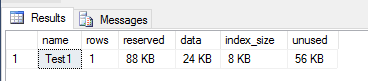
We can see that 1 row is in the table which is 8KB in size. This is because SQL stores data on 8KB pages so 8KB is the minimum size for a table which has data in it! We can see this by running the undocumented DBCC command, DBCC IND:-

DBCC IND('StorageTest','Test1',1);
GO

TableAllocations1

Not going to go into what each of the columns mean but you can see that this table has two rows. Both classified as “in-row data”, the first row is page type 10 which is an IAM page and the second row is page type 1 (a data page), which contains the row we inserted.

More info on DBCC IND and page types

“In-row data” is exactly what it sounds like, data in the rows on the page.

What happens when we add a column that will take the size of the row over the 8060 limit? I commonly see large columns added to tables with the reason of “we don’t know how big the data will be so we’re making this column as big as SQL will allow” *sigh*. For example:-

ALTER TABLE dbo.[Test1]
ADD [Address] VARCHAR(8000);
GO

Let’s populate that column with some data:-

UPDATE dbo.[Test1]
SET [Address] = 'zz'
WHERE PKID = 1;
GO

What’s the size of the table now?

EXEC sp_spaceused 'Test1';
GO

InitialTableSize1

Still the same, good, but if this column is completely filled to its maximum so the size of a row will be over the limit, what will happen to the size of the table and where will the data be stored?

Let’s fill the column up for the row that is already in the table:-

UPDATE dbo.[Test1]
SET [Address] = REPLICATE('zz',4000)
WHERE PKID = 1;
GO

Now we have a row that has exceeded the maximum size allowed, what has that done to the size of the table?

EXEC sp_spaceused 'Test1';
GO

TableSize2

Huh? The size of the table has tripled from 8KB to 24KB! What’s going? Let’s run DBCC IND again and have a look:-

DBCC IND('StorageTest','Test1',1);
GO

TableAllocations2

There are now two new pages allocated to the table, classified as “Row-overflow data”. Because we’ve gone over the row limit, SQL has allocated a new IAM page and a new page to store the data that has gone over the limit. This means that just by adding that column and populating it to its maximum limit the table has noticeably increased in size. If there were thousands/millions of rows in this table there would be a big impact on the performance of queries SELECTing from it due to the extra amount of page reads that would have to be performed.

I know this is a very contrived example but it’s good to see how SQL reacts to columns being added to tables that can make a row exceed its maximum size.

I have to admit though, I rarely see VARCHAR(4000) added to a table. What’s far more common is VARCHAR(MAX). How does SQL react to having a column with this datatype added to a table? Well, let’s find out.

First reset our table (dropping the column and rebuilding to bring it back down to its original size):-

ALTER TABLE [Test1] DROP COLUMN [Address];

ALTER TABLE [Test1] REBUILD;
GO

Add the column:-

ALTER TABLE dbo.[Test1]
ADD [Address] VARCHAR(MAX);
GO

Populate the row with data:-

UPDATE dbo.[Test1]
SET [Address] = REPLICATE('zz',4000)
WHERE PKID = 1;
GO

Check the size of the table:-

EXEC sp_spaceused 'Test1';
GO

TableSize3

Again the table has tripled in size (ignore the reserved size, it’s larger as we’ve been messing about). If we look at the page allocations we can see why:-

DBCC IND('StorageTest','Test1',1);
GO

TableAllocations3

SQL has allocated two new pages to the table, classified as”LOB data”. This time SQL has pushed out the data in the NVARCHAR(MAX) column to a special page type designed for large data types. Other data types that this applies to are nvarchar(max) and varbinary(max) (also text, ntext and image in previous versions).

So in summary, most data within SQL Server is stored on pages classified as “In-row data”. If the combined size of columns in a row exceeds 8060 bytes, then SQL will push data onto pages classified as “Row-overflow data”. Finally if certain LOB data types are used, then SQL stores that data on pages classifed as “LOB data”.