In-Memory OLTP: Part 4 – Native Compilation

This post follows on from In-Memory OLTP: Part 3 – Durability & Recovery

In this final post for the #SQLNewBlogger challenge I want to go over another new feature of In-Memory OLTP, natively compiled stored procedures. Natively compiled stored procedures differ from normal stored procedures in that the In-Memory OLTP engine converts the code within the stored procedure to machine code when they are created. This means that no extra compilation to convert t-sql into a set of instructions that can be processed by a CPU needs to be performed when they are executed.

(I’m guessing that as disk IO has been taken out of the picture, Microsoft looked at other ways to improve performance of data operations and the compile time of stored procedures was identified, kinda cool eh?)

Here’s the syntax for creating a natively compiled stored procedure:-

CREATE PROCEDURE dbo.Example 
WITH NATIVE_COMPILATION, SCHEMABINDING, EXECUTE AS OWNER
AS
    BEGIN ATOMIC WITH
    (TRANSACTION ISOLATION LEVEL = SNAPSHOT, LANGUAGE = N'English')
	   .
	   .
	   .
	   .
	   .
	   .
    END
GO

Let’s go over the settings specified in the create statement:-

  • NATIVE_COMPLIATION – Does what it says on the tin
  • SCHEMABINDING – This prevents the tables accessed being dropped
  • EXECUTE AS OWNER – EXECUTE AS CALLER is not supported so a specific execution context must be supplied
  • ATOMIC – Everything within the stored procedure is executed as one “block”. Either all the statements within the transaction succeed or will be rolled back

As BEGIN ATOMIC has been specified the following must also be declared:-

  • TRANSACTION ISOLATION LEVEL = SNAPSHOT – Only SNAPSHOT, REPEATABLEREAD, and SERIALIZABLE are supported
  • LANGUAGE = N’English’ – a language from sys.syslanguages must be declared

Let’s see this in action. Create a database to contain a memory optimised table and stored procedure (code from the previous posts):-

USE [master];
GO

IF EXISTS(SELECT 1 FROM sys.databases WHERE name = 'InMemoryOLTPDemo')
DROP DATABASE [InMemoryOLTPDemo];
GO
  
IF NOT EXISTS(SELECT 1 FROM sys.databases WHERE name = 'InMemoryOLTPDemo')
BEGIN
    CREATE DATABASE [InMemoryOLTPDemo]
       ON PRIMARY
    (NAME       = N'InMemoryOLTPDemo Primary',
    FILENAME   = N'C:\SQLServer\Data\InMemoryOLTPDemo.MDF',
    SIZE       = 5MB,
    FILEGROWTH = 1MB,
    MAXSIZE    = UNLIMITED)
       LOG ON
    (NAME       = 'InMemoryOLTPDemo Log',
    FILENAME   = N'C:\SQLServer\LogInMemoryOLTPDemo_Log.LDF',
    SIZE       = 5MB,
    FILEGROWTH = 1MB,
    MAXSIZE    = UNLIMITED)
    COLLATE Latin1_General_100_BIN2;
 END

ALTER DATABASE [InMemoryOLTPDemo] ADD FILEGROUP MemData CONTAINS MEMORY_OPTIMIZED_DATA;
   
ALTER DATABASE [InMemoryOLTPDemo] 
ADD FILE
    (NAME       = N'InMemoryOLTPDemo Memory Optimised',
    FILENAME   = N'C:\SQLServer\Data\InMemoryOLTPDemo_MemOp')
    TO FILEGROUP MemData;
GO

Set up the memory optimised table:-

USE [InMemoryOLTPDemo];
GO
 
IF EXISTS(SELECT 1 FROM sys.tables WHERE name = 'EmployeeTableInMemory')
DROP TABLE [EmployeeTableInMemory];
GO
 
IF NOT EXISTS(SELECT 1 FROM sys.tables WHERE name = 'EmployeeTableInMemory')
CREATE TABLE [EmployeeTableInMemory]
   (EmployeeID   INT NOT NULL PRIMARY KEY NONCLUSTERED HASH WITH (BUCKET_COUNT = 1024),
    Department   SYSNAME NOT NULL INDEX IX_Department NONCLUSTERED HASH WITH (BUCKET_COUNT = 1024),
    FirstName   SYSNAME,
    LastName    SYSNAME,
    DateCreated DATE)
WITH (MEMORY_OPTIMIZED = ON, DURABILITY = SCHEMA_AND_DATA);
GO

SET NOCOUNT ON;
DECLARE @Counter INT = 1;
 
WHILE @Counter < 100000
BEGIN
 
INSERT INTO dbo.EmployeeTableInMemory
(EmployeeID, Department, FirstName, LastName, DateCreated)
VALUES
(@Counter, 'TEST', 'TestForename','TestSurname',CONVERT(DATE,GETDATE()))
 
SET @Counter = @Counter + 1;
END
GO

Now, create a normal stored procedure and a memory optimised one:-

CREATE PROCEDURE dbo.TestNormal
AS
    SELECT E1.EmployeeID, E1.Department, E1.FirstName, E1.LastName, E1.DateCreated
    FROM dbo.EmployeeTableInMemory E1
    INNER JOIN dbo.EmployeeTableInMemory E2 ON E1.EmployeeID = E2.EmployeeID 
    INNER JOIN dbo.EmployeeTableInMemory E3 ON E1.EmployeeID = E3.EmployeeID 
    INNER JOIN dbo.EmployeeTableInMemory E4 ON E1.EmployeeID = E4.EmployeeID 
    INNER JOIN dbo.EmployeeTableInMemory E5 ON E1.EmployeeID = E5.EmployeeID 
    INNER JOIN dbo.EmployeeTableInMemory E6 ON E1.EmployeeID = E6.EmployeeID 
    INNER JOIN dbo.EmployeeTableInMemory E7 ON E1.EmployeeID = E7.EmployeeID 
    INNER JOIN dbo.EmployeeTableInMemory E8 ON E1.EmployeeID = E8.EmployeeID 
    INNER JOIN dbo.EmployeeTableInMemory E9 ON E1.EmployeeID = E9.EmployeeID 
    INNER JOIN dbo.EmployeeTableInMemory E10 ON E1.EmployeeID = E10.EmployeeID 
    ORDER BY E10.EmployeeID DESC OPTION(RECOMPILE)
GO

CREATE PROCEDURE dbo.TestNative 
WITH NATIVE_COMPILATION, SCHEMABINDING, EXECUTE AS OWNER
AS
    BEGIN ATOMIC WITH
    (TRANSACTION ISOLATION LEVEL = SNAPSHOT, LANGUAGE = N'English')
	   SELECT E1.EmployeeID, E1.Department, E1.FirstName, E1.LastName, E1.DateCreated
	   FROM dbo.EmployeeTableInMemory E1
	   INNER JOIN dbo.EmployeeTableInMemory E2 ON E1.EmployeeID = E2.EmployeeID 
	   INNER JOIN dbo.EmployeeTableInMemory E3 ON E1.EmployeeID = E3.EmployeeID 
	   INNER JOIN dbo.EmployeeTableInMemory E4 ON E1.EmployeeID = E4.EmployeeID 
	   INNER JOIN dbo.EmployeeTableInMemory E5 ON E1.EmployeeID = E5.EmployeeID 
	   INNER JOIN dbo.EmployeeTableInMemory E6 ON E1.EmployeeID = E6.EmployeeID 
	   INNER JOIN dbo.EmployeeTableInMemory E7 ON E1.EmployeeID = E7.EmployeeID 
	   INNER JOIN dbo.EmployeeTableInMemory E8 ON E1.EmployeeID = E8.EmployeeID 
	   INNER JOIN dbo.EmployeeTableInMemory E9 ON E1.EmployeeID = E9.EmployeeID 
	   INNER JOIN dbo.EmployeeTableInMemory E10 ON E1.EmployeeID = E10.EmployeeID 
	   ORDER BY E10.EmployeeID DESC
    END
GO

N.B. – These are horrible stored procs, I know. They’re just for demo purposes. I’ve included OPTION(RECOMPILE) in the normal stored proc so that you can re-run when testing to see the differences each time (otherwise the plan will be cached).

Now run each one with STATISTICS TIME ON:-

SET STATISTICS TIME ON;
EXEC dbo.TestNormal;
GO

NormalProcCompileTime

SET STATISTICS TIME ON;
EXEC dbo.TestNative;
GO

NativeProcCompileTime


You can see that the natively compiled stored procedure never has any time registered for parse and compile. This is because it was compiled when it was created, meaning that if the procedure has any parameters they are not taken into consideration. All natively compiled stored procedures can be thought of as being optimised for unknown.

In addition, you’re not going to be able to see the execution plan when the stored procedure is executed. Try including the actual execution plan when running the code above. Querying sys.procedures will also not show any clues that the procedure is natively compiled, you’ll have to remember which stored procedures are natively compiled or you’re going to have real fun when investigating any performance issues!

So when should you use natively compiled stored procedures? As with many (most???) things with SQL Server, it depends. There are limitations to what you can do with them, they are designed for OLTP operations that are frequently called which need to be blazingly fast. A full list of the supported constructs for natively compiled stored procedures can be found here. My advice would be take every situation on a case by case basis and test to death but it’s worth remembering that they can only access memory optimised tables and that like those tables, they cannot be altered once created (you have to drop and re-create, feasible on a busy OLTP system?).

So that’s it! I’ve really enjoying writing this series of posts. Thanks very much for reading!

Further Reading
Creating Natively Compiled Stored Procedures – Microsoft
Best Practices for Calling Natively Compiled Stored Procedures

In-Memory OLTP: Part 3 – Checkpoints

This post follows on from In-Memory OLTP: Part 2 – Indexes

So far in this blog series memory optimised tables have been created with the durability option of SCHEMA_ONLY meaning that data will not be retained. However there is another durability option of SCHEMA_AND_DATA which means that SQL will retain data held in memory optimised tables.

But how is this achieved? Well, this is done via the transaction log (the same as with disk based tables) and checkpoint file pairs which are written to by the checkpoint process. It is these CFPs that I want to go through in this post.

Checkpoint Operations

The purpose of the checkpoint operation in SQL is to reduce recovery time by hardening to disk data pages that have been altered in memory (i.e.- “dirty” pages) and as such SQL will not have to apply the corresponding redo operations from the transaction log in the event of a crash. However even though the purpose is the same for both disk based and memory optimised tables the process is different. For memory optimised tables the checkpoint process is continuous and utilises the previously mentioned checkpoint file pairs (CFPs).

Each CFP contains:-

  • One data file which records INSERT operations
  • One delta file which records DELETE operations

N.B. – UPDATES are recorded as INSERT & DELETE operations

To show what is meant by a continuous checkpoint let’s have a look at the process. Create a database as normal:-

USE [master];
GO

IF EXISTS(SELECT 1 FROM sys.databases WHERE name = 'InMemoryOLTPDemo')
DROP DATABASE [InMemoryOLTPDemo];
GO
 
IF NOT EXISTS(SELECT 1 FROM sys.databases WHERE name = 'InMemoryOLTPDemo')
BEGIN
    CREATE DATABASE [InMemoryOLTPDemo]
       ON PRIMARY
    (NAME       = N'InMemoryOLTPDemo Primary',
    FILENAME   = N'C:\SQLServer\Data\InMemoryOLTPDemo.MDF',
    SIZE       = 5MB,
    FILEGROWTH = 1MB,
    MAXSIZE    = UNLIMITED)
       LOG ON
    (NAME       = 'InMemoryOLTPDemo Log',
    FILENAME   = N'C:\SQLServer\LogInMemoryOLTPDemo_Log.LDF',
    SIZE       = 5MB,
    FILEGROWTH = 1MB,
    MAXSIZE    = UNLIMITED)
    COLLATE Latin1_General_100_BIN2;
 END
 GO

Then add the filegroup and underlying file structure for memory optimised tables:-

ALTER DATABASE [InMemoryOLTPDemo] ADD FILEGROUP MemData CONTAINS MEMORY_OPTIMIZED_DATA;
  
ALTER DATABASE [InMemoryOLTPDemo] 
ADD FILE
    (NAME       = N'InMemoryOLTPDemo Memory Optimised',
    FILENAME   = N'C:\SQLServer\Data\InMemoryOLTPDemo_MemOp')
    TO FILEGROUP MemData;
GO

Have a look at the file system, you will see that a folder has been created at C:\SQLServer\Data\ called InMemoryOLTPDemo_MemOP:-

Memory Optimised Folder

Drilling down into the folder, there will be two subfolders with unique identifiers for names. The lowest level folder will be empty until a memory optimised table is created:-

USE [InMemoryOLTPDemo];
GO

IF EXISTS(SELECT 1 FROM sys.tables WHERE name = 'EmployeeTableInMemory')
DROP TABLE [EmployeeTableInMemory];
GO

IF NOT EXISTS(SELECT 1 FROM sys.tables WHERE name = 'EmployeeTableInMemory')
CREATE TABLE [EmployeeTableInMemory]
   (EmployeeID	 INT NOT NULL PRIMARY KEY NONCLUSTERED HASH WITH (BUCKET_COUNT = 1024),
    Department	 SYSNAME NOT NULL INDEX IX_Department NONCLUSTERED HASH WITH (BUCKET_COUNT = 1024),
    FirstName   SYSNAME,
    LastName    SYSNAME,
    DateCreated DATE)
WITH (MEMORY_OPTIMIZED = ON, DURABILITY = SCHEMA_AND_DATA);
GO

N.B. – Note that the durability option for this table is now set as SCHEMA_AND_DATA

Rechecking the folder, it will now have a number of files:-

Checkpoint Files 1

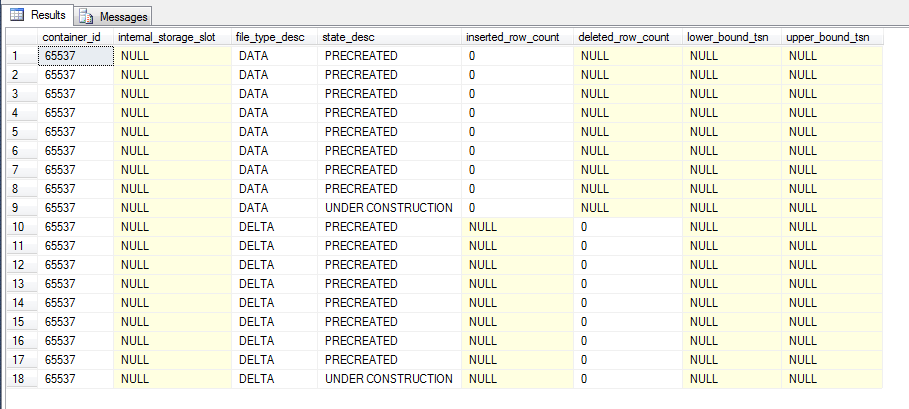
These are the physical CFPs, 18 files in total, 9 pairs.

We can get more information on these files by running the following script within SQL:-

SELECT
    container_id,
    internal_storage_slot,
    file_type_desc,
    state_desc,
    inserted_row_count,
    deleted_row_count,
    lower_bound_tsn,
    upper_bound_tsn
FROM
    sys.dm_db_xtp_checkpoint_files
ORDER BY
    file_type_desc,
    state_desc

sys.dm_db_xtp_checkpoint_files 1

Here we can see the 9 file pairs, most of which are ready for use by being marked as PRECREATED and one pair currently ready to have records written to them by being marked as UNDER CONSTRUCTION.

We can also see the following:-

  • inserted_row_count – number of records inserted into the data file
  • deleted_row_count – number of records in the delta file marking records in the data file as deleted
  • lower_bound_tsn – earliest transaction covered by the file
  • upper_bound_tsn – latest transaction covered by the file

N.B. – For a full description of the columns contained in this DMV see here

So let’s insert and then delete some data:-

DECLARE @Counter INT = 1;

WHILE @Counter < 1000
BEGIN

INSERT INTO dbo.EmployeeTableInMemory
(EmployeeID, Department, FirstName, LastName, DateCreated)
VALUES
(@Counter, 'TEST', 'TestForename','TestSurname',CONVERT(DATE,GETDATE()))

SET @Counter = @Counter + 1;
END
GO

DELETE FROM dbo.EmployeeTableInMemory
WHERE EmployeeID < 200;
GO

Check the DMV:-

SELECT
    container_id,
    internal_storage_slot,
    file_type_desc,
    state_desc,
    inserted_row_count,
    deleted_row_count,
    lower_bound_tsn,
    upper_bound_tsn
FROM
    sys.dm_db_xtp_checkpoint_files
ORDER BY
    file_type_desc,
    state_desc

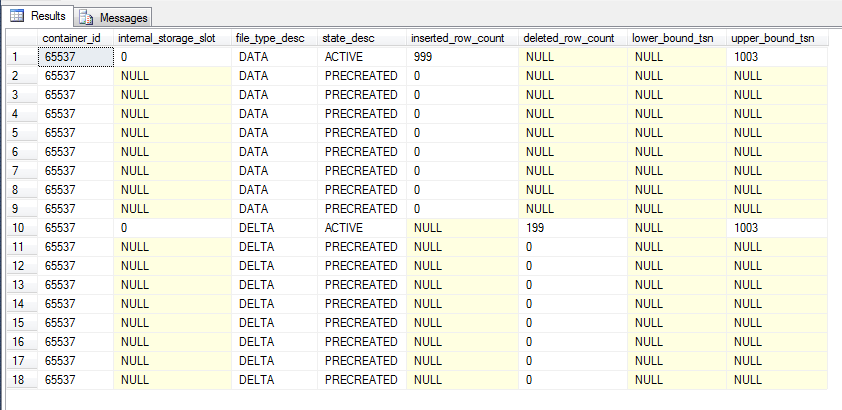
sys.dm_db_xtp_checkpoint_files 2

The continuous checkpoint process has written the data changes to the CFP marked as UNDER CONSTRUCTION. So what happens when a checkpoint occurs? Let’s run a manual checkpoint operation:-

CHECKPOINT

And then re-check the DMV:-

SELECT
    container_id,
    internal_storage_slot,
    file_type_desc,
    state_desc,
    inserted_row_count,
    deleted_row_count,
    lower_bound_tsn,
    upper_bound_tsn
FROM
    sys.dm_db_xtp_checkpoint_files
ORDER BY
    file_type_desc,
    state_desc

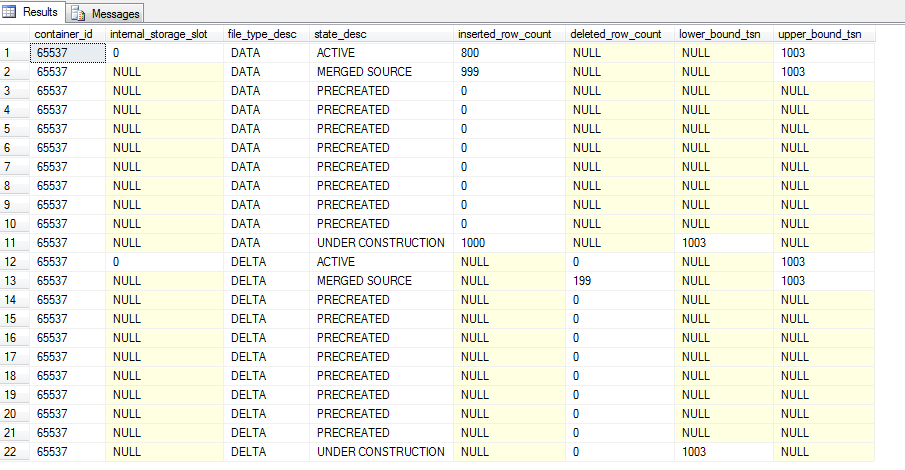
sys.dm_db_xtp_checkpoint_files 3

The previous files marked as “Under Construction” are now “Active”. This is the continuous checkpoint process in action, changes are written to the CFPs as they occur. When a CHECKPOINT command is issued (either by SQL or by the user manually) the current CFPs marked as UNDER CONSTRUCTION are then marked as ACTIVE. No more records will be written to the data file, although records can still be written to the delta (to mark records in the data file as deleted).

A new CFP will be created if more data is inserted into the table:-

DECLARE @Counter INT = 1000;
 
WHILE @Counter < 2000
BEGIN
 
INSERT INTO dbo.EmployeeTableInMemory
(EmployeeID, Department, FirstName, LastName, DateCreated)
VALUES
(@Counter, 'TEST', 'TestForename','TestSurname',CONVERT(DATE,GETDATE()))
 
SET @Counter = @Counter + 1;
END

And check the DMV again:-

SELECT
    container_id,
    internal_storage_slot,
    file_type_desc,
    state_desc,
    inserted_row_count,
    deleted_row_count,
    lower_bound_tsn,
    upper_bound_tsn
FROM
    sys.dm_db_xtp_checkpoint_files
ORDER BY
    file_type_desc,
    state_desc

sys.dm_db_xtp_checkpoint_files 4

There are now 20 records in the table, the two new records representing the data and delta files of the new CFP marked as UNDER CONSTRUCTION. As you may have guessed, adding more and more CFPs can affect recovery time so a background process runs to analyse the CFPs and merge old ones when necessary (i.e.- when the data in them is no longer required). But CFPs can be merged manually by running sys.sp_xtp_merge_checkpoint_files:-

EXEC sys.sp_xtp_merge_checkpoint_files 'InMemoryOLTPDemo',1003,1003;
GO

And check the DMV one more time:-

SELECT
    container_id,
    internal_storage_slot,
    file_type_desc,
    state_desc,
    inserted_row_count,
    deleted_row_count,
    lower_bound_tsn,
    upper_bound_tsn
FROM
    sys.dm_db_xtp_checkpoint_files
ORDER BY
    file_type_desc,
    state_desc

sys.dm_db_xtp_checkpoint_files 5

The active data file now has 800 records which is the original 999 minus the 199 from its corresponding delta file. The old CFP is now marked as MERGED SOURCE which means that a merge operation has been “installed”. This can be checked by running:-

SELECT request_state_desc, lower_bound_tsn, upper_bound_tsn
FROM sys.dm_db_xtp_merge_requests;
GO

sys.dm_db_xtp_merge_requests 1

This CFPs are no longer needed and can be removed by the background (or “garbage”) process, once:-

  • A checkpoint has occurred
  • A log backup has been taken
  • The garbage collection process has run

This can be done manually by running:-

--Take a full backup (as we don't currently have one)
BACKUP DATABASE [InMemoryOLTPDemo]
TO DISK = N'C:\SQLServer\Backups\InMemoryOLTPDemo.BAK';
GO

And then:-

--This section may need to be run twice
CHECKPOINT;
GO
BACKUP LOG [InMemoryOLTPDemo]
TO DISK = N'C:\SQLServer\Backups\InMemoryOLTPDemo.TRN';
GO
EXEC sp_xtp_checkpoint_force_garbage_collection;
GO
CHECKPOINT;
GO

The reason the second set of code has to be run twice is that SQL will mark the merged CFPs as REQUIRED FOR BACKUP/HA as this is the first log backup we’ve taken. Running it a second time will mark them as TOMBSTONE:-

sys.dm_db_xtp_checkpoint_files 6

These files can now be removed by the garbage collection process, which can be replicated by running:-

CHECKPOINT;
GO
BACKUP LOG [InMemoryOLTPDemo]
TO DISK = N'C:\SQLServer\Backups\InMemoryOLTPDemo.TRN';
GO
EXEC sp_filestream_force_garbage_collection;
GO

N.B.- You should never do this on a production system, the garbage process is automatic but hey, this is a demo.

Again, this code may have to be run more than once but (eventually) you’ll see:-
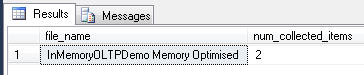
InMemory OLTP Garbage Collection Process
This means that two CFP files which were marked as TOMBSTONE have been removed.

Recovery

Just a final word on how the CFPs are used in the recovery process. If (when???) SQL crashes, the data and delta files are used to re-populate all memory optimised tables. The files are scanned and loaded into memory, all active rows in the data file are inserted after removal of rows in the delta file. Due to the pairing of the data & delta files the recovery process can be parallelised with multiple threads reading each pair. Once the load is complete the tail of the log is replayed to bring the database back to its state before the crash (as normal).

I hope that’s been a good overview of checkpoint file pairs for memory optimised tables. Thanks for reading!

Further Reading

Checkpoint Operation for Memory-Optimized Tables
Durability for Memory-Optimized Tables

In-Memory OLTP: Part 2 – Indexes

Following on from In-Memory OLTP: Part 1 – Introduction where we created a database capable of hosting memory optimised tables, I’d now like to run through the indexing options available.

As I mentioned in the last post, memory optimised tables do not have data pages. They are data rows written to memory sequentially with index pointers in the row header, meaning that it is the indexes that give order to the rows in the table. Therefore each memory optimised table must have at least one index and two new types of indexes are available.

These indexes are different from the disk based indexes that we’ve come to know and love. Each has their own internal structures which I’ll go through below.

Hash Indexes

Hash indexes are defined on Books Online as:-

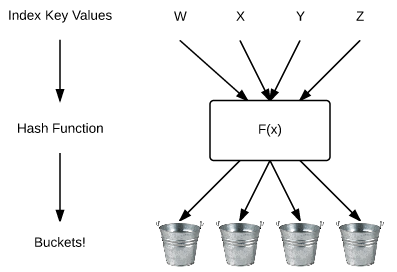
A hash index consists of a collection of buckets organized in an array. A hash function maps index keys to corresponding buckets in the hash index

Confused? Yeah, me too. It helps to visualise this as:-

Hash Function Diagram

The new engine takes the value in the index and applies a hash function to map it to the internal structure (or “bucket”). We can see this by inserting records into the table created in part one and then querying a new DMV.

But first, here’s the code from part one to create the datatabase:-

USE [master];
GO

IF NOT EXISTS(SELECT 1 FROM sys.databases WHERE name = 'InMemoryOLTPDemo')
BEGIN
    CREATE DATABASE [InMemoryOLTPDemo]
	   ON PRIMARY
    (NAME       = N'InMemoryOLTPDemo Primary',
	FILENAME   = N'C:\SQLServer\Data\InMemoryOLTPDemo.MDF',
	SIZE       = 5MB,
	FILEGROWTH = 1MB,
	MAXSIZE    = UNLIMITED)
	   LOG ON
    (NAME       = 'InMemoryOLTPDemo Log',
	FILENAME   = N'C:\SQLServer\LogInMemoryOLTPDemo_Log.LDF',
	SIZE       = 5MB,
	FILEGROWTH = 1MB,
	MAXSIZE    = UNLIMITED)
    COLLATE Latin1_General_100_BIN2;


    ALTER DATABASE [InMemoryOLTPDemo] ADD FILEGROUP MemData CONTAINS MEMORY_OPTIMIZED_DATA;
 
    ALTER DATABASE [InMemoryOLTPDemo] 
    ADD FILE
    (NAME       = N'InMemoryOLTPDemo Memory Optimised',
	FILENAME   = N'C:\SQLServer\Data\InMemoryOLTPDemo_MemOp')
    TO FILEGROUP MemData;
END
GO

Now the table can be created and records inserted:-

USE [InMemoryOLTPDemo];
GO
 
IF NOT EXISTS(SELECT 1 FROM sys.tables WHERE name = 'EmployeeTableInMemory')
BEGIN
CREATE TABLE [EmployeeTableInMemory]
   (EmployeeID   INT NOT NULL PRIMARY KEY NONCLUSTERED HASH WITH (BUCKET_COUNT = 1024),
    Department   SYSNAME NOT NULL INDEX IX_Department NONCLUSTERED HASH WITH (BUCKET_COUNT = 1024),
    FirstName   SYSNAME,
    LastName    SYSNAME,
    DateCreated DATE)
WITH (MEMORY_OPTIMIZED = ON, DURABILITY = SCHEMA_ONLY);

 
DECLARE @Counter INT = 1;
DECLARE @Department SYSNAME;
 
WHILE @Counter &lt; 1025
BEGIN
 
SELECT @Department =
    CASE
    WHEN @Counter <= 100 THEN 'IT'
    WHEN @Counter > 100 AND @Counter <= 200 THEN 'HR'
    WHEN @Counter > 200 AND @Counter <= 300 THEN 'Accounting'
    WHEN @Counter > 300 AND @Counter <= 400 THEN 'Finance'
    WHEN @Counter > 400 AND @Counter <= 500 THEN 'Marketing'
    WHEN @Counter > 500 AND @Counter <= 600 THEN 'IT'
    WHEN @Counter > 600 AND @Counter <= 700 THEN 'HR'
    WHEN @Counter > 700 AND @Counter <= 800 THEN 'Accounting'
    WHEN @Counter > 800 AND @Counter <= 900 THEN 'Finance'
    WHEN @Counter > 900 AND @Counter <= 1000 THEN 'Marketing'
    ELSE 'Management' END; 
 
INSERT INTO dbo.EmployeeTableInMemory
(EmployeeID, Department, FirstName, LastName, DateCreated)
VALUES
(@Counter, @Department, 'TestForename','TestSurname',CONVERT(DATE,GETDATE()))
 
SET @Counter = @Counter + 1;
END

END
GO

N.B. – I’ve created two hash indexes here. One as a primary key on EmployeeID and one as a nonclustered index on Department, just so that you can see the difference in syntax.

The newly created memory optimised table now has 1024 records in it. The number of buckets used can be viewed by querying the following DMV:-


--View hash index stats
SELECT
    OBJECT_NAME(h.object_id),
    i.name,
    h.total_bucket_count,
    h.empty_bucket_count,
    h.avg_chain_length,
    h.max_chain_length
FROM 
    sys.dm_db_xtp_hash_index_stats h
INNER JOIN
    sys.indexes i ON (h.object_id = i.object_id AND h.index_id = i.index_id)
WHERE 
    OBJECT_NAME(h.object_id) = 'EmployeeTableInMemory';
GO

Which gives the following output:-

Hash Index DMV Stats

Wait, why haven’t all the buckets been used? The indexes were created with 1024 buckets and the table had 1024 records inserted so what’s going on? Shouldn’t the PK have used all the buckets?

This happens because the hash function is balanced resulting in values not being mapped evenly to the hash buckets. Books Online advises that the distribution of values to their hash buckets usually follows a Poisson Distribution:-

Poission Distribution Example
Image source:- http://root.cern.ch/root/html/TMath.html

But does that mean determining the number of buckets to use is very difficult? Remember that the index has to be created at the same time as the table and cannot be altered.

The general rule seems to be to have a bucket count that is approximately twice the number of unique records in the column it is applied to. Books Online also mentions that there should not be any noticeable performance impact if the bucket count is within five times the number of unique records.

Performance can be affected by setting an incorrect bucket count so if you cannot determine an approximate figure you should use the second type of index available on memory optimised tables, range indexes.

Range Indexes

Range indexes utilise a new structure called a Bw-tree:-

The Bw-tree Structure
Bw-Tree Structure

Look familiar? Looks somewhat similar to a normal B-tree right? In fact a Bw-tree can be thought of as a lock/latch free version of a traditional B-tree.

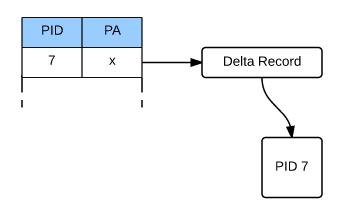
This is implemented by use of a mapping table which maps physical memory locations to logical page identifers (PIDs). The PIDs are used to link the nodes in the Bw-tree which allows the physical location of a page to change on every update with the mapping table updated to the new physical location. This means that the pages are never updated, never changed, they are simply replaced for each update enabling the no locking or latching functionality.

However at the leaf level, not all updates replace a page. Instead “delta” records are created.

Bw-tree Delta Record

When a DML operation occurs (e.g.- delete/insert/update) a delta record describing the change is created. This delta record is then linked to the original page and the physical address of the page in the mapping table is updated to point to the delta record.

This allows a performance saving by the In-Memory OLTP engine not having to create a new page for every operation. However this does mean that when traversing down the Bw-tree, SQL will have to go through all the delta records before hitting a page. This can have a performance impact so there is a background process that routinely consolidates a page’s delta records.

Still with me? OK, let’s create a range index. It’s pretty simple to do, however again, as tables cannot be altered once created they must be created at the same time as the table:-

USE [InMemoryOLTPDemo];
GO

IF EXISTS(SELECT 1 FROM sys.tables WHERE name = 'EmployeeTableInMemory')
DROP TABLE [EmployeeTableInMemory];
GO


IF NOT EXISTS(SELECT 1 FROM sys.tables WHERE name = 'EmployeeTableInMemory')
CREATE TABLE [EmployeeTableInMemory]
   (EmployeeID	INT NOT NULL PRIMARY KEY NONCLUSTERED HASH WITH (BUCKET_COUNT = 1024),
    Department	SYSNAME NOT NULL INDEX IX_Department NONCLUSTERED HASH WITH (BUCKET_COUNT = 1024),
    FirstName   SYSNAME,
    LastName    SYSNAME,
    DateCreated DATE NOT NULL INDEX IX_DateCreated NONCLUSTERED)
WITH (MEMORY_OPTIMIZED = ON, DURABILITY = SCHEMA_ONLY);
GO

No new DMVs for range indexes (use sys.indexes for information) the differences are the internal structure and how they’re created.

Usage

So how are these new indexes used? Well hash indexes are used for queries with equality operators, for example:-

SELECT *
FROM dbo.EmployeeTableInMemory
WHERE Department = 'IT'
ORDER BY EmployeeID ASC;
GO

Range Indexes and used for queries with inequality operators (scanning a range of values):-

SELECT *
FROM dbo.EmployeeTableInMemory
WHERE DateCreated &gt;= CONVERT(DATE,'2015-03-31')
AND DateCreated &lt;= CONVERT(DATE,'2015-04-02')
ORDER BY EmployeeID ASC;
GO

N.B. – Have a look at the query plans generated.

Limitations

Finally as this is pretty much version 1.0 of In-Memory OLTP there are some limitations on creating indexes:-

  • Character columns in the index must have a binary collation
  • No clustered indexes
  • Only one unique index supported (the primary key)
  • Maximum of eight indexes per table
  • Indexes created “in-line” with table and cannot be dropped/altered

I hope that’s been a good introduction into indexes on memory optimised tables. Thanks for reading!

Further Reading

Guidelines on using indexes on memory optimised table – Books Online
Hash indexes – Books Online
Hash indexes – Tony Rogerson
The Bw-Tree: A B-tree for New Hardware – Microsoft Research
The Bw-Tree: A B-Tree On Steroids – Justin Levandoski, David Lomet & Sudipta Sengupta

In-Memory OLTP: Part 1 – Introduction

In-Memory OLTP is getting a lot of (rightly deserved imho) hype at the moment. But what does it entail exactly? If you’re a DBA with a few years experience under your belt and are looking to get into this new feature but don’t have the time to sit and read the various technical articles that are out there, this series of blog posts will get you started. I’ll include links along the way so that you can dive further in when you get a chance.

Let’s get started…

Back in December I wrote a review of Kalen Daleny’s book SQL Server Internals: In-Memory OLTP, you can read it here

Since then I’ve had a chance investigate the new functionality for myself and as part of Ed Leighton-Dick’s #SQLNewBlogger challenge in April I’ll write a 4 part series covering:-

Introduction

In-Memory OLTP is a completely new engine incorporated within the existing SQL engine. This means that even though familiar tools and code are used to create and administer memory optimised objects they behave very differently than the established disk based objects.

Memory optimised tables exist entirely in memory, meaning that there are no calls to disk for user IO operations. However there are background processes that write to disk if data in the tables is specified as durable. Their internal structure is different too, no data pages are used, they are data rows written into memory sequentially with each row containing an index pointer to the next. This means that each memory optimised table must have a minimum of one index. I’ll go through the indexes available on memory optimised tables in Part 2 of this series.

Another major difference between In-Memory OLTP and traditional disk based objects is that In-Memory OLTP support the ACID properties of transactions but with no locking needed. In order to do this In-memory OLTP uses an optimistic concurrency model called the multi-version concurrency control (MVCC) model which implements a new form of row versioning. More information on MVCC can be found here.

However, before we get into the features of In-Memory OLTP we first need to create a database that can hold memory optimised objects.

So create a database as normal:-

CREATE DATABASE [InMemoryOLTPDemo]
    ON PRIMARY
(NAME	    = N'InMemoryOLTPDemo Primary',
 FILENAME   = N'C:\SQLServer\Data\InMemoryOLTPDemo.MDF',
 SIZE	    = 5MB,
 FILEGROWTH = 1MB,
 MAXSIZE    = UNLIMITED)
    LOG ON
(NAME	    = 'InMemoryOLTPDemo Log',
 FILENAME   = N'C:\SQLServer\LogInMemoryOLTPDemo_Log.LDF',
 SIZE	    = 5MB,
 FILEGROWTH = 1MB,
 MAXSIZE    = UNLIMITED)
COLLATE Latin1_General_100_BIN2;
GO

Now add a filegroup and file that is designated as containing memory optimised objects/data:-

ALTER DATABASE [InMemoryOLTPDemo] ADD FILEGROUP MemData CONTAINS MEMORY_OPTIMIZED_DATA;

ALTER DATABASE [InMemoryOLTPDemo] 
ADD FILE
(NAME       = N'InMemoryOLTPDemo Memory Optimised',
 FILENAME   = N'C:\SQLServer\Data\InMemoryOLTPDemo_MemOp')
TO FILEGROUP MemData;
GO

N.B. – Couple of notes with this…you can only have one memory optimised filegroup per database AND it cannot be removed once created (you have to drop the database!). Also note that a binary collation was specified. This is because indexes on memory optimised tables that include character columns have to be set to a binary collation.

The following SELECT statement will return the memory optimised filegroup and corresponding files:-

SELECT
    g.name,
    g.type_desc,
    f.name,
    f.physical_name,
    f.state_desc
FROM
    sys.filegroups g
INNER JOIN
    sys.master_files f on g.data_space_id = f.data_space_id
WHERE
    f.database_id = DB_ID()
AND
    g.type = 'FX';
GO

Once the filegroup has been created with the corresponding files, memory optimised tables can now be created and populated. The syntax is nearly exactly the same as for “normal” (or disk based) tables, with a couple of extra settings and restrictions:-

CREATE TABLE [TableInMemory]
   (RecordID    INT NOT NULL PRIMARY KEY NONCLUSTERED HASH WITH (BUCKET_COUNT = 1024),
	FirstName   SYSNAME,
	LastName    SYSNAME,
	DateCreated DATE)
WITH (MEMORY_OPTIMIZED = ON, DURABILITY = SCHEMA_ONLY);
GO

Memory optimised tables do not support clustered indexes so here I’ve used a new type of index called a HASH index. I’ll cover the new indexes supported by In-Memory OLTP objects in section 2 of this blog series.

The other difference from the norm is at the end of the script. MEMORY_OPTIMIZED = ON does exactly what it says on the tin, designates this table as memory optimised.

The second part DURABILITY = SCHEMA_ONLY indicates that in the event of a instance restart only the schema of the table will be preserved. DURABILITY = SCHEMA_AND_DATA indicates that the table will have data written to disk via a background process so that it can be recovered in the event of an instance restart (this option is the default). I’ll go through this in Part 3.

So, we’ve created a database that can contain memory optimised objects and also created a SCHEMA_ONLY durable memory optimised table. In the next post I’ll go through the new types of indexes supported by the In-Memory OLTP engine.

Finally, it’s worth mentioning the restrictions around memory optimised tables:-

  • No clustered indexes
  • No unique indexes (apart from the primary key)
  • Character columns in indexes have to be set to a binary collation
  • No foreign keys
  • No check constraints
  • No triggers
  • Only certain datatypes supported which are fully detailed here

Further Reading

In-Memory OLTP – Books Online
Exploring In-memory OLTP Engine – Rob Garrison
In-Memory OLTP Whitepaper – Kalen Delaney

Book Review – SQL Server Internals: In-Memory OLTP by Kalen Delaney

The new SQL Server 2014 feature In-Memory OLTP (code-named “Hekaton”) has been attracting a lot of interest since its release, promising to deliver (if you believe the rhetoric) an increase of up to 100 times in performance.

If you’re like me, you’ve got a copy of SQL Server 2014 Developer Edition and have played around, maybe created some memory-optimised objects but not really done much more.

But what is the real power of this feature? Why is it causing such a stir among the SQL Server community? I wanted to learn more, see what exactly In-Memory OLTP is and what it can do.

So when I saw that Red Gate were sending out copies of Kalen Delaney’s book SQL Server Internals: In-Memory OLTP for review, I jumped at the chance. I was hoping for a complete overview of the feature, specifically:-

What is In-Memory OLTP?
How does it provide the promised performance boost?
How does it differ from the existing SQL Server architecture?
How can it be applied in the “real world”?

Does the book deliver? I’ll run through each chapter, detailing what the content is and then summarise if it met my expectations.

(N.B. – The book comes with code examples, all of which can be downloaded from here. I would highly recommend that anyone reading through this book also get the code and follow along in their own instance of SQL)

The introduction to the book explains how the existing SQL Server Engine is optimised for disk based storage and why the need for In-Memory OLTP arose (aka the limitations of IO subsystems). It details the goals that the team at Microsoft were set and that In-Memory OLTP meets all of them. It then sets expectations for the book, explaining what each chapter covers and what it relates to.

I liked the way that the introduction talks about specific performance bottlenecks within SQL Server, explaining what they are, how In-Memory OLTP resolves them and in which chapter that particular feature is covered.

DBCC PINTABLE was before my time as a DBA but I have heard it being mentioned in the same breath as In-memory OLTP. The first thing this chapter 1 does is point out that the two are in no way related. In-memory OTLP is an entirely feature within the SQL Server engine, with its behaviour very different that than of the existing disk based system.

The chapter then covers objects within the new features detailing tables, indexes, stored procedures, how the promised no locking/latching access works and how In-Memory objects deal with the recovery and durability required for objects within SQL Server. Each time detailing the differences against the existing objects within SQL Server.

Each of the areas of In-Memory OLTP is broadly covered in this chapter, giving a good overview of what In-Memory OLTP is, what it can do and how it does it. If you are approaching In-Memory OLTP with no prior knowledge, this will give you a good grounding.

Chapter 2 covers creating databases that will contain memory-optimised tables, detailing the new syntax required and what limitations/restrictions there are.

Of particular interest to me was that In-Memory OLTP tables will only support indexes on character columns with a binary collation (currently). The chapter mentions setting this option at either the column or database level, the book recommends setting this at the column level.
(N.B. – This is something that I really liked about the book. All the way through it provides recommendations on the usage of In-Memory OLTP, giving sound reasoning for them).

We then get to use the first of the provided scripts, creating a database that is configured to contain memory-optimised tables and then creating the tables themselves.

The final part of the chapter talks about how to access the in-memory objects, either by standard t-sql or the new feature, natively compiled stored procedures. We are told that Chapter 7 gives a more in-depth look at natively compiled procedures but for now we are just given a brief listing some of the restrictions when querying memory optimised tables, either via t-sql or the new natively compiled stored procedures.

Chapter 3 explains how memory optimised objects are structured and how they are accessed. We are introduced to the optimistic multi-version concurrency control (MVCC) model, which uses a form of row versioning for accessing/modifying rows in memory optimised tables. This can be a little hard to follow (well it was for me at first) but the book walks us through INSERT, UPDATE and DELETE operations, step by step, detailing the work that SQL performs in the background.

This chapter shows just how differently SQL treats memory optimised tables compared to disk based tables. The book goes through these differences, explaining how SQL avoids read-write/write-write conflicts without acquiring any locks, using simple examples for clarification.

Probably the most technical chapter, chapter 4 explains the new hash and range indexes that are available for memory optimised tables.

We are taken through the new internal structures of both types of indexes, the buckets in the hash indexes and the “Bw-tree” in the range indexes. Then the book goes through how SQL performs internal index operations: consolidation, splitting and merging of pages.

The most useful section of this chapter is where it details when each type of index should be used. Hash indexes being useful for unique data being queried with equality predicates whereas range indexes used for searching for a range of values. I am intrigued with how hash indexes will perform; the book mentions that the correct number of “buckets” must be set for optimum performance but I am confused as to how this figure is to be calculated (I’m guessing trial and error).

Chapter 5 goes through how SQL Server preserves the ACID properties of every transaction against memory optimised tables. It goes through the internal processes that SQL performs for every transaction, detailing the differences in the difference isolation levels.

Of particular interest is the compatibility of the existing isolation levels with memory optimised objects. For instance READ UNCOMMITTED is not supported. What is of real benefit is the advice on when the different isolation levels that are available can be used for cross container queries (queries referencing tables on disk and in memory).

I suspect that when I come to use memory optimised tables “in anger”, I will stick to the default isolation level but having this extra information for reference is definitely useful.

There are more code examples here, allowing us to run queries in different isolation levels and observe how SQL reacts (i.e. – the errors that are generated!).

Chapter 6 explains how SQL Server supports recovery of data in memory optimised tables. It explains how SQL Server writes to the transaction log and details the concept of “reduced logging”. We are given a code example to highlight this. I really like delving into the internals of SQL Server so I thought this was great.

We are introduced to “Checkpoint File Pairs”; the book provides in-depth detail on how they are structured and how they are managed. Code is again provided so that we can observe the processes themselves, querying the relevant system objects to see what SQL is doing in the background. This is something that I’m going to explore further on my own, but it’s really helpful to have the code from the book to give me a start.

Finally the chapter details what SQL does during the recovery process, going through the checkpoint file load process and then replaying the tail of the transaction log.

Another completely new feature is the native compilation of stored procedures that can be used to access memory optimised tables. Chapter 7 explains that stored procedures can be converted to processor instructions that the server’s CPU(s) will execute directly without further compilation. This is where the performance benefit comes from; the CPU having to execute fewer instructions reduces processing time.

It also reveals that memory optimised tables are also natively compiled, so both tables and stored procedures are stored as DLLs, loaded into memory and linked to SQL Server.

The chapter then gives code examples on how to create the objects, highlighting the differences in syntax and then detailing the restrictions. The final part of the chapter, the part that I found most interesting, was focussed on performance comparisons. First we are shown details of the performance comparisons that Microsoft carried out. Then we are shown example code, allowing us to perform our own testing. I really like this, viewing performance data is one thing but being able to run scripts and see the results really drives the point home.

To complete the book, chapter 8 details how In-Memory OLTP is supported and can be managed.
We are taken through feature support, managing the memory allocations required, new reports, additions to catalog views and new dynamic management objects, best practices, current uses and finally the migration process.

The listing of the additions to the catalog views and the new dynamic management objects will be extremely useful. There is a brief summary of each but I would recommend copying out each one, finding the MSDN article and reading that in full. It’s good to know what information is available via these system objects, and the information here will allow you to build your own scripts to analyse the In-Memory OLTP architecture.

Another section that I found helpful was the section detailing current uses of In-Memory OLTP. I came away from the section already thinking about how I could apply the feature to the existing systems I manage in my day job. A little premature maybe, but for me it took In-Memory OLTP from theoretical to something that I could actually implement.

So did the book meet my expectations? Well, I started out with the questions:-

What is In-Memory OLTP?
How does it provide the promised performance boost?
How does it differ from the existing SQL Server architecture?
How can it be applied in the “real world”?

Chapter 1 gives a good overview of what In-Memory OLTP is, giving a good overview of each of the features which sets the reader up nicely for the rest of the book. How In-Memory OLTP delivers its promised performance boost and how it differs from the existing disk based architecture is mentioned throughout the book. As each feature is discussed we are told how it works and how it is different from the existing SQL Server architecture. Finally, the section in chapter 8 which talks about existing applications of In-Memory OLTP answered my final question. This was a nice touch and as I said earlier, got me thinking about how I could implement In-Memory OLTP in the system I manage.

So I have to say, yes, the book definitely met my expectations. By using an informal style (the diagrams are almost cartoonish) the book presents what could have been a very dry subject clearly, relating back to the existing architecture within SQL Server to highlight the differences and advantages of the new In-Memory OLTP features. It provides recommendations on how to implement In-Memory OLTP, providing examples of when it would and would not be useful.

The code used in each of the examples is available for download, allowing the reader to follow along and try out each of the new features. Not only does this code help explain the book subject matter but it will allow analysis of In-Memory OLTP objects when deployed in a Production environment (or at least provide a foundation for the reader to build their own custom scripts).

I would recommend this book to anyone looking to learn/implement SQL Server’s In-Memory OLTP feature.

The book can be purchased from Amazon. There will be a PDF version available in 2015 from http://www.red-gate.com/community/books/.