Collation Conflicts

I have recently seen some “bad plans” being generated by the optimiser and from investigation, the cause came down to the fact that the collation of the database where the queries were running was different to the tempdb collation.

Consider this situation, you have a stored procedure which collects various records and stores them in a temporary table. This temporary table is then used as a reference to delete records from another table in the database. This is a bit of a contrived example, but I just want to show you the impact differing collations can have.

N.B. – I’m running this in SQL Server 2012

First I’ll create a database with a different collation to the tempdb (the tempdb collation on my local instance is Latin1_General_CI_AS):-

CREATE DATABASE [CollationConflict] COLLATE SQL_Latin1_General_CP1_CI_AS;

Then I’ll create two tables in the database, populate them with data and create some nonclustered indexes.

Here’s the first table in the database:-

USE [CollationConflict];
GO

SET NOCOUNT ON;

IF EXISTS(SELECT 1 FROM sys.objects WHERE name = 'TableA')
    DROP TABLE dbo.[TableA];
GO

IF NOT EXISTS(SELECT 1 FROM sys.objects WHERE name = 'TableA')
    CREATE TABLE dbo.[TableA]
    (RecordID INT IDENTITY(1,1) PRIMARY KEY,
	Name VARCHAR(10));
GO

DECLARE @Counter	INT = 0;
DECLARE @Value		CHAR(10) = 'TEST';

WHILE @Counter <= 50000
BEGIN
    SET @Value = 'TEST' + CONVERT(VARCHAR(4),@Counter)

    INSERT INTO dbo.[TableA]
    (Name)
    VALUES
    (@Value);

    SET @Counter = @Counter + 1;
END

CREATE NONCLUSTERED INDEX [IX_TableA_Name] ON dbo.[TableA](NAME);
GO

And here’s the second table:-

IF EXISTS(SELECT 1 FROM sys.objects WHERE name = 'TableB')
    DROP TABLE dbo.[TableB];
GO

IF NOT EXISTS(SELECT 1 FROM sys.objects WHERE name = 'TableB')
    CREATE TABLE dbo.[TableB]
    (RecordID INT IDENTITY(1,1) PRIMARY KEY,
	Name VARCHAR(10));
GO

DECLARE @Counter	INT = 0;
DECLARE @Value		CHAR(10) = 'TEST';

WHILE @Counter <= 50000
BEGIN
    SET @Value = 'TEST' + CONVERT(VARCHAR(4),@Counter)

    INSERT INTO dbo.[TableB]
    (Name)
    VALUES
    (@Value);

    SET @Counter = @Counter + 1;
END

CREATE NONCLUSTERED INDEX [IX_TableB_Name] ON dbo.[TableB](NAME);
GO

To show the difference in plan’s generated, I’ll now create two temporary tables. The first one will use the same collation as tempdb but the second will be created with a different collation explicitly set.

Here’s the first temporary table using tempdb’s collation:-

CREATE TABLE #TempTableA
    (RecordID	 INT IDENTITY(1,1) PRIMARY KEY,
	Name		 VARCHAR(10));

DECLARE @Counter	INT = 0;
DECLARE @Value		CHAR(10) = 'TEST';

WHILE @Counter <= 500
BEGIN
    SET @Value = 'TEST' + CONVERT(VARCHAR(4),@Counter)

    INSERT INTO #TempTableA
    (Name)
    VALUES
    (@Value);

    SET @Counter = @Counter + 1;
END

CREATE NONCLUSTERED INDEX [IX_TempTableA_Name] ON #TempTableA(NAME);
GO

Here’s the second temporary table using same collation as the user database:-

CREATE TABLE #TempTableB
    (RecordID	 INT IDENTITY(1,1) PRIMARY KEY,
	Name		 VARCHAR(10) COLLATE SQL_Latin1_General_CP1_CI_AS);

DECLARE @Counter	INT = 0;
DECLARE @Value		CHAR(10) = 'TEST';

WHILE @Counter < 500
BEGIN
    SET @Value = 'TEST' + CONVERT(VARCHAR(4),@Counter)

    INSERT INTO #TempTableB
    (Name)
    VALUES
    (@Value);

    SET @Counter = @Counter + 1;
END

CREATE NONCLUSTERED INDEX [IX_TempTableB_Name] ON #TempTableB(NAME);
GO

Now I’m going to run two separate SQL statements which will reference the temp tables. The statements will perform the exact same operation, deleting a set of records from the main tables based on the records in the temp tables.

The only difference is that the COLLATE option is specified in the first (otherwise an error will be generated):-

DELETE A
FROM dbo.[TableA] AS A
INNER JOIN #TempTableA AS B ON A.Name = B.Name COLLATE Latin1_General_CI_AS
WHERE B.RecordID < 20;
GO

DELETE A 
FROM dbo.[TableB] AS A
INNER JOIN #TempTableB AS B ON A.Name = B.Name
WHERE B.RecordID < 20;
GO

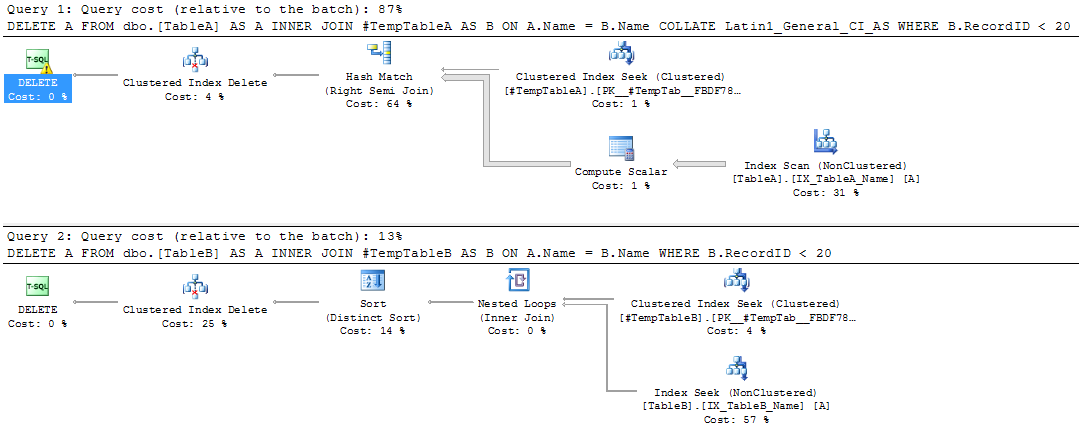
The DELETE statements will generate the following plans when executed:-
Query Plans

The first query is scanning the nonclustered index. The properties of the DELETE operator show why:-

DELETE Operator Properties

SQL is performing an implicit conversion, even though the COLLATE option was specified in the join. This is causing the nonclustered index scan. The impact of this can be seen by comparing the properties of the scan vs the seek in the second plan:-

Comparison

The scan is reading all the records in the table, simply because of the implicit conversion!

So, if your user databases have a different collation than your tempdb ensure that you specify the correct collation when creating your temporary tables. Or just make sure your databases have the same collation as your SQL instance!

Happy New Year 2015

I know it’s late but I’ve been away, I hope you all had a good Christmas and New Year.

I try and regularly review my skills as a DBA but more so at the start of a new year. You know the type of questions:-

  • Have I improved my overall skillset over the last year?
  • What areas have I worked specifically on?
  • How do my skills in those areas compare to last year?
  • Are there any areas in which I need to improve upon?
  • What can I do over the next week/month/year in order to keep improving?

2014 was a pretty exciting year for me. I moved to Dublin to work and looking back, it was the completely correct decision. I’ve been involved in a major project over the last few months and all in all (with few exceptions) everything has gone well. Highlights for me include setting up a brand new production environment, migrating our old databases (goodby SQL 2005!) and then learning how to configure our brand new SAN. SAN administration is completely new to me and it’s been fun. Challenging but good fun.

As DBAs we have to constantly keep learning in order to not be left behind. 2014 was no exception, a new version of SQL came out with a bunch of brand new features (think buffer pool extensions and In-memory OLTP). I don’t know about you but I’ve been reading about and experimenting with SQL 2014 like crazy.

So what am I looking forward to doing in the new year? Well, here’s the top three things I want to get done this year:-

  • Implement Always-On availability groups for diaster recovery
  • Further work with In-Memory OLTP (get a lab up and running and do some benchmarking)
  • Completely review replication (I haven’t used it in a production environment, so I have to keep going back over it)

There’s no way that that list will stay as is but it’s good to have something to start with. I bet you’ve all got similar lists, either written down or just in your heads. So here’s to 2015! Let’s hope it’s as exciting and challenging as 2014!

Blogging for a year!

I’m actually quite proud of the fact that I’ve now been doing this for a year now (and that I’m still going).

So one year on, what have I learnt?

Syndicate
Get your blog syndicated with other, larger websites. The amount of views my blog got went through the roof after I syndicated with SQLServerCentral.com and ToadWorld.com. These websites will allow your blog to have a greater audience, otherwise how will people know your blog exists? Mine certainly isn’t showing up on the first page of Google results (yet).

Code
Everyone’s got tonnes of SQL scripts, however I bet you didn’t write them all. When you’re using code in your posts you must make sure you’ve written it, otherwise you MUST reference the person who did. I’ve written a couple of blogs were I went to use a script from my library but had no idea if I’d written it or not. In that situation it’s better to use a script from the net and reference the author.

Don’t over commit
Set a realistic goal for the amount of posts you will write in a given time period. I started out trying to write a minimum of one blog per month. I think this is a good target for myself, I’m not an accomplished writer so I didn’t want to set an unrealistic goal. I’ve managed to (mostly) keep to this target, only missing last December as I was moving to Dublin. It’s also allowed me time to think about topics that I want to write about and then spend a good amount of time writing and then editing.

Say, yes!
I’ve been contacted a couple of times over the last year by people wanting to either reference my blog or write a post for them. I’ve said yes each time and why not? I started this blog to give back to the SQL community and am really happy that people are reading it, and I’m absolutely ecstatic that someone out there has found it good enough to reference in their own work. There is no downside to saying yes to these requests. Your blog will get more exposure and you’ll get better as a writer.

It’s been done before
If you’re writing a technical blog, you’ll be very aware of the fact that the topics you are writing about have been written about many (perhaps many) times before. You need to remember that the point of your blog is to bring your perspective to the topic you’re writing about. What challenges in a particular topic have you faced? How did you overcome them?

Enjoy it
This is a hobby of mine, it’s not a job. I enjoy the fact that I can write about SQL and that my posts can help people out there. I never want to get to a stage where I’m treating this as a job, it’ll always be a hobby for me.

Thanks for reading!

The Art of Performance Tuning

Performance tuning often gets called an art as people feel that a certain knack or innate talent comes into play. And whilst I don’t disagree that a certain level of knowledge is involved, I completely disagree that only certain people can performance tune.

Given the correct approach, anyone should be able to learn to effectively performance tune.

But how should performance tuning be approached? I’d like to take a step back from delving into specifics and define the process of performance tuning, a set of guidelines that can be used in any circumstance.

I believe that performance tuning should follow the scientific method, which is defined as:-

“A set of principles and procedures for the systematic pursuit of knowledge involving the recognition and formulation of a problem, the collection of data through observation and experiment, and the formulation and testing of hypotheses”

In practice, this can be broken down into the following steps:-

1) Observation
2) Declaration of the end goal or issue
3) Forming a hypothesis
4) Testing the hypothesis
5) Analysis of results
6) Conclusion
7) Further research

This way of approaching performance tuning comes into its own particularly when investigation is required in order to respond to issues in a live environment. The trick is to follow the method and not to go with “gut” feelings or guesses. Stick to what you know.

For example, your production server has started responding slowly, with queries taking longer than expected to complete. This could be due to memory pressure, but you are not sure. It would be better to start off by declaring “Performance of the server is poor”, which you know to be 100% correct, rather than declaring “Performance of the server is poor due to memory pressure”.

So the steps to follow would be:-

1. Observation
-Queries on production running for longer than expected
2. Declaration
-Performance of the server is poor
3. Hypothesis
-The poor performance of the server is due to memory pressure
4. Testing
-Running an extended events session on the server to catch incoming queries
5. Analysis
-Several queries performing scans of large tables
6. Conclusion
-Creation of a covering non-clustered index to prevent the table scans
7. Further Research
-Are there any other queries being executed that are performing table scans?

These steps may seem obvious but using the scientific method will prevent you from being lead down blind alleys and potentially missing the actual problem. What if the analysis in the example above indicated that memory pressure was not the cause of the poor performance of the server? If you had originally declared “Performance of the server is poor due to memory pressure” you could end up wasting valuable time and effort looking for other indications to back that statement up.

The scientific method provides a structure for the investigation of any performance issues you encounter. It’s very easy to feel under pressure when investigating performance issues, which can lead to mistakes being made or obvious problems being missed. Following the process of problem declaration, forming a hypothesis and then testing gives you a rigid structure to stick to when you’re feeling under the cosh, something to rely on as being a tried and tested method of investigation.