DBCC CLONEDATABASE in SQL Server 2014

In SQL Server 2014 SP2 an interesting new DBCC command was included, DBCC CLONEDATABASE

This command creates a “clone” of a specified user (not supported for the system databases) database that contains all objects and statistics of the specified database. Hmm, could be useful, but, how does it work? Let’s have a look.

First create a database: –

USE [master];
GO

CREATE DATABASE [Test];
GO

And then create a test table: –

USE [TEST];
GO

CREATE TABLE dbo.TestTable 
(PK_ID	   INT IDENTITY(1,1),
 ColA	   VARCHAR(10),
 ColB	   VARCHAR(10),
 ColC	   VARCHAR(10),
 CreatedDate DATE,
 CONSTRAINT [PK_ID] PRIMARY KEY (PK_ID));
GO

Insert some data and then make sure stats have been generated: –

INSERT INTO dbo.TestTable
(ColA,ColB,ColC,CreatedDate)
VALUES
(REPLICATE('A',10),REPLICATE('B',10),REPLICATE('C',10),GETUTCDATE());
GO 100000

EXEC sp_updatestats;
GO

Now we can run the DBCC CLONEDATABASE command: –

DBCC CLONEDATABASE ('test','testclone');
GO

And verify that a read only copy of the database has been generated: –

dbcc clonedatabase

So, let’s have a look at the data in the new database: –

SELECT TOP 1000 [PK_ID]
      ,[ColA]
      ,[ColB]
      ,[ColC]
      ,[CreatedDate]
  FROM [testclone].[dbo].[TestTable];
GO

No data! Ok, so let’s have a look at the stats: –

USE [testclone];
GO

EXEC sp_spaceused 'dbo.testtable';
GO


DBCC SHOW_STATISTICS(N'testtable',PK_ID);
GO

dbcc clonedatabase stats
There’s the stats, SQL thinks that there’s 1000 rows in the table, pretty cool.

What we’ve ended up with is a read only database with no data but the objects and stats of the target database.

First thing, I’d be doing is backing that clone up and bringing it down to my local instance. Want to see how code will execute against production but don’t want to touch that prod environment? Here’s your answer.

@Microsoft, can we have this for other versions of SQL please?

The new SQL Server Management Studio

Ok, so this is old news I know, but I’ve had a busy couple of months and am only getting around to writing this now. SSMS is now a separate release from SQL itself. The latest release is here.

Monthly releases and no longer having to download GBs to get a client?

SSMS Updates

Cool!

Has anyone else noticed this?

SSMS Themes

Microsoft! Give us a dark theme, come on! I’ve always been enviously of those Devs with their dark themed Visual Studio.

I am a little annoyed about one thing however (please try to hide your shock). Management Studio since April uses a different add-in model which means all the old plugins that I had no longer worked.

Thankfully it seems that vendors have been working hard and there are a number of plugins out there now that support the newest version of management studio. A couple of my favourites are:-

SQL Sentry’s Plan Explorer (who doesn’t use this)

ApexSQL Refactor (the best of the free formatters that I could find)

Another couple of cool developments in the community are:-

The SQL Server Management Studio Enhancements Trello Board

This allows people who use SSMS to suggest ideas (bug fixes?) to Microsoft and if a “card” gets enough votes, it’ll become a Connect item. Nice to see but let’s watch that space and see what happens (says the cynic in me).

The SQL Community on Slack

I have mixed feelings towards Slack if I’m honest. On one hand it is a really good collaboration tool for teams and one the other, it’s another way for me to be interrupted at work. I now have email, Skype, Skype for frickin’ business and now Slack…grrr
Anyway, at the very least it’s going to allow me to keep in touch with other members of the SQL community out there.

Thanks for reading!

First foray into presenting

It’s been a while since I’ve posted as the run up to Xmas last year and this January have been particularly busy. February doesn’t seem to be going to be any quieter but at least I’m being kept on my toes.

Anyway, waaaay back in December the SQL Server Ireland User Group (website) ran a Xmas “extravaganza” in which they held a series of lightening talks. Presenting is something that I’ve wanted to get into for a while so with a bit of pushing from one of the guys on the panel, I signed myself up. The talk only needed to be 5 minutes long but this was ideal for me considering I’ve never presented before.

The talk I did was on how I implemented partitioning on a set of existing tables within my company’s OLTP databases. First time presenting? Stick with something you know. I also felt pretty safe from awkward questions (or people pointing out how I could have implemented the solution more effectively!) as I wanted the session to be very specific to the environment I was working with and the limitations/restrictions I had to deal with.

So how did I do? Well considering I was quite convinced that I was going to stammer, freeze up and then flee the room (honestly, I thought this WAS what was going to happen)…quite well really. I did have a minor technical glitch…I was duplicating my desktop onto the projected screen and it started reverting back to extend (as I have it in the office), so the screen on the projector went blank. Not a problem at first as this happened when I was setting up so I quickly went into settings and set it back to duplicate.

However, I did this too quickly and forgot to click the “Keep Changes” option so after 10 seconds it reverted and the screen went blank again. So I went back into the settings, fixed it, forgot to click “Keep Changes” and ended up in this loop until one of the other presenters helped me out (thankfully). In the end I managed to laugh it off, continue and ended up winning a bottle of champagne for “Best New Speaker” so I’m not going to obsess about that too much (I promise).

In the end I really enjoyed the whole experience…OK…looking back with rose tinted glasses I enjoyed it, at the time I was too nervous. I’m not going to turn this post into another “Best pieces of advice for first time presenters” (although I can’t promise I won’t do one of those posts in the future) but one thing I will say is know, really know your presentation. Go over it over and over, practice continuing when making mistakes and don’t stick to a rigid script. By this I mean, if you go off track slightly, you’ll be able to make it through without stumbling over or losing track.

So what now? Well I’ve been accepted to present another lightening talk at SQL Saturday Exeter. It’s only 10 minutes I know but it’s double what I’ve done previously and the SQL Saturday events are much bigger. I’ll post about how it went afterwards but for now I’m looking forward to it, until the panic sets in!

SQL Server 2016 – Stretch Databases

One of the features I’ve been interested in that’s coming with SQL Server 2016 is the stretched database. The ability to “stretch” individual tables in a database into the cloud seems really cool and could help organisations easily archive their data.

There’s a full guide to stretch databases in SQL 2016 Books Online but I’d like to go through a quick setup.

Prerequisites – An Azure account (uh huh) and if you’re installing on a server, you’ll have to add the Azure portal to the list of trusted sites and enable javascript.

First thing to do is enable the SQL instance to host stretched databases:-

EXEC sp_configure 'remote data archive' , '1';
RECONFIGURE;

Now create a database:-

USE [master];
GO

IF NOT EXISTS(SELECT TOP 1 1 FROM sys.databases WHERE name = 'StretchedDatabase')
	CREATE DATABASE [StretchDatabase];
GO

Then create a table that will be “stretched”:-

USE [StretchDatabase];
GO

IF NOT EXISTS(SELECT TOP 1 1 FROM sys.objects WHERE name = 'StretchTable')
CREATE TABLE [StretchTable]
(PkID INT IDENTITY(1,1) PRIMARY KEY,
 FirstName SYSNAME,
 CreatedDate DATETIME);
GO

Ok, so now we connect to our Azure account and setup the stretch. I’m sure there’s a way to do this in powershell but as this is my first time I’m going to use the GUI *gasp*. Right click on the database and go to Tasks > Enable Database for Stretch:-
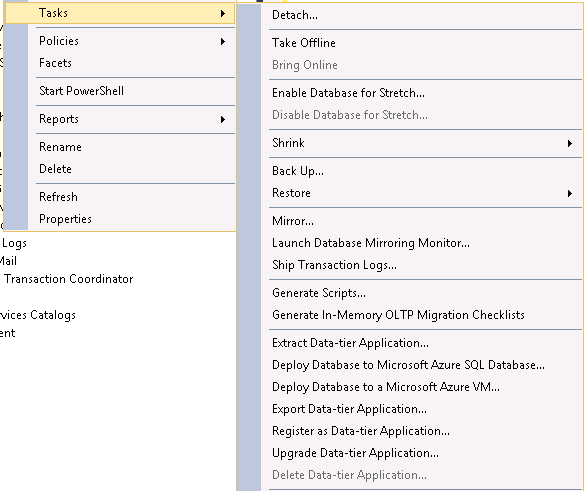
EnableStretchDatabase1 EnableStretchDatabase2

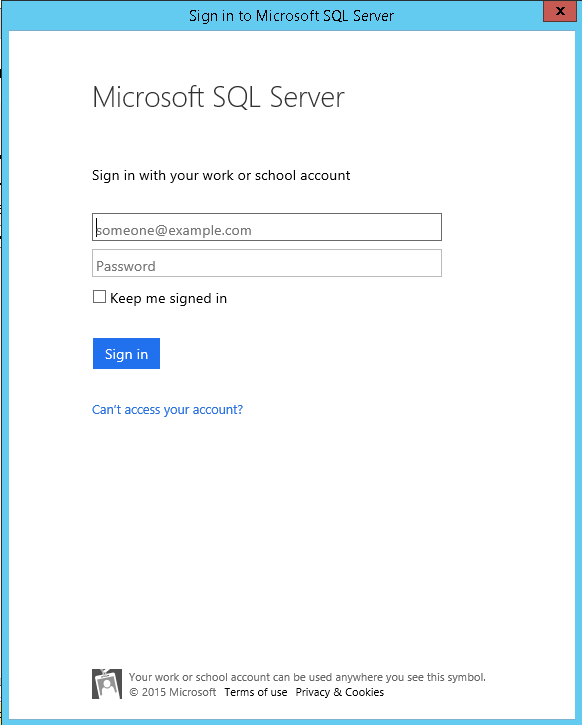
Enter your Azure login details:-

EnableStretchDatabase3

Ensure you’re using the right subscription (I’ve only got one but you may have a personal & work account):-
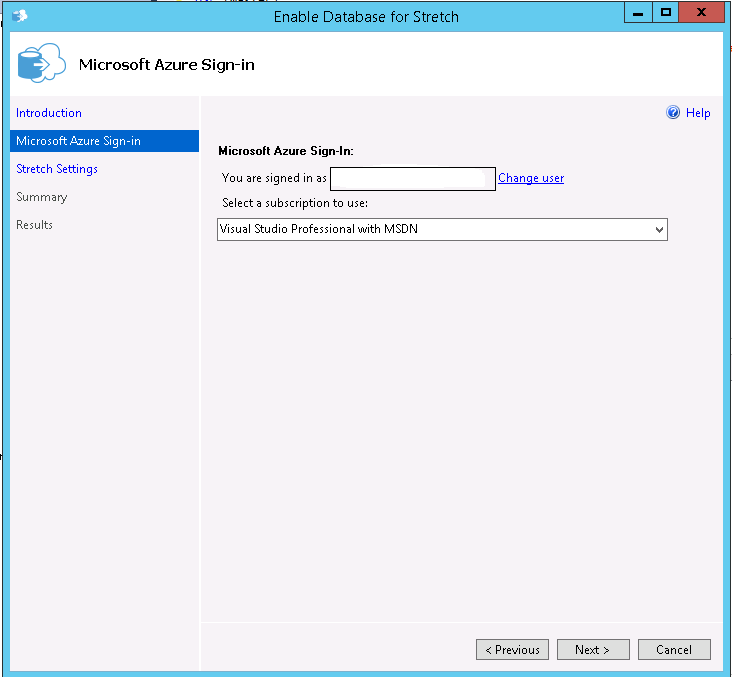
EnableStretchDatabase5

Pick a location for the stretched data to residue in and a login/password. You’ll need to make a note of the login/password for future use when working on the Azure blob (think backup/restore). Also I kept the defaults for the firewall rules but you may want to change them:-

EnableStretchDatabase6

Review the details displayed and click “Finish” (note that there’s no option to script this):-
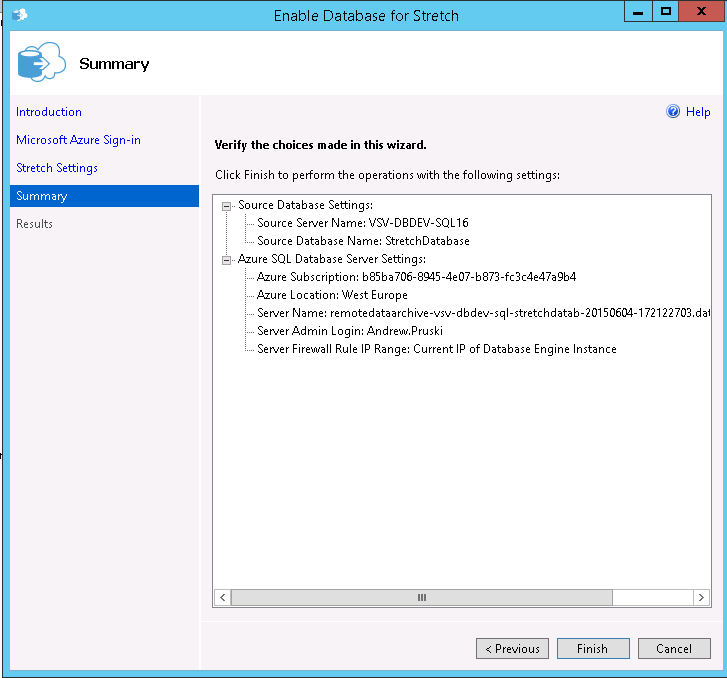
EnableStretchDatabase7

If all goes well you should see:-

EnableStretchDatabase8

And you can verify that the stretch is setup and connected by looking at the newly created linked server:-
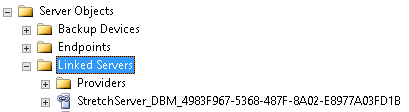
EnableStretchDatabase9

There will also be a new database created in your Azure account:-
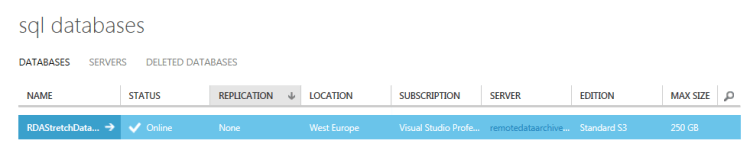
EnableStretchDatabase10
That’s it! The database is setup to be have tables stretched into Azure. Now we need to enable the table we created to be stretched:-

USE [StretchDatabase];
GO

ALTER TABLE [StretchTable]
    ENABLE REMOTE_DATA_ARCHIVE WITH ( MIGRATION_STATE = ON );
GO

OK, so let’s pump a load of data into the stretched table:-

INSERT INTO dbo.StretchTable
(FirstName,CreatedDate)
VALUES
('TEST',GETDATE());
GO 100

There’s a new DMV in SQL 2016 to allow us to see details of the data that has been migrated to Azure:-

SELECT * FROM sys.dm_db_rda_migration_status;

ViewMigratedData2

The new DMV is documented here

As you can see, all the rows that we inserted into the table have been migrated into Azure. I have to admit, I didn’t think this is how the stretch technology would work. For some reason (and I have no basis for thinking this), I thought there would be settings to say only migrate data in the table based on certain conditions would be stretched up to Azure. Being able to set conditions on stretched tables to control how data is migrated is definitely something I’d like to see Microsoft bring in but for now this technology could be very useful in moving old archives tables out of local storage and into the cloud.

But what happens when a database containing a stretched table is restored from backup? Let’s give it a go, so backup the database:-

USE [master];
GO

BACKUP DATABASE [StretchDatabase]
TO DISK = N'C:\SQLServer\Backups\StretchDatabase.BAK'
WITH STATS = 5;
GO

And then immediately restore it:-

RESTORE DATABASE [StretchDatabase]
FROM DISK = N'C:\SQLServer\Backups\StretchDatabase.BAK'
WITH REPLACE, RECOVERY, STATS = 5;
GO

Now query the stretched table:-

USE [StretchDatabase];
GO

SELECT * FROM dbo.StretchTable;
GO

What?! No rows! This happens because the stretched table needs to be reauthorised, remember that login & password you created earlier? You’ll need to use those when executing a new stored procedure sys.sp_reauthorize_remote_data_archive

EXEC sys.sp_reauthorize_remote_data_archive
	@azure_username = N'YOUR USERNAME',
	@azure_password = N'YOUR PASSWORD';
GO

Now try querying the table again:-

SELECT * FROM dbo.StretchTable;
GO

Rows! The table has reconnected with Azure and the query can return the rows. This step will need to be added to any backup/restore strategy that you put in place. Thankfully you’ll only have to do it once as it’s not table specific. Finally, let’s have a look at the query plan that is generated when querying tables that have been stretched. I’m going to use another new feature in SQL 2016, live query statistics. This couldn’t be easier to use, just click on the new button in SSMS 2016 next to the button that includes the actual execution plan and off you go:-

SELECT * FROM dbo.StretchTable;

LiveQueryStatistics

In the above GIF you can see the new remote query operator on the right. The live query statistics feature also shows that this is the only source of the data, with the table in the data not returning any rows at all. This is due to the fact that we have not inserted any more rows into the table, if the table was “live” we would see both the table and the remote query operator returning rows and then being combined by the concatenation operator before the select.

SQL Server 2016 features I’m interested in

Microsoft announced this month what features/improvements will be in the next version of SQL Server, SQL Server 2016. You can download the datasheet they’ve posted from here.

The features that have caught my attention are:-

  • Enhancements to In-Memory OLTP
  • The Query Data Store
  • Temporal Database
  • Stretch Database
  • Automatic failover based on database health
  • Enhanced Data Caching

Enhancements to In-Memory OLTP – I’ve said in previous posts that In-Memory OLTP in SQL 2014 is pretty much version 1.0, good start but it needs work (try dropping a memory optimised filegroup from a database, go on, try it!). It’ll be interesting to see exactly what they’ve changed.

The Query Data Store – This sounds great, being able to track how a query’s execution plan changes over time will be fantastic.

Temporal Database – The datasheet says “Track Historical Changes”. Does this mean the database will track DDL statements executed against it?

Stretch Database – Like it or not, Azure is getting bigger and bigger. I’m interested in this as I’d love to see what impact there would be on queries that span data held locally and in the cloud. I know, I know, One could argue that those queries shouldn’t be hitting your OLTP database but in my experience it will happen.

Automatic failover based on database health – This sounds like a recipe for diaster IMHO, wonder how this would actually determine a database’s health. Will the settings be configurable?

Enhanced Data Caching – Direct quote from the datasheet – “Cache data with automatic, multiple TempDB files per instance in multi-core environments” – Not exactly sure what this means, sounds exciting though, eh?

The datasheet is very brief on details, more of a marketing document than anything else so I’ll be keeping a close eye on the Microsoft blog for more details.

P.S. – Anyone not looking forward to native JSON support? 😉

UPDATE (2015-05-28):- It’s out for CTP, details on what’s new can be found here