Tools of the trade

I’ve been meaning to write this post for a while now, nice and simple, just want to list the tools that I use on a day-to-day basis and hopefully a couple of them may be new to someone out there. Btw – if anyone uses anything else regularly and thinks I should be, let me know!

So first off has to be SQL Server Management Studio. There are other applications out there that can be used to administer/query SQL Server but I’m yet to find one that beats SSMS. Sure, it has it’s problems but for ease of use and the sheer amount of plugins available, I can’t see myself ever using anything else (thankfully it’s now available separately from SQL Server itself, how long did it take Microsoft to do that??).

Here’s the plugins that I have (they’re all free ‘cos I’m cheap): –

SQLSentry Plan Explorer
Everyone should have this installed, if you don’t…go install it now. Seriously, do it now.

RedGate SQL Search
Great tool for finding objects in your SQL instances. Don’t use it that much but it’s awesome to have already there when needed.

SSMSBoost
To be honest, I only ever use the the option to format SQL on a regular basis and if you only want that you could be better off downloading the Poor Man’s T-SQL Formatter. However the option to restore previously closed tabs has been a lifesaver in the past.

Here’s some of the other tools I use on a daily basis (again all free, did I mention that I’m cheap?): –

Edit – BeyondCompare isn’t free, you have a 30 day free trial and then it’s $30 (well worth it)

Terminals
Good RDP tool, I admit that I haven’t really tried any others as this does exactly what I need

Notepad++
I don’t think I need to say anything about this. I’ve tried other text editors (atom is pretty cool) but nothing imho comes close to this.

Launchy
I love this tool. I really love this tool. If you’re not using it, go and download it now. Yes it’s an application launcher it’s also much more. I use it as a app launcher but also to search for files/folders and run .bat scripts that perform maintenance tasks on my laptop. Very cool, go and download it.

QDir
For moving files around, I can’t recommend this enough. Loads of options, easy to use and navigate. There’s hundreds of multi-pane file explorers out there but I’ve found that this one has the best user experience (not that I’ve tried all of them mind).

BeyondCompare
If you have to compare scripts, this is a life saver. I often have to review changes being made to stored procedures this tool easily allows me to see the differences between the existing and new code. This has saved me hundreds of hours (not exaggerating).

Thanks for reading!

Update to TRUNCATE TABLE in SQL 2016 (partition support)

Continuing my obsession with partitioning I thought I’d write this quick post about a cool change in SQL Server 2016.

This change allows you to truncate an individual partition, instead of having to switch that partition out to another table and then truncate it. Full details can be found here: – https://msdn.microsoft.com/en-us/library/ms177570.aspx

Here’s a demo, initial setup to create a database, partition function & scheme and then a table: –

CREATE DATABASE [PartitioningDemo]
 ON PRIMARY
(NAME = N'PartitionDemo', FILENAME = N'C:\SQLServer\SQLData\PartitionDemo.mdf', SIZE = 51200KB, MAXSIZE = UNLIMITED, FILEGROWTH = 1024KB), 
 FILEGROUP [DATA] 
(NAME = N'DATA', FILENAME = N'C:\SQLServer\SQLData\DATA.ndf', SIZE = 51200KB, MAXSIZE = UNLIMITED, FILEGROWTH = 1024KB ),
 FILEGROUP [ARCHIVE] 
(NAME = N'ARCHIVE', FILENAME = N'C:\SQLServer\SQLData\ARCHIVE.NDF', SIZE = 51200KB, MAXSIZE = UNLIMITED, FILEGROWTH = 1024KB )
 LOG ON
(NAME = N'PartitionDemo_log', FILENAME = N'C:\SQLServer\SQLLog\PartitionDemo_log.ldf', SIZE = 20480KB, MAXSIZE = 2048GB, FILEGROWTH = 512KB)
GO

USE [PartitioningDemo];
GO

CREATE PARTITION FUNCTION PF_PartitionedTable(DATE)
       AS RANGE RIGHT
    FOR VALUES ('2014-01-01','2015-01-01','2016-01-01');

 
CREATE PARTITION SCHEME PS_PartitionedTable
    AS PARTITION PF_PartitionedTable
TO ([ARCHIVE],[ARCHIVE],[DATA],[DATA]);


CREATE TABLE dbo.PartitionedTable
(PKID INT IDENTITY(1,1),
 ColA VARCHAR(10),
 ColB VARCHAR(10),
 CreatedDate DATE)
 ON PS_PartitionedTable(CreatedDate);
 
CREATE UNIQUE CLUSTERED INDEX [IX_CreatedDate_PartitionedTable] ON dbo.PartitionedTable
 (CreatedDate,PKID) 
ON PS_PartitionedTable(CreatedDate);
GO

Now inserting some data into that table: –

SET NOCOUNT ON;
INSERT INTO dbo.PartitionedTable
(ColA,ColB,CreatedDate)
VALUES
(REPLICATE('A',10),REPLICATE('A',10),'2013-02-01');
GO 1000
 
INSERT INTO dbo.PartitionedTable
(ColA,ColB,CreatedDate)
VALUES
(REPLICATE('A',10),REPLICATE('A',10),'2014-02-01');
GO 1000
 
INSERT INTO dbo.PartitionedTable
(ColA,ColB,CreatedDate)
VALUES
(REPLICATE('A',10),REPLICATE('A',10),'2015-02-01');
GO 1000
 
INSERT INTO dbo.PartitionedTable
(ColA,ColB,CreatedDate)
VALUES
(REPLICATE('A',10),REPLICATE('A',10),'2016-02-01');
GO 1000

Check the data in the partitions: –

SELECT
    t.name AS TableName, i.name AS IndexName, p.partition_number, p.partition_id, 
    --i.data_space_id, f.function_id, f.type_desc, 
    fg.name AS [filegroup], 
    r.boundary_id, r.value AS BoundaryValue, p.rows
    --,r.*
FROM
    sys.tables AS t
INNER JOIN
    sys.indexes AS i ON t.object_id = i.object_id
INNER JOIN
    sys.partitions AS p ON i.object_id = p.object_id AND i.index_id = p.index_id 
INNER JOIN
    sys.allocation_units a ON a.container_id = p.hobt_id 
INNER JOIN
    sys.filegroups fg ON fg.data_space_id = a.data_space_id 
INNER JOIN
    sys.partition_schemes AS s ON i.data_space_id = s.data_space_id
INNER JOIN
    sys.partition_functions AS f ON s.function_id = f.function_id
LEFT OUTER JOIN
    sys.partition_range_values AS r ON f.function_id = r.function_id 
                                    AND r.boundary_id = p.partition_number
WHERE
    t.name = 'PartitionedTable'
AND
    i.type <= 1
AND
    a.type = 1 --in row data only
ORDER BY p.partition_number DESC;

PartitionedTable1

OK, now we can truncate an individual partition by running:-

TRUNCATE TABLE dbo.PartitionedTable WITH (PARTITIONS (1));
GO

Re-checking the data: –
PartitionedTable2

And the data in partition 1 has been removed! We can also remove data from multiple partitions: –

TRUNCATE TABLE dbo.PartitionedTable WITH (PARTITIONS (2,3));
GO

Looking again: –
PartitionedTable3

And the data is gone in both the partitions. Pretty cool! Makes it a lot easier to remove data that has expired and no longer needs to be retained.

Although, it does make it a lot easier to remove data in general…what could go wrong?

(OK, I think that’s enough with the partitioning, need to look at something else…)

Partitioning and filegroup restores

I’ve been playing around with partitioning quite a lot recently and wanted to write a quick post about how it can help you out in a DR situation.

Partitioning is mainly for increasing the manageability of your data but it also has other benefits, one of them being giving you the ability to split a single table across multiple filegroups. This will allow you to keep your current data in one filegroup and, let’s call it historical data, in another. In a DR situation, if you need to bring your current data online quickly and worry about the rest later, this can really help you out.

So let’s run through a quick example.First, create a database:-

CREATE DATABASE [PartitioningDemo]
 ON PRIMARY 
(NAME = N'PartitionDemo', FILENAME = N'C:\SQLServer\SQLData\PartitionDemo.mdf', SIZE = 51200KB, MAXSIZE = UNLIMITED, FILEGROWTH = 1024KB), 
 FILEGROUP [DATA] 
(NAME = N'DATA', FILENAME = N'C:\SQLServer\SQLData\DATA.ndf', SIZE = 51200KB, MAXSIZE = UNLIMITED, FILEGROWTH = 1024KB ),
 FILEGROUP [ARCHIVE] 
(NAME = N'ARCHIVE', FILENAME = N'C:\SQLServer\SQLData\ARCHIVE.NDF', SIZE = 51200KB, MAXSIZE = UNLIMITED, FILEGROWTH = 1024KB )
 LOG ON 
(NAME = N'PartitionDemo_log', FILENAME = N'C:\SQLServer\SQLLog\PartitionDemo_log.ldf', SIZE = 20480KB, MAXSIZE = 2048GB, FILEGROWTH = 512KB)
GO

This database has three filgroups. The PRIMARY (as always), DATA and an ARCHIVE filegroup. What this demo is going to show you is how to bring the PRIMARY and DATA filegroups online first and then bring the ARCHIVE filegroup online afterwards.

So now let’s create a partition scheme and function:-

USE [PartitioningDemo];
GO

CREATE PARTITION FUNCTION PF_PartitionedTable(DATE)
	   AS RANGE RIGHT 
    FOR VALUES ('2014-01-01','2015-01-01','2016-01-01');
GO


CREATE PARTITION SCHEME PS_PartitionedTable
    AS PARTITION PF_PartitionedTable
TO ([ARCHIVE],[ARCHIVE],[DATA],[DATA]);
GO

The table we’re going to build will be partitioned by year, two partitions on the ARCHIVE group and two on the DATA filegroup.

So let’s create the table (and its clustered index): –

CREATE TABLE dbo.PartitionedTable
(PKID INT IDENTITY(1,1),
 ColA VARCHAR(10),
 ColB VARCHAR(10),
 CreatedDate DATE)
 ON PS_PartitionedTable(CreatedDate);


CREATE UNIQUE CLUSTERED INDEX [IX_CreatedDate_PartitionedTable] ON dbo.PartitionedTable
 (CreatedDate,PKID) 
ON PS_PartitionedTable(CreatedDate);
GO

Now insert some data: –

SET NOCOUNT ON;

INSERT INTO dbo.PartitionedTable
(ColA,ColB,CreatedDate)
VALUES
(REPLICATE('A',10),REPLICATE('A',10),'2013-02-01');
GO 1000

INSERT INTO dbo.PartitionedTable
(ColA,ColB,CreatedDate)
VALUES
(REPLICATE('A',10),REPLICATE('A',10),'2014-02-01');
GO 1000

INSERT INTO dbo.PartitionedTable
(ColA,ColB,CreatedDate)
VALUES
(REPLICATE('A',10),REPLICATE('A',10),'2015-02-01');
GO 1000

INSERT INTO dbo.PartitionedTable
(ColA,ColB,CreatedDate)
VALUES
(REPLICATE('A',10),REPLICATE('A',10),'2016-02-01');
GO 1000

Let’s quickly check the data in the partitions:-

SELECT 
	t.name AS TableName, i.name AS IndexName, p.partition_number, p.partition_id, 
	--i.data_space_id, f.function_id, f.type_desc, 
	fg.name AS [filegroup], 
	r.boundary_id, r.value AS BoundaryValue, p.rows
	--,r.*
FROM 
	sys.tables AS t
INNER JOIN
	sys.indexes AS i ON t.object_id = i.object_id
INNER JOIN
	sys.partitions AS p ON i.object_id = p.object_id AND i.index_id = p.index_id 
INNER JOIN 
    sys.allocation_units a ON a.container_id = p.hobt_id 
INNER JOIN 
    sys.filegroups fg ON fg.data_space_id = a.data_space_id 
INNER JOIN
	sys.partition_schemes AS s ON i.data_space_id = s.data_space_id
INNER JOIN
	sys.partition_functions AS f ON s.function_id = f.function_id
LEFT OUTER JOIN 
	sys.partition_range_values AS r ON f.function_id = r.function_id 
									AND r.boundary_id = p.partition_number
WHERE 
	t.name = 'PartitionedTable'
AND 
	i.type <= 1
AND
    a.type = 1 --in row data only
ORDER BY p.partition_number DESC;

DataInPartitionedTable1

So both filegroups have 2000 rows in them. Now let’s perform a filegroup restore, bringing the PRIMARY & DATA filegroups online first.

Take a full and log backup of the database:-

USE [master];
GO

--FULL DATABASE BACKUP
BACKUP DATABASE [PartitioningDemo]
   TO DISK = 'C:\SQLServer\Backups\PartitioningDemoFullBackup.bak'
   WITH INIT
GO


--LOG BACKUP
BACKUP LOG [PartitioningDemo]
	TO DISK = N'C:\SQLServer\Backups\PartitioningDemoLogBackup.trn'
	WITH NO_TRUNCATE, INIT
GO

OK, now we’re simulating a problem, first take a tail log backup:-

BACKUP LOG [PartitioningDemo]
	TO DISK = N'C:\SQLServer\Backups\PartitioningDemoTailLogBackup.trn'
	WITH INIT, NORECOVERY
GO

And now we’re going to perform a filegroup restore of the PRIMARY and DATA filegroups:-

--PRIMARY filegroup
RESTORE DATABASE [PartitioningDemo] 
   FILEGROUP = 'PRIMARY'
   FROM DISK = 'C:\SQLServer\Backups\PartitioningDemoFullBackup.bak'
   WITH 
   REPLACE, PARTIAL, NORECOVERY;
GO


--DATA filegroup
RESTORE DATABASE [PartitioningDemo] 
   FILEGROUP = 'DATA'
   FROM DISK = 'C:\SQLServer\Backups\PartitioningDemoFullBackup.bak'
   WITH 
   REPLACE, PARTIAL, NORECOVERY;
GO


--Restore transaction log & tail log backups
RESTORE LOG [PartitioningDemo] FROM DISK = N'C:\SQLServer\Backups\PartitioningDemoLogBackup.trn' WITH NORECOVERY;
RESTORE LOG [PartitioningDemo] FROM DISK = N'C:\SQLServer\Backups\PartitioningDemoTailLogBackup.trn' WITH RECOVERY;
GO

Now we can query the table:-

SELECT COUNT(*) FROM [PartitioningDemo].dbo.[PartitionedTable]
WHERE CreatedDate > CONVERT(DATE,'2015-01-01')
GO


--Check access to archive data
SELECT COUNT(*) FROM [PartitioningDemo].dbo.[PartitionedTable]
WHERE CreatedDate < CONVERT(DATE,'2015-01-01')
GO

First query will run fine but the second will generate an error:-

QueryError1

So we still have to restore the ARCHIVE filegroup:-

--Restore ARCHIVE filegroup
RESTORE DATABASE [PartitioningDemo] 
   FILEGROUP = 'ARCHIVE'
   FROM DISK = 'C:\SQLServer\Backups\PartitioningDemoFullBackup.bak'
   WITH 
   NORECOVERY;
GO


--Restore transaction log & tail log backups
RESTORE LOG [PartitioningDemo] FROM DISK = N'C:\SQLServer\Backups\PartitioningDemoLogBackup.trn' WITH NORECOVERY;
RESTORE LOG [PartitioningDemo] FROM DISK = N'C:\SQLServer\Backups\PartitioningDemoTailLogBackup.trn' WITH NORECOVERY;
GO

Bring the database fully online:-

RESTORE DATABASE [PartitioningDemo] WITH RECOVERY;
GO

And re-run the queries against the table:-

SELECT COUNT(*) FROM [PartitioningDemo].dbo.[PartitionedTable]
WHERE CreatedDate > CONVERT(DATE,'2015-01-01')
GO


--Check access to archive data
SELECT COUNT(*) FROM [PartitioningDemo].dbo.[PartitionedTable]
WHERE CreatedDate < CONVERT(DATE,'2015-01-01')
GO

Now both queries will return results:-
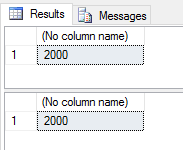
QueryResults1

Neat huh? You can see that in a DR situation, if you have a correct partitioning and filegroup strategy in place, you can reduce the amount of time it will take to bring your current data online.

More about filegroup restores: –
https://msdn.microsoft.com/en-ie/library/aa337540.aspx

First foray into presenting

It’s been a while since I’ve posted as the run up to Xmas last year and this January have been particularly busy. February doesn’t seem to be going to be any quieter but at least I’m being kept on my toes.

Anyway, waaaay back in December the SQL Server Ireland User Group (website) ran a Xmas “extravaganza” in which they held a series of lightening talks. Presenting is something that I’ve wanted to get into for a while so with a bit of pushing from one of the guys on the panel, I signed myself up. The talk only needed to be 5 minutes long but this was ideal for me considering I’ve never presented before.

The talk I did was on how I implemented partitioning on a set of existing tables within my company’s OLTP databases. First time presenting? Stick with something you know. I also felt pretty safe from awkward questions (or people pointing out how I could have implemented the solution more effectively!) as I wanted the session to be very specific to the environment I was working with and the limitations/restrictions I had to deal with.

So how did I do? Well considering I was quite convinced that I was going to stammer, freeze up and then flee the room (honestly, I thought this WAS what was going to happen)…quite well really. I did have a minor technical glitch…I was duplicating my desktop onto the projected screen and it started reverting back to extend (as I have it in the office), so the screen on the projector went blank. Not a problem at first as this happened when I was setting up so I quickly went into settings and set it back to duplicate.

However, I did this too quickly and forgot to click the “Keep Changes” option so after 10 seconds it reverted and the screen went blank again. So I went back into the settings, fixed it, forgot to click “Keep Changes” and ended up in this loop until one of the other presenters helped me out (thankfully). In the end I managed to laugh it off, continue and ended up winning a bottle of champagne for “Best New Speaker” so I’m not going to obsess about that too much (I promise).

In the end I really enjoyed the whole experience…OK…looking back with rose tinted glasses I enjoyed it, at the time I was too nervous. I’m not going to turn this post into another “Best pieces of advice for first time presenters” (although I can’t promise I won’t do one of those posts in the future) but one thing I will say is know, really know your presentation. Go over it over and over, practice continuing when making mistakes and don’t stick to a rigid script. By this I mean, if you go off track slightly, you’ll be able to make it through without stumbling over or losing track.

So what now? Well I’ve been accepted to present another lightening talk at SQL Saturday Exeter. It’s only 10 minutes I know but it’s double what I’ve done previously and the SQL Saturday events are much bigger. I’ll post about how it went afterwards but for now I’m looking forward to it, until the panic sets in!

Pass 2015 – Overall Thoughts

I know I only posted one other blog about Pass but I’ve been way too busy over the last couple of weeks to write any more. So here’s my thoughts on what was my first (and hopefully not last) Pass Summit (would have posted this earlier but I’ve been enjoying a bit of jet lag).

Firstly, I had a whale of a time. I met a whole bunch of people, including guys from UK & Dublin chapters and the Midnight DBAs; went to some great sessions and picked up some free stuff from a load of vendors. Secondly, how cool were the evening events? The welcome reception was very slick and the party at EMP Museum (what a place) was brilliant. They could probably tone down the karaoke a tad mind, did it really need to start so early?

The only grumble I have is that I didn’t really enjoy the first timers “speed networking” session. For those who don’t know, you’re lined up in rows facing each other and are given three minutes each way to introduce yourself and talk about a certain subject (biggest challenge at work, programs that you use most frequently etc.). At the end of the six minutes you move down one seat to your left and the process kicks off again. For me, this went on a little bit too long…after about the third round I was starting to get a little weary. The room was very loud so you practically had to shout for three minutes. I left with a bit of parched throat but thankfully a beer was waiting for me at the welcome reception.

The keynotes. I enjoyed them although I have to admit, when I saw the length of them I was a bit put off. However both were delivered excellently. The first keynote by Joseph Sirosh & Shawn Bice going through the new features of SQL Server 2016 was very interesting. I’d seen most of what they talked about before but I hadn’t heard about native support for R within SQL Server – that’s going to be huge!

The second keynote by David DeWitt & Rimma Nehme talking about the progression of IoT was less my cup of tea (I’m more of a demo guy) but they still talked about a lot of interesting concepts. One of which was fog computing (google it) which led to the expression, “What the fog?”. Ha ha.

Now, the sessions. I attended more of the “out there” sessions if I’m honest. I’ve been to a few conferences at this point in my career so didn’t what to go and see the same old subjects (e.g. – basic stuff on the SQL database engine; indexes, partitioning, query tuning etc.), I wanted to see something new. Highlights included a session on Hadoop, a really cool workshop on u-sql and a session on technical writing.

The best session that I attended though was the Speaker Idol final at 4pm on the last day. 4 great speakers all competing for a grand prize of a full 75 minute session at Pass Summit 2016 hosted by the indefatigable Denny Cherry (b|t). All week everyone I talked to mentioned the sense of community at Pass and in my opinion, the Speaker Idol final was where it was most prevalent. Each of the speakers performed brilliantly and congratulations to David Maxwell who won (see his blog post on the Summit here.

Now to see how to get to the Summit 2016…