SQL Server 2016 – Perform Volume Maintenance

One of the server settings that I always enable when configuring a new instance of SQL is database instant file initialisation

In case you don’t know what this is, it is a setting that can be granted to the service account that the SQL database engine runs under that prevents SQL Server from “zeroing out” new space when a data file is created or expanded.

This improves the performance of CREATE/ALTER DATABASE statements, RESTORE statements and AUTOGROWTH operations. A full detailed article to how and why can be found here.

It’s cool to see that you can now enable this when installing SQL Server: –

SQL2016 Perform Volume Maintenance

I can’t think of any downside to having this enabled (off the top of my head, there’s probably one or two) and it’s good to see that Microsoft know that most people enable it so adding it as an option in the installer is great imho.

Bug fixes in SQL Server

SQL Server 2016 CU1 has been released and one thing I noticed was: –

FIX: Canceling a backup task crashes SQL Server 2014 or 2016

That’s pretty nasty, when I originally clicked on the link I was expecting to see detailed a pretty precise set of circumstances in which that bug can occur but no no, apparently not. Cancelling any backup task can lead to this happening.

This lead me to thinking about going to RTM versions of SQL when they’re released, there’s always a debate of whether to wait for the first service pack or not. Often people (like myself) are keen to upgrade to take advantage of new features that are available and will push for the upgrade.

Actually I tell a lie, I’ve always installed new versions of SQL Server on my laptop as soon as they’re available but I’ve been firmly in the “wait ’til the first service pack is released before deploying to production” brigade since SQL Server 2012.

The reason for this is that in a previous position, when SQL Server 2012 was released the devs were very keen to implement it immediately for a new project. I did halfheartedly object but in the end it was deployed (I even remember someone telling me, “yeah but it’s been in CTP for aaaaaages, they’ll have picked up most of the bugs”, ha ha ha).

Well, we had no end of problems and it wasn’t until SP2 was released and we patched our instance that things improved. KBs like this one really put me against using RTM versions and stuff like this made me even more cautious.

So when Microsoft announced that they were changing their patching policy and recommending that CUs should be proactively installed as they are released, I wasn’t particularly happy. Should I have been? Surely testing the CUs to the same level as the SPs is a good thing?

Being the pessimist that I am, all I saw with this was just more ways to introduce risk to my systems. If I’m not suffering any issues why would I install all CUs released instead of waiting for the SP?

And to be honest that’s what I’m going to do, unless I’m seeing a specific issue I’m going to wait for the SP and not bother with the CUs. Unless, and I’ve seen this mentioned, Microsoft do away with the SPs and just release CUs periodically.

Then I guess it’ll be a matter of installing on my dev/staging systems and test, test, test.

The new SQL Server Management Studio

Ok, so this is old news I know, but I’ve had a busy couple of months and am only getting around to writing this now. SSMS is now a separate release from SQL itself. The latest release is here.

Monthly releases and no longer having to download GBs to get a client?

SSMS Updates

Cool!

Has anyone else noticed this?

SSMS Themes

Microsoft! Give us a dark theme, come on! I’ve always been enviously of those Devs with their dark themed Visual Studio.

I am a little annoyed about one thing however (please try to hide your shock). Management Studio since April uses a different add-in model which means all the old plugins that I had no longer worked.

Thankfully it seems that vendors have been working hard and there are a number of plugins out there now that support the newest version of management studio. A couple of my favourites are:-

SQL Sentry’s Plan Explorer (who doesn’t use this)

ApexSQL Refactor (the best of the free formatters that I could find)

Another couple of cool developments in the community are:-

The SQL Server Management Studio Enhancements Trello Board

This allows people who use SSMS to suggest ideas (bug fixes?) to Microsoft and if a “card” gets enough votes, it’ll become a Connect item. Nice to see but let’s watch that space and see what happens (says the cynic in me).

The SQL Community on Slack

I have mixed feelings towards Slack if I’m honest. On one hand it is a really good collaboration tool for teams and one the other, it’s another way for me to be interrupted at work. I now have email, Skype, Skype for frickin’ business and now Slack…grrr
Anyway, at the very least it’s going to allow me to keep in touch with other members of the SQL community out there.

Thanks for reading!

Setting up powershell remote sessions

Hey guys, differing from usual this is a quick post on setting up powershell remote sessions. I know you can remotely connect to powershell sessions using the Server Manager that comes with Windows Remote Administration Tools but it’s a bit of a clicky process and I like to eliminate using the mouse as much as possible.

Disclaimer! I’m not a scripter, there are probably much better ways of doing this but I’ll show you the way I set it up and how to fix any errors you may come across.

So here goes, first thing to do is check that the Windows Remote Management service (WinRM) is running, so open a powershell session (as an admin) and run:-

Get-Service WinRM

If it’s not running, start the service:-

Start-Service WinRM

And now enable powershell remoting:-

Enable-PSRemoting -force

Next thing to do is check your trusted hosts lists, so run:-

cd wsman::localhost
cd Client
dir

N.B. – I’m going to the Client via two cd commands as going straight to wsman::localhost\Client sometimes generates an error (not sure why TBH). If you get errors, try each command separately.

If the host you want to remote to isn’t in the list, run the following (changing the RemoteComputer1,RemoteComputer2 to your servers): –

winrm s winrm/config/client '@{TrustedHosts="RemoteComputer1,RemoteComputer2"}'

Btw, if you see this error:-
WinRM Error

Restart the WinRM service: –

Stop-Service WinRm
Start-Service WinRm

Cool, so now we can connect to a remote powershell session on the servers entered into the list. Save this simple script somewhere: –

Param (
    [string]$Server,
    [string]$Credential
      )

Enter-PSSession -ComputerName $Server -Credential $Credential

Which can be called by a .BAT file, passing in the parameters:-

powershell -NoExit -ExecutionPolicy Bypass -File 'PATH TO THE PS1 File' -Server YOURSERVER -Credential YOURLOGIN

N.B. – Use the -Credential parameter if your server is in a different domain (like a Staging or QA environment).

This .BAT file can be called via a cool program like Launchy and voila, a remote powershell session!

SQL 2016 – Dynamic Data Masking

One of the new features that’s coming with SQL Server 2016 is Dynamic Data Masking. DDM is designed to allow DBAs to limit exposure of sensitive data within a database with minimal (if any) changes required to existing queries.

How often have you seen a column in a database…in plain text…called password?? ARGH.

I really like the idea of being able to mask data without having to change any existing queries in the database. But how does it work? Well, SQL doesn’t do anything to the data itself but when a select statement retrieves data a “masking” function is applied to the columns (I won’t blame you if you just rolled your eyes and said “well…duh” when reading that last statement). These functions can be:-

Default: Changes column values to xxxx

MASKED WITH (FUNCTION = 'default()'))

Email: Changes email address to XXXX@XXXX.com

MASKED WITH (FUNCTION = 'email()')

Random: Replaces numeric data with range of values specified. Example shown will replace data with values from 1 to 100.

MASKED WITH (FUNCTION = 'random(1,100)')

Custom: A user defined type that can mask characters specified. Example shown masks all characters apart from the first and last with XXX.

MASKED WITH (FUNCTION = 'partial(1,"XXX",1)')

These functions can be applied when the table is created or added afterwards by running a ALTER TABLE statement. But enough of me explaining, let’s create a database for testing: –

USE [master];
GO

CREATE DATABASE [DDM_Demo];
GO

Now we can create a table, specifying the masking function inline: –

USE [DDM_Demo];
GO

CREATE TABLE dbo.Users
(UserID			INT IDENTITY(1,1) PRIMARY KEY,
 Forename		VARCHAR(20),
 Surname		VARCHAR(20),
 Username		VARCHAR(20),
 Email			VARCHAR(50) MASKED WITH (FUNCTION = 'email()'),
 AccountPassword	VARCHAR(50) MASKED WITH (FUNCTION = 'default()'));
GO

This will create a pretty simple table with the columns Email and AccountPassword masked with the email and default functions respectively. To see how they work insert some test data: –

INSERT INTO dbo.Users
(Forename,Surname,Username,Email,AccountPassword)
VALUES
('Andrew','Pruski','APruski','dbafromthecold@gmail.com','123456ABCDE');
GO

But I’m guessing your a sysadmin in your test instance (if you’re not, what’s going on there?) so in order to see the data masking in action, we need a new login & user: –

CREATE LOGIN [DDM_Login] WITH PASSWORD = 'testing', CHECK_POLICY=OFF,CHECK_EXPIRATION=OFF;
CREATE USER [DDM_User] FOR LOGIN [DDM_Login];
ALTER ROLE [db_datareader] ADD MEMBER [DDM_User];
GO

Now run a SELECT statement with under the new account’s credentials: –

EXECUTE AS USER = 'DDM_User';
SELECT * FROM dbo.Users ;
REVERT;
GO

ddm1

Cool! The data has been masked to the user. If we want this user to be able to see the data, we can run: –

GRANT UNMASK TO DDM_User;
GO

Now re-run the SELECT statement: –

EXECUTE AS USER = 'DDM_User';
SELECT * FROM dbo.Users;
REVERT;
GO

ddm2

And now the user can see the data. To remove the access: –

REVOKE UNMASK TO [DDM_User];
GO

To add a new column with masking (this time using the custom function): –

ALTER TABLE dbo.Users
ALTER COLUMN Surname ADD MASKED WITH (FUNCTION = 'partial(1,"XXX",1)');
GO
EXECUTE AS USER = 'DDM_User';
SELECT * FROM dbo.Users ;
REVERT;
GO

ddm3

The column has now been masked with a custom function. To remove the data masking function from the column, run: –

ALTER TABLE dbo.Users
ALTER COLUMN Surname DROP MASKED;
GO

N.B. – As far as I can tell, adding/dropping the data masking function is a meta-data only operation (if anyone knows otherwise, let me know!).

Obviously there are some limitations around columns that can have masking applied. Masking cannot be applied to: –

  • Columns already encrypted
  • Filestream
  • Sparse columns
  • Computed columns

There is a caveat with computed columns however, if a computed column depends on a masked column then the computed column WILL be masked. Also, masked columns cannot be part of a key for a full text index.

A final word of caution with this feature…THIS IS NOT ENCRYPTION! It is exactly what it says it is, a mask. This can be seen by having a look at the data on the page: –

DBCC IND('DDM_Demo','Users',1);
GO

DBCC TRACEON(3604);
GO
DBCC PAGE ('DDM_Demo',1,232,3);
GO

N.B. – For more info on DBCC IND & DBCC PAGE go here:- http://strictlysql.blogspot.ie/2010/08/dbcc-ind-dbcc-page-intro.html

ddm4

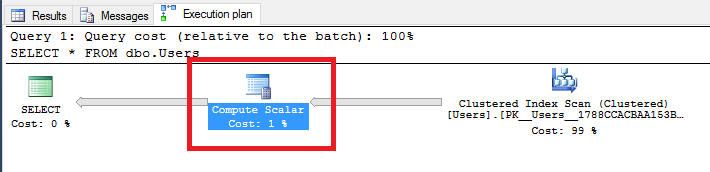
The data can be seen in plain text on disk, the masking function only comes into play when reading the data. I’ve been playing around with this and, I can’t see any huge performance impact incurred when having to mask the data. SQL does report a extra operator when reading the data: –

GRANT SHOWPLAN TO DDM_User;
GO

EXECUTE AS USER = 'DDM_User';
SELECT * FROM dbo.Users ;
REVERT;
GO

ddm5

That COMPUTE SCALAR operator isn’t there usually when running a bog standard select against a table but I’ve tried inserting 1,000,000 rows into the table, selecting from it, then dropping the masking, re-running the select and comparing the performance statistics but cannot see any (significant) impact. Here’s the code I used to test (have a go at running it yourself): –

--Switching off performance metrics for the inserts
SET STATISTICS TIME OFF;
SET STATISTICS IO OFF;
SET NOCOUNT ON;
GO

--Inserting a load of rows to the table
--I know this is horrible code!!!!!!!!!!!!!!!!!!!!!!!!!
DECLARE @Counter INT = 0;

WHILE @Counter <= 1000000
BEGIN

    INSERT INTO dbo.Users
    (Forename,Surname,Username,Email,AccountPassword)
    VALUES
    ('TestForename' + CONVERT(SYSNAME,@Counter),
     'TestSurname'  + CONVERT(SYSNAME,@Counter),
     'TestUsername' + CONVERT(SYSNAME,@Counter),
	'testemail'    + CONVERT(SYSNAME,@Counter) + '@gmail.com',
	'TestPassword' + CONVERT(SYSNAME,@Counter));
    
    SET @Counter = @Counter + 1
END


--Allowing the user to see the execution plan
GRANT SHOWPLAN TO DDM_User;
GO

--Cleaning out the data from the buffer pool
DBCC DROPCLEANBUFFERS;
GO

--Running the initial select
SET STATISTICS IO ON;
SET STATISTICS TIME ON;
EXECUTE AS USER = 'DDM_User';
SELECT * FROM dbo.Users ;
REVERT;
GO

--Dropping the masking
ALTER TABLE dbo.Users
ALTER COLUMN Email DROP MASKED
ALTER TABLE dbo.Users
ALTER COLUMN AccountPassword DROP MASKED;
GO

--Cleaning out the data from the buffer pool (again)
DBCC DROPCLEANBUFFERS;
GO

--Re-running the SELECT without the masking
SET STATISTICS IO ON;
SET STATISTICS TIME ON;
EXECUTE AS USER = 'DDM_User';
SELECT * FROM dbo.Users ;
REVERT;
GO

I have seen a minor increase in execution times but nothing that makes me worried. I am aware that this is a very simple test so any “gremlins” may not be apparent so as ever with a new feature, if you’re going to implement it, get it on a test system and hammer the thing!

Thanks for reading.