Monday Coffee 2017-03-13

Less than a week to go until SQLSaturday Iceland now, it’s going to be a busy couple of months for me but am looking forward to it. I’ll get my slides and demos uploaded here at some point.

I’ve been debating whether or not to do demos live when I’m speaking. In the past I’ve everything live but certain presentations make that a little risky. I’ve done lightening talks where I’ve performed the demo then and there but that’s because I know that the risk of something going wrong is minimal. I’m working on a local instance of SQL and am not depending on anything else (e.g. – an internet connection).

It also depends on what the demo actually is, if it’s code based then running it live means that you can talk about the code but if the code is simple and the demo is more about the process, running it live really doesn’t add anything to the table.

For my session on containers, the demos will be videos. This is in part to reduce the risk of something going wrong but mainly it’s because the code is very simple, what’s happening when I’m running it is what I want to talk about. A video demo means that I don’t have to concentrate on typing the code (you really should never type in demos, copy & paste) and can talk about what’s happening.

Doing it this way will be beneficial as I can focus entirely on the audience and not be staring at my screen. I want to engage with the audience as much as possible and make the session as good as it can be.

Have a good week!
Friday Reading 2017-03-10

Just over a week to go until SQL Saturday Iceland! Really looking forward to presenting my session and then I have four days to explore!

Building the Terminator Vision HUD in HoloLens
Because why not?

The $650 SQL Saturday
Steve Jones talks about running a SQLSat event on a budget

Azure Marketplace
Can someone find the Windows Server 2016 Core image please?

xp_cmdshell – Naming, Shaming and Taming
Setting up a SQL Server Audit to capture xp_cmdshell usage

TEN BUCKS! TEN FREAKIN’ BUCKS! ZERO W AFTERMATH
Old news really but have you all got your Raspberry Pi Zero W?

Also – v 7.3.3 – Fix CIA Hacking Notepad++ Issue

Enjoy the rugby and have a good weekend!

Exporting Container Images

I’ve already covered how to push images to the Docker hub here but what if we only want to share a custom image in-house?

Well, it’s really simple to do by using the docker save and load commands. I’ll run through the process.

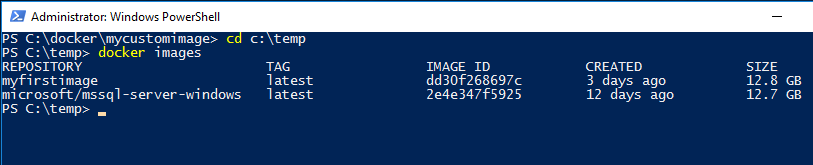
What I’ve done is created a custom image following the instructions here. Here’s my custom image: –

dockercustomimage

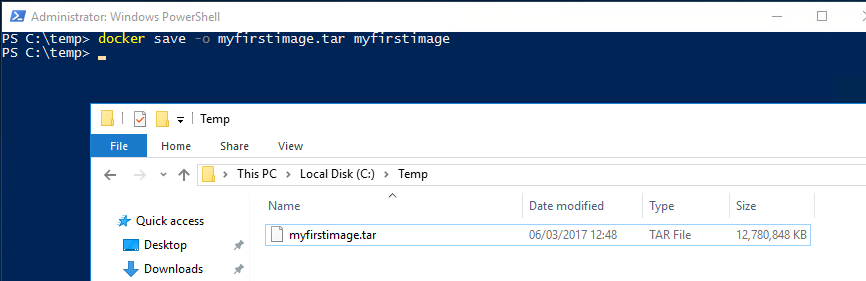
What I’m going to do now is save my custom image to a location [C:\temp] on my host server. So I’ll run: –

docker save -o myfirstimage.tar myfirstimage

N.B. – I’m saving the file as a .tar as this seems to be the format that works best for loading the image. I’ve tried exporting to other formats (.zip) but it always seems to become corrupt. The .tar format has always worked for me so I’ll stick with it.

Now the SQL images aren’t the smallest so this could take some time. But once it’s complete you’ll see the save .tar file: –

dockersavedimage

This can now be copied over to another server running the Docker engine and loaded into the local registry by running:-

docker load -i myfirstimage.tar

dockerloadimage

This will take some time but once it’s complete the exported image will be available in the server’s Docker registry. So that image was built on one server, exported and then loaded on another server. It’s an easy way to share images without having to push up to the Docker Hub.

By doing this you can ensure that every one of your team is using the same configured instance of SQL Server. Hopefully an end to “well it worked on my machine”…

Thanks for reading!

Monday Coffee 2017-03-06

Last week Docker announced the availablity of Docker Enterprise Edition. The existing version of Docker that I’ve been using has now been renamed to the Docker Community Edition.

So what does this mean for us Windows people hacking around with Docker on our local Windows 10 boxes? Very little it seems. The Community Edition will have access to the full Docker platform and (if needed) can be added to with paid-for addons from the Docker cloud. I haven’t had a chance to look over all the paid offerings but they seem to be mainly cloud based services, so I doubt I’ll need them (at the moment).

The Enterprise Edition is interesting as it raises the question, is Docker suitable for SQL Server in production environments? Now, I’m a big fan of Docker and have been using it extensively in my dev/test environments but I’m still not sure about production.

If you think about the advantages running SQL Server in containers brings; simple to setup, quick to deploy; are they relevant to production? I want to spend time setting up my 24/7 critical SQL Server instance, speed of build doesn’t really matter.

There may be other advantages that Docker Enterprise Edition brings so I’m definitely going to check it out but there’ll have to be something pretty good in there to convince me SQL Server containers are for production.

Have a good week!

Friday Reading 2017-03-03

Fun week, lot’s of things going on and throughout I’ve been reading…

Windows Server Premium Assurance and SQL Server Premium Assurance
Microsoft announce Premium Assurance, an additional six years of support

SQL VNext sp_configure on Windows and Linux with dbatools
Rob explores the SpConfigure commands in dbatools in SQL instances running on Windows and Linux

William Durkin – My first MVP Award
William Durkin thanks those who have helped him along the way to becoming a Data Platform MVP. Congrats William!

SQL Browser, what is it good for? Absolutely something!
Chris Sommer goes through what the SQL Browser service actually does

Announcing Docker Enterprise Edition
Docker have release a new version for business-critical deployments

Have a good weekend!